7 Costs to Check in a Multi-Location AI Tracking Plan: A Practical Guide

On this page
When people say multi-location AI tracking plan, they mean the subscription that shows how assistants such as ChatGPT, Perplexity, Gemini and Copilot, plus Google’s AI Mode and AI Overviews, recommend each of your branches. The sticker price is only one line of the bill. The real cost depends on how many questions you track per branch, which engines run them, how often they refresh, and who on your team needs access.
Most owners compare plans by the headline number and then find out the plan doesn’t fit their footprint. A five-branch company needs more prompts than a single shop, more structure in the dashboard, and a clear way to report results branch by branch.
This guide walks through seven costs to check before you buy. I use one worked example from start to finish, show the exact answers each pricing page gives, and then compare the results so you can pick a next step from evidence, not guesswork. I use RadarKit for my own local tracking, so it is the main tool here, with Peec AI and Otterly covered as solid alternatives.
What Is a Multi-Location AI Tracking Plan?
It is a subscription that runs your chosen questions through AI assistants on a schedule and records what comes back for each location. You get answers like “Was our Durham branch named for move-out cleaning?” and “Which competitors showed up instead?”
A good plan covers four things:
- Prompts: the questions customers type, usually with a city or neighborhood in them
- Engines: the assistants that answer those questions
- Schedule: how often each prompt runs again
- Structure: projects, seats and reports that let you split results by branch
Every one of these has a price attached. Some are bundled. Some show up only when you outgrow a tier. That is why a multi-location AI tracking plan needs a cost check before anyone enters a card number.
If you are still deciding what to track at all, my guide on how to track franchise AI visibility covers the setup side.
The Worked Example: One Business, One Service, Five Cities, 30 Days
To keep the numbers honest, I set one scenario and kept it fixed through every check.
| Item | What I chose |
|---|---|
| Business | A residential cleaning company with five branches (illustrative) |
| Service | Move-out cleaning |
| Locations | Charlotte, Raleigh, Durham, Greensboro and Wilmington, North Carolina |
| Prompts | 10 per city, so 50 in total |
| Engines wanted | All six major assistants if the budget allows |
| Date range | One 30-day test window |
| Team | One owner, one marketing lead, one outside agency |
The business is made up. The plan limits and prices are not. Every answer in the checks below comes from the vendor’s own public pricing page, and I name the source next to each one.
The same method works for a plumbing group, a chain of gyms, a law firm with regional offices or a set of auto repair shops. Swap the service and cities, keep the logic.
How to Work Out Your Monthly Answer Volume
Before the seven costs, you need one number for your multi-location AI tracking plan: how many AI answers your setup creates in a month. Pricing pages use different units, such as prompts, credits, responses or answers, and this number lets you compare them fairly.
The formula is simple:
Prompts x engines x refreshes per month = answers per month
For the cleaning company, 50 prompts on 6 engines refreshed daily for 30 days gives 9,000 answers. The same 50 prompts on 3 engines gives 4,500. Refresh every 72 hours instead of daily and the count drops to about a third.
Keep this number next to every price you look at. A cheap plan that covers a third of your answers is not cheaper once you scale it up to your real need.
7 Costs to Check in a Multi-Location AI Tracking Plan
Each check below follows the same pattern: the question to ask, the real answer from the pricing pages, the source, and what the answer means for the example business.
Cost 1: Prompt Volume Across All Locations
The check: How many unique prompts does the multi-location AI tracking plan allow, and does that number cover every branch?
Real answers:
- RadarKit lists 15 prompts on Lite, 50 on Growth and 100 on Pro, with custom volume on Enterprise. Source: RadarKit pricing page.
- Peec AI lists 50 prompts on Starter, 150 on Pro and 350 on Advanced. Source: Peec AI pricing page.
- Otterly lists 20 prompts on Lite, 160 on Standard and 535 on Premium, with Enterprise starting from 1,000. Source: Otterly pricing page.
What it means for the example: Fifty prompts is the floor for five cities at ten questions each. RadarKit Growth and Peec AI Starter both match that exactly. On Otterly, the Lite plan holds 20 prompts, so the example lands on Standard, which leaves a lot of room to add more cities later.
Prompt count is the cost that grows fastest when you add branches. Each new location brings its own set of questions, so plan for growth from the start. A buffer of 20 to 30 percent is sensible if you expect to open new sites within the year.
Cost 2: AI Engine Coverage
The check: Which assistants does each plan run, and do you pay more to add the ones your customers use?
Real answers:
- RadarKit runs ChatGPT, Google AI Mode, Google AI Overviews, Microsoft Copilot, Perplexity and Gemini on every plan. Enterprise adds model selection. Source: RadarKit pricing page.
- Peec AI lets you choose 3 models on Starter, Pro and Advanced, from a list that includes ChatGPT, Perplexity, AI Overview, AI Mode, Gemini and others. Enterprise opens all models. Source: Peec AI pricing page.
- Otterly asks you to tick 3 engines out of a menu of 7 on its paid self-serve tiers. The menu holds ChatGPT, Perplexity, Gemini, Claude, Microsoft Copilot and both Google surfaces (AI Overviews and AI Mode). Credits pay for each engine, and one Claude reply costs triple. Source: Otterly pricing page.
What it means for the example: If the owner wants all six assistants, RadarKit covers that on the base price. With Peec AI and Otterly, the team picks the three engines that matter most to its customers, which is a reasonable choice for many local businesses.
When you scope a multi-location AI tracking plan, think about where your customers actually ask. A home services brand might care most about Google AI Overviews and ChatGPT. A younger audience might lean on Perplexity. Pay for coverage you will read, not coverage you will ignore.
Cost 3: Refresh Frequency and Answer Volume
The check: How often do prompts run again, and how many answers does that create each month?
Real answers:
- RadarKit re-scans every 72 hours on Lite, then once a day on Growth and Pro. In plain numbers that is 900 responses for Lite, 9,000 for Growth and 18,000 for Pro each month, using six models. Source: RadarKit pricing page.
- Peec AI runs everything daily. Its table shows Starter at 4,500 answers a month, Pro at 13,500 and Advanced at 31,500. Source: the Peec AI plans page.
- Otterly checks daily, and Premium adds a weekly option. The credit pools are 2,000 (Lite), 15,000 (Standard) and 50,000 (Premium). Otterly defines a credit as a single prompt run one time on a single engine. Source: Otterly pricing page.
What it means for the example: The cleaning company’s 50 prompts create 9,000 answers a month on RadarKit Growth for $79, which works out to under one cent per answer. On Peec AI Starter, 50 prompts across 3 models create 4,500 answers for $95. On Otterly Standard, 50 prompts on 3 engines use about 4,650 of the 15,000 monthly credits for $189, so roughly two thirds of the allowance stays free for growth.
Daily refresh matters more in a multi-location AI tracking plan than for a single shop. Answers shift from day to day, and with five cities you want enough data points per branch to see a real trend inside a 30-day window.
Cost 4: Location Targeting and City-Level Data
The check: Are answers collected from within each branch’s city, or at country level, with the city written into the question?
Real answers:
- RadarKit offers more than 50 countries or locations on its three self-serve tiers and more than 70 on Enterprise. The comparison table puts a cross next to state and city tracking for Lite, Growth and Pro, and a tick for Enterprise. Questions are asked in real chat interfaces over residential IPs. Source: RadarKit pricing page and Local Radar page.
- Peec AI covers a single country with Starter, three with Pro or Advanced, and no cap with Enterprise. Its table also ticks Local GEO for all tiers. Source: Peec AI pricing page.
- Otterly lists unlimited countries and languages on every plan. Source: Otterly pricing page.
What it means for the example: All five branches sit in one country, so a single-country setup covers the footprint. On self-serve plans, the practical method is to put the city in the prompt, for example “who handles move-out cleaning near downtown Greensboro.” If the owner later wants answers pulled from a residential IP inside each city, that need points to an Enterprise conversation.
Of all seven, location targeting is the line in a multi-location AI tracking plan that catches teams off guard. Ask the question directly before you sign up, and write the answer down. My post on how to compare AI visibility across cities shows how to set up city prompts so results stay comparable.
Cost 5: Projects and Workspaces
The check: How many separate projects does the plan allow, and how will you organize branches inside them?
Real answers:
- RadarKit starts at two projects (Lite), moves to five (Growth), then ten (Pro), and removes the cap on Enterprise. Source: RadarKit pricing page.
- Peec AI allows 1 project on Starter, 2 on Pro, 5 on Advanced and unlimited on Enterprise. Source: Peec AI pricing page.
- Otterly includes 1 workspace on Lite and unlimited workspaces on Standard, Premium and Enterprise. Source: Otterly pricing page.
What it means for the example: There are two ways to set this up. You can run one project per branch, which makes branch reports clean. Or you can run one project for the brand and group prompts by city using topics or tags. RadarKit Growth supports either route for five branches. Peec AI Starter suits the single-project approach with city tags. Otterly Standard supports a workspace per branch.
Decide the structure of your multi-location AI tracking plan first, then check the project limit. Changing structure halfway through a test window makes your before-and-after numbers harder to read. For the reporting side, see my guide to building a multi-location AI report.
Cost 6: Team Seats, Reporting and Client Sharing
The check: Who needs to log in, and how will each branch manager or client see results?
Real answers:
- RadarKit adds no extra seats on Lite, two on Growth and five on Pro, with no limit on Enterprise. A Client Portal and full history come with every tier. Branded PDF reports top out at two monthly on Lite, ten on Growth and twenty on Pro. Source: RadarKit pricing page.
- Peec AI includes unlimited users on every plan, with shareable dashboards, role-based permissions and CSV exports. The Data Studio connector sits on Advanced and Enterprise. Source: Peec AI pricing page.
- Otterly includes unlimited team member seats on every plan. The Data Studio connector starts on Standard. Source: Otterly pricing page.
What it means for the example: The cleaning company has three people who need access. RadarKit Growth covers the owner plus two extra seats, and the Client Portal and read-only report links let branch managers view results without needing editing access. Peec AI and Otterly include unlimited users, which suits larger teams.
When you budget a multi-location AI tracking plan, count every person who needs to see data, including agencies and branch staff. Then decide who needs to edit and who only needs to view. Read-only sharing often removes the need for extra seats altogether.
Cost 7: Add-Ons, Agents and the Time to Act
The check: What costs extra once tracking is running, and how much staff time will the results need?
Real answers:
- RadarKit bundles agents into each tier. Lite gets 6 Content Agent articles or optimizations, Growth gets 19 and Pro gets 32. The Outreach and Reddit Agents draw from one shared pool sized 10, 20 or 40 by tier, and Chat Agent messages land at 15, 25 or 50. MCP, the API, Search Console, Google Analytics and WordPress are switched on for everyone, and a 7-day free trial opens each plan. Source: RadarKit pricing page.
- Peec AI gives Starter 500 agent credits, Pro 750 and Advanced 1,000. Its MCP works across all tiers, while the API begins with Pro. Choosing yearly billing trims 15 percent, and you can trial it first. Source: Peec AI pricing page.
- Otterly sells top-up credit packs. Standard users can buy 5,000 more for $65 monthly, and Premium users 10,000 more for $99 monthly. API and MCP request allowances begin at Standard. A yearly plan shows a 15 percent saving, and a free trial is open. Source: Otterly pricing page.
What it means for the example: Tracking tells you where each branch stands. Someone still has to act on it, by updating location pages, asking for reviews or getting the business listed on the sites AI cites. Budget a few hours per branch each month for that work, or pick a plan that includes agents to draft the content and outreach for you.
Most buyers leave staff hours out of a multi-location AI tracking plan budget. A cheap plan that creates a pile of data nobody acts on is the most expensive choice of all.
Compare the Results and Choose the Next Action
Here is how the seven checks line up for the cleaning company at list prices with monthly billing.
| Cost | RadarKit Growth ($79) | Peec AI Starter ($95) | Otterly Standard ($189) |
|---|---|---|---|
| Prompts | 50 | 50 | 160 |
| Engines | 6 included | Choose 3 | Choose 3 of 7 |
| Refresh | Daily | Daily | Daily |
| Monthly answers | 9,000 | 4,500 | Up to 15,000 credits |
| Location setup | 50+ countries; city in prompt | 1 country | Unlimited countries |
| Projects | 5 | 1 | Unlimited workspaces |
| Seats | Owner plus 2 | Unlimited | Unlimited |
| Built-in action tools | Content, Outreach, Reddit, Chat agents | Peec agent credits | Recommendations |
Three next actions come out of this evidence:
- If you want all six engines and branch-level projects on a small budget, start a RadarKit Growth trial and load the 50 prompts.
- If unlimited users matter more than engine count, Peec AI Starter or Otterly Standard fit well.
- If you need answers pulled from inside each city, raise Enterprise options with vendors before committing.
Whatever multi-location AI tracking plan you choose, run the 30-day window first and review the data before you upgrade. My wider breakdown of AI visibility tracking tool pricing is useful if you want more vendors in the comparison.
Best Tools for a Multi-Location AI Tracking Plan
The three tools below all publish their prices, which makes cost checks easy. RadarKit is the one I use daily, so it gets the most detail.
RadarKit: Best for Multi-Location Local Tracking on a Small Budget
RadarKit is an AI search tracking tool built for brands and local businesses. It types your prompts into the consumer versions of Gemini, ChatGPT, Copilot and Perplexity, along with Google’s AI Overviews and AI Mode, just as a shopper would, and stores every reply.
For a multi-location AI tracking plan, Local Radar is the screen I open first. It tells you if AI suggested your business, how often, at what rank, and which other local businesses got named instead, with their ratings and review counts.
How RadarKit Handles Several Locations
You set up projects for brands or branches, add topics, and drop in the prompts for each city. RadarKit runs them on schedule and turns the results into a Visibility Score, an average rank and a share-of-voice figure. Any date range can sit next to the period before it, which is exactly what you need at the end of a 30-day test.
Agencies get a Client Portal and branded PDFs, so each branch or client sees its own results without extra work.
RadarKit Key Features
- Six AI engines: Each prompt is typed into the consumer apps of ChatGPT, Gemini, Perplexity and Copilot, plus Google AI Overviews and Google AI Mode, sent over residential IPs from 50-plus countries.
- Prompts and topics: Group customer questions into topics, let them run on a timetable, or fire one off instantly when you need a fresh reading.
- Visibility Score: One number showing what percent of your prompt-and-model runs named you, trended against the previous stretch.
- Brand Reputation: A score that follows how assistants describe your brand as time passes.
- Average Position: Your spot in each recommendation list, set against the other domains that appear.
- Sentiment: Mentions tagged positive, mixed or negative, overall and per engine, with repeated phrases pulled out.
- Local Radar: Your appearance rate and rank in local answers, plus every rival business named with its category, stars and review total. You can narrow results to one listing source, Yelp or a Google Business Profile for instance, and see the prompts each business wins. State and city targeting comes with Enterprise.
- Shopping Radar: Products, stores, prices, ratings and positions from AI shopping carousels, plus which stores win most often.
- Ads Radar: Paid placements that appear around AI answers, logged with who bought them, the headline and copy, where they link, the creative itself and how often they show up.
- Citation Data: Pages that AI cites or simply consults, which of them link to you, and the content formats cited most.
- Page Radar: Watch any single page, a guest post included, and see which engines cite it and for which prompts.
- Query Fanout: The background web searches each model ran before answering, and how frequently a model bothers to search.
- Competitors and Share of Voice: Every other brand or domain recommended alongside you, sorted by voice share and typical position.
- Create Content: Before drafting, the Content Agent reads through the pages AI cites, the Google results, any fanout searches and People Also Ask questions. The draft then follows your brand voice, in formats such as blog posts, list articles, head-to-head comparisons, alternatives pages, FAQ pages and first-person reviews.
- Optimize Content: Hand an older article to the agent so it gets rewritten to cover the entities and fanouts AI already rewards, tidy it up, and push it live on WordPress.
- AI Traffic Analytics: Hook up Google Analytics 4 in read-only mode and AI-driven visits show up beside your visibility numbers.
- Plan Agent and Google Search Console: Search Console can be linked on any tier. The Plan Agent blends that data with your citations, spots gaps, and writes a to-do list the other agents can pick up.
- Outreach Agent: Finds sites citing competitors, writes on-brand pitches, and sends them from your Gmail once you approve, with follow-ups.
- Reddit Agent: Surfaces the Reddit discussions AI quotes for your topics and highlights the ones where nobody mentions your brand yet.
- Chat Agent: Ask plain-language questions about a project and get answers drawn from your live data.
- API and MCP access: Use the REST API or the MCP server to work with your data from Claude, ChatGPT, Codex or Cursor.
- Exports, PDF reports and Client Portal: Download files covering responses, sources, rivals, rankings, fanouts and radar results. Lite makes 2 branded PDFs a month, Growth 10 and Pro 20. Clients can follow along through a live portal or through a read-only report link they can open anytime.
- Full history: Nothing gets deleted on any plan, so you can line up a chosen period against the previous one whenever you like.
- Projects and workspaces: Two projects come with Lite, five with Growth and ten with Pro, while Enterprise sets no ceiling, which suits several brands or branches.
- Project settings and seats: Store a brand kit, alternate names for you and for rivals, a timezone and team roles. Growth adds two seats, Pro adds five, and Enterprise opens unlimited seats plus SSO.
- Free GEO tools: No signup is needed for the free LLMs.txt validator, the matching generator or the AI SEO extension for Chrome.
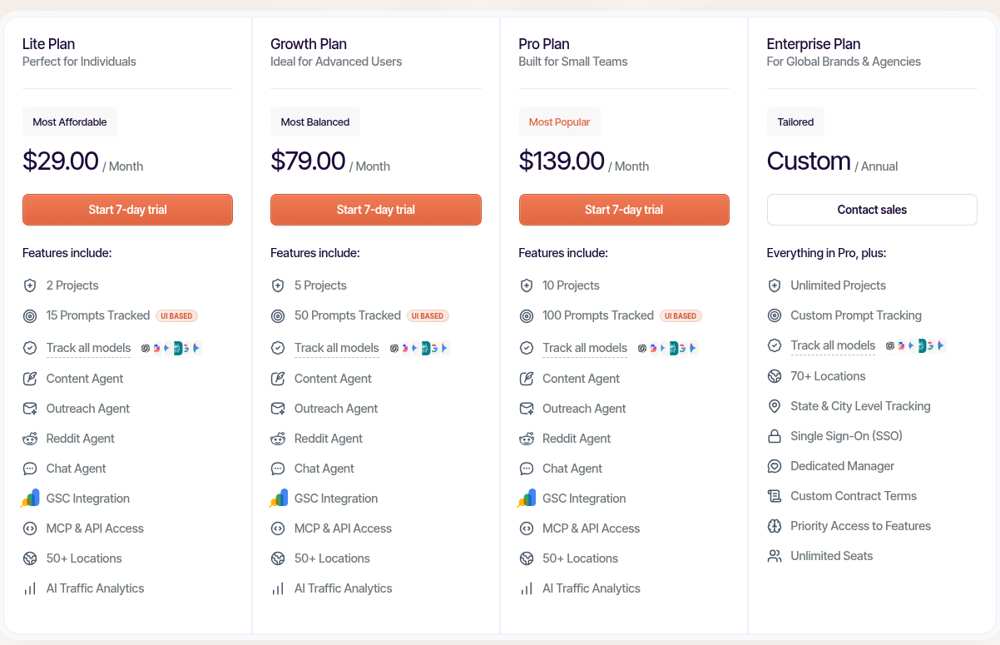
RadarKit Pricing
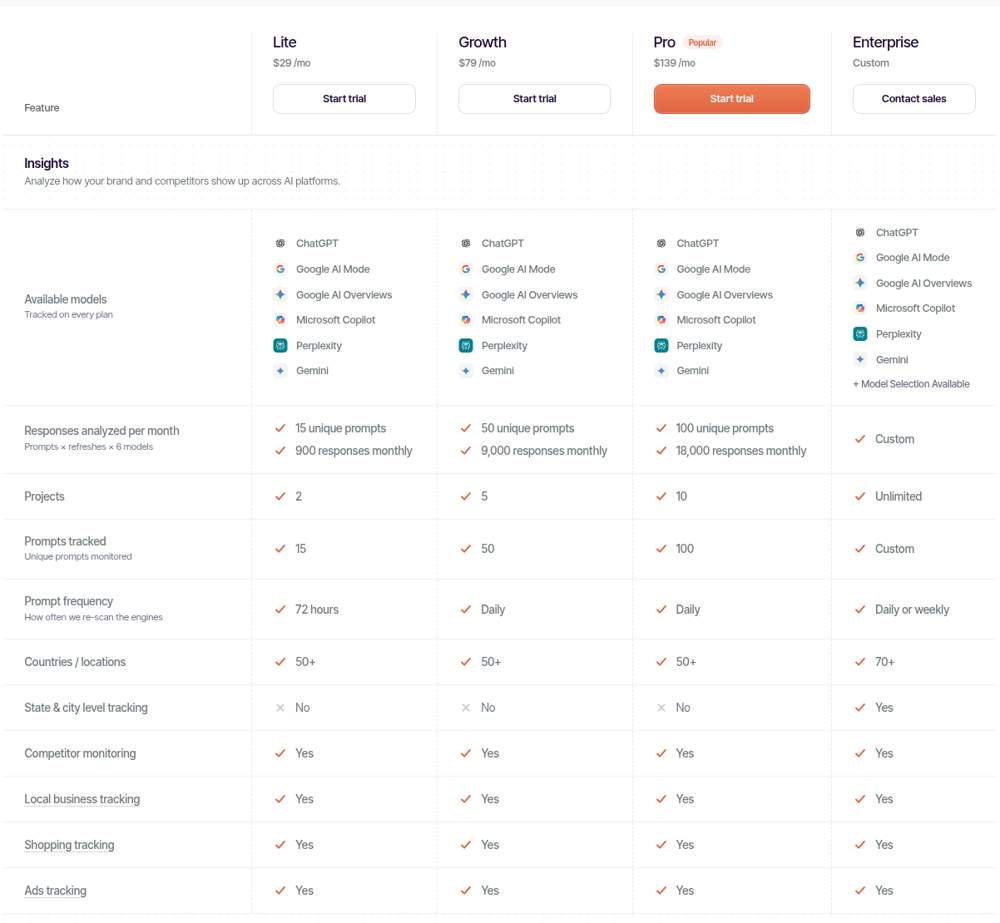
The RadarKit pricing page lists four plans:
- Lite ($29 monthly): room for 2 projects and 15 prompts, a fresh scan every 72 hours, about 900 responses, 50+ locations.
- Growth ($79 monthly): room for 5 projects and 50 prompts, scanned each day, about 9,000 responses, and 2 added seats.
- Pro ($139 monthly): room for 10 projects and 100 prompts, scanned each day, about 18,000 responses, 5 extra seats and priority support.
- Enterprise (custom, billed yearly): no project cap, prompt volume set per contract, 70+ locations, tracking down to state and city, SSO, any number of seats and a dedicated manager.
All three self-serve tiers come with the six engines, Local Radar, shopping and ad tracking, the full agent set, the Client Portal and a week-long free trial. If you contact support within 48 hours of the first charge after the trial, you can get a full refund.
Best For
- Brands running between two and ten branches who want all six engines without add-ons
- Agencies reporting local AI results to several clients
- Small teams hoping to keep tracking, content drafting and outreach under one login
Peec AI: Best for Teams That Need Unlimited Users
Peec AI is an analytics product for AI search, aimed at marketing departments and agencies. On a daily cycle it scores your visibility, your rank, the tone of each mention and your slice of the conversation, and it spends real effort on source data and on how AI perceives a brand.
Peec AI Key Features
- Daily scores for visibility, rank, tone and voice share, set against your rivals
- Source analytics with domain and URL detail, citation share and source classification
- An ads library, AI Shopping and Local GEO, all ticked on each tier
- Gap analysis and recommended actions, plus agent actions built from your data
- Unlimited users on every plan, with role-based permissions and shareable dashboards
- MCP for every customer, with API access unlocked at Pro
Peec AI Pricing
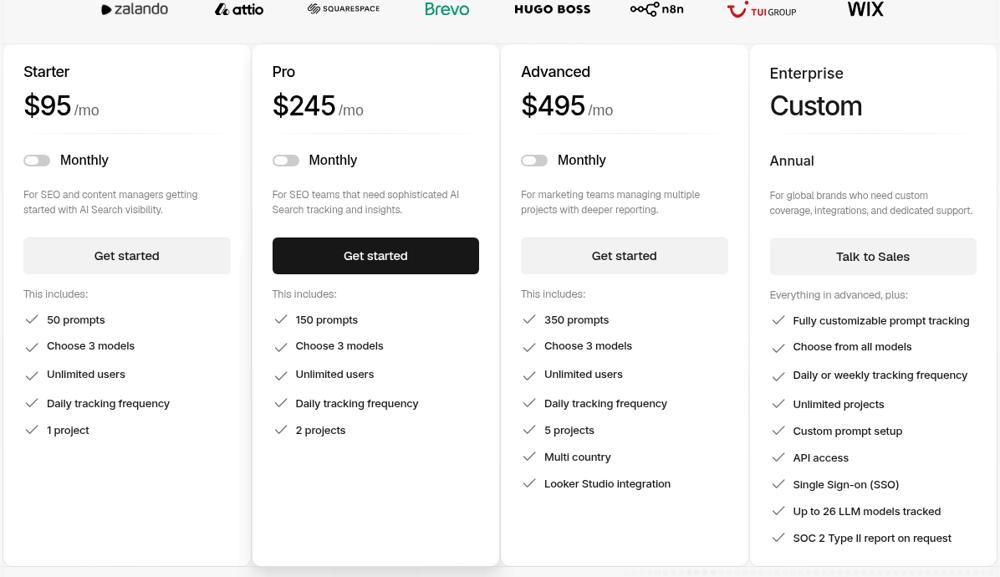
- Starter ($95 monthly): one project, one country, 50 prompts on 3 models of your choice, refreshed daily
- Pro ($245 monthly): two projects, three countries, 150 prompts on 3 models
- Advanced, $495 a month: 350 prompts, 3 models, 5 projects, multi-country, Looker Studio integration
- Enterprise, custom: unlimited prompts, projects and models, API, SSO
Annual billing takes 15 percent off, and there is a free trial.
Best For
- Marketing teams where many people need their own login
- Brands that care about source and brand perception analysis
Otterly: Best for Flexible Workspaces and Credit-Based Scaling
Otterly is an AI search monitoring tool with a credit system that makes scaling easy to plan. You choose engines, track prompts daily, and add credits when your footprint grows.
Otterly Key Features
- Tracking for brand visibility, mention tone and share of voice
- Citation source tracking with source classification
- Prompt research helpers such as a keyword converter and a fan-out explorer
- A GEO audit that reviews crawlability and on-page content
- Every tier allows unlimited brands, rivals, team seats, countries and languages
- Standard and higher unlock the API, MCP and a Data Studio connector
Otterly Pricing
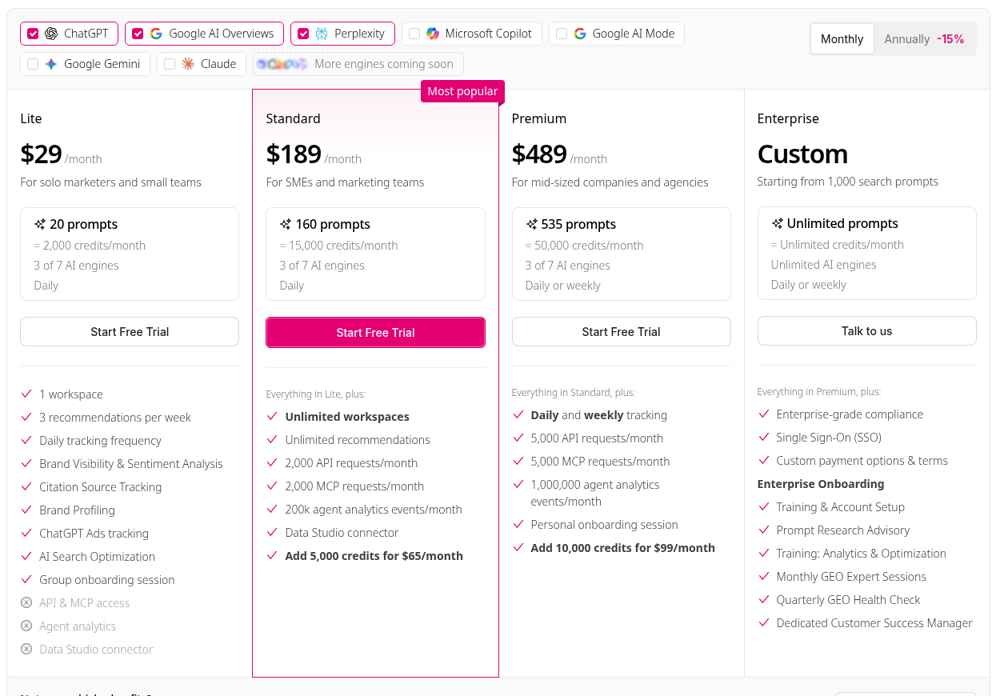
- Lite ($29 monthly): one workspace, 20 prompts, a 2,000-credit pool, 3 engines from 7, daily runs
- Standard ($189 monthly): as many workspaces as you need, 160 prompts, a 15,000-credit pool, with 5,000 more credits for $65 monthly
- Premium ($489 monthly): 535 prompts, a 50,000-credit pool, daily or weekly runs, with 10,000 more credits for $99 monthly
- Enterprise, custom: from 1,000 prompts, unlimited engines, SSO and a dedicated success manager
Annual billing shows 15 percent off, and every plan has a free trial.
Best For
- Agencies that want a separate workspace for each client or branch
- Teams that like a clear credit model they can top up
Common Mistakes When Budgeting for Multi-Location Tracking
- Pricing one branch and multiplying later. Build the full prompt list for your multi-location AI tracking plan for every location before you compare plans.
- Ignoring refresh speed. A plan that refreshes every few days gives you fewer data points per branch inside a 30-day window.
- Assuming city-level data. Confirm whether prompts run from each city or at country level.
- Forgetting viewers. Branch managers and agency staff count, even if they only need to look.
- Leaving no time to act. Tracking without follow-up work rarely moves the numbers.
Cost is only one angle. My post on choosing a local AEO tool walks through the other checks worth making before you buy.
Final Thoughts
A multi-location AI tracking plan should fit your footprint today and leave room for the next branch. Start with the answer-volume formula, run the seven cost checks, and compare plans on the same scenario.
For the cleaning company in this guide, the evidence pointed to a plan with all six engines, daily refresh and five projects. Your numbers might point somewhere else, and that is the whole point of checking. Pick the plan the evidence supports, give it a month of daily data, and let what you learn decide the next move.
FAQs
How much does a multi-location AI tracking plan cost?
Published self-serve plans start at $29 a month and go up to several hundred dollars, with custom pricing for enterprise needs. The right tier depends on prompts per location, engines, refresh speed and seats, so run the answer-volume formula first.
How many prompts should each location have?
Eight to fifteen prompts per location is a practical range for most service businesses. Cover your main service, a few related services, and phrase each question two ways: once with “near me” and once with the city name.
Do I need city-level targeting for every branch?
Not always. Many teams get useful results from a multi-location AI tracking plan by naming the city in the prompt. If you need answers pulled from a residential IP inside each city, look at enterprise tiers.
Does RadarKit track all six AI engines on every plan?
Yes. RadarKit runs ChatGPT, Google AI Mode, Google AI Overviews, Microsoft Copilot, Perplexity and Gemini on Lite, Growth and Pro. Enterprise adds model selection.
Which RadarKit plan suits a business with five locations?
Growth is a natural starting point. It includes 5 projects, 50 prompts with daily refresh, 9,000 responses a month and 2 extra seats for $79 a month, with a 7-day free trial.
Is AI recommending your brand?
Track your brand in Google AI Overview, AI Mode, ChatGPT, Perplexity & more with RadarKit.
No payment upfront. Cancel anytime.