How to Track a Service-Area Business in AI Search: A Practical Guide
On this page
To track a service-area business in AI search, choose one business, one service, a defined group of towns and a fixed date window, then record the exact answers and cited sources that each AI assistant returns for that setup. After a few rounds, you compare the evidence town by town and pick the one fix that the answers point to.
A service-area business travels to the customer. Think of a mobile mechanic, a carpet cleaner, a roofer, a pet groomer with a van, a tutor who teaches in family homes, or a locksmith on call. None of them wants walk-in traffic, so many hide their street address. That is good for privacy, but it makes AI visibility harder to read, because each assistant has to guess where the business actually works.
This guide gives you a repeatable 7-point method. It follows one made-up company from the first question to the final decision, so you can copy the structure for your own trade. I use RadarKit for the automated side of this work, and I cover how its Local Radar view fits near the end.
What Makes a Service-Area Business Hard to Measure in AI Answers
A storefront has one pin on the map. When someone asks ChatGPT for a bakery in a certain district, the assistant can match the request against a known address. A service-area business has no such anchor. It might sit in one town on paper and earn most of its money in four others.
That gap creates three tracking problems:
- The town question: An answer might name your business for the town you are based in and skip the towns where you do most of your jobs.
- The location question: Results shift with the searcher’s location, so a check run from your office does not show what a customer twenty minutes away sees.
- The accuracy question: An assistant might mention you but describe the wrong coverage, suggest that customers can visit a workshop, or list a service you stopped offering.
Because of these three issues, a single “are we mentioned?” check tells you very little. Tracking a service-area business in AI search means checking where you appear, which towns you appear for, and whether the details are right.
Where AI Assistants Get Town-Level Facts for Mobile Businesses
AI assistants answer local questions with a mix of trained knowledge and live web searches. For a service-area company, the live search part matters most, because coverage facts change and rarely appear in older training data.
The pages that tend to carry town-level facts include:
- Your own website, especially any page that names a town and the work you do there.
- Your Google Business Profile, where you can list service areas and hide the address.
- Review and listing sites such as Yelp, Bing Places, Angi, Nextdoor or trade directories.
- Community threads on Reddit or local forums where people swap recommendations.
- Local news stories, sponsor pages and supplier “find an installer” lists.
Each assistant leans on its own blend of sources. Perplexity shows its citations openly. Google AI Overviews and AI Mode tend to draw on pages already well placed in Google results. ChatGPT and Copilot run web searches of their own. So the same question can produce four different shortlists, and that is normal. It also means the visibility of any service-area business in AI search has to be judged engine by engine.
Groundwork: Profile, Town Pages and Listings Before Round One
Before the first check, spend an hour on basics. You are not trying to fix everything. You only want the facts you control to be clear, so the results reflect real visibility rather than avoidable confusion.
Run through this short list:
- Confirm your Google Business Profile lists the towns you genuinely serve and hides the address if customers never visit. This list of Google Business Profile tips for AI answers goes deeper.
- Make sure your business name, phone number and hours match on your site and your main listings.
- Note which towns have their own page on your website and which ones are only mentioned in a footer list.
- Write down your current service list, so you can spot an answer that names an old service.
Keep these notes. When a later answer gets something wrong, you will know right away whether the mistake comes from your own pages or from somewhere else.
Meet Elm Ridge Appliance Repair, the Worked Example
From here on, one illustrative business carries the whole walkthrough. Elm Ridge Appliance Repair is invented for this walkthrough. The towns, answers and sources below are sample entries that show the method, not real findings.
Here is the setup:
- Business: Elm Ridge Appliance Repair, a three-van team that repairs fridges, washers and ovens in customers’ homes.
- Home base: Elm Ridge, where the owner registered the business. No customers visit that address.
- Service for this test: Refrigerator repair, the job that brings in the most revenue.
- Towns: Elm Ridge, Stonebridge and Oakvale (the busiest), plus Fernhill and Marlow Heights (growth towns near the edge of the area).
- Date window: 28 days, with one round of checks at the start of each week.
The same structure works for a mobile dog groomer, a pressure washing crew, an in-home physical therapist or a junk removal firm. Only the service and the towns change.
Tracking a Service-Area Business in AI Search: The 7-Point Method
Each point below builds on the one before it. Points 1 to 3 set up the test, points 4 and 5 collect the evidence, and points 6 and 7 turn that evidence into a decision.
1) Write the Customer Question and the Pass Mark
Start with the question you want answered, written as a business question rather than a prompt. For Elm Ridge, the owner asked: “When people in my five towns ask an assistant who can fix a fridge at home, are we on the shortlist, and is our coverage described correctly?”
That one sentence decides what you collect. It says the test is about refrigerator repair, about five specific towns, and about two outcomes: being named and being described well.
Turning a Vague Worry into a Testable Question
Most owners start with something loose, like “Does ChatGPT know us?” That question has no town, no service and no finish line. Tighten it by adding three things: the job, the places and what counts as a good result.
For Elm Ridge, the pass mark was simple. The team wanted to be named in at least half the answers for its three busiest towns, with correct coverage in every answer that mentioned it. The edge towns had no pass mark yet, because the first round would serve as the starting point.
Five Outcome Tags for Every Answer
Give each answer one tag so the rounds stay comparable:
- Shortlisted: The answer names you as an option for the requested town and service.
- Named in passing: You appear, but as a side note rather than a suggestion.
- Wrong coverage: You are named, but the answer misstates where you work or implies a walk-in location.
- Missing: Other businesses are named and you are not.
- No local list: The assistant gives general advice and names no businesses at all.
The last tag matters more than it looks. If an engine gives no list for a prompt, that is not a loss for you. It just means the prompt does not trigger local suggestions on that engine.
2) Freeze the Business, the Job, the Towns and the 28-Day Window
Changing the setup halfway through ruins the comparison. Once you choose the business, the service, the towns and the dates, leave them alone until the window ends.
For Elm Ridge, the frozen settings were refrigerator repair, the five towns above and a 28-day window with checks on day 1, day 8, day 15 and day 22. A final check on day 28 closed the window.
Ranking Towns by Job Records, Not by a Map Radius
It is tempting to draw a circle on a map and track every town inside it. A better approach is to open your job history and count the jobs per town over the past year.
That count usually splits towns into three groups. Core towns bring most of the revenue. Growth towns are places you want more work from. Occasional towns produce a job now and then. Track the first two groups and leave the rest for later. For a deeper town comparison, read this piece on AI visibility across several cities, which uses a tiered approach.
3) Draft Prompts That Sound Like a Customer at Home
People with a broken appliance write short, urgent questions. They rarely type a polished brief. Your prompts should match that tone, so the answers resemble what real customers read.
Keep the wording identical across towns and swap only the place name. That way, a difference between Stonebridge and Oakvale reflects the market and not your phrasing.
Prompt Groups for Mobile and On-Site Services
Elm Ridge used four prompt groups, with three prompts in each:
- Urgent, unbranded: “My fridge stopped cooling, who can come out today in Stonebridge?”
- Planned, unbranded: “Best fridge repair service that does home visits in Oakvale.”
- Comparison: “Is it worth repairing a ten-year-old fridge, and who repairs them in Fernhill?”
- Branded accuracy: “Does Elm Ridge Appliance Repair cover Marlow Heights?”
Keep branded prompts in their own group and report them on their own. They test whether facts are right, while unbranded prompts test whether new customers discover you. The difference is explained well in this piece on branded vs unbranded local prompts.
4) Run Each Engine Under the Same Conditions
Consistency is the whole game here. Use the same engines, the same prompt wording, the same settings and roughly the same time of day for every round.
Elm Ridge tracked six engines: ChatGPT and Gemini, Perplexity and Copilot, plus both Google answer formats (Overviews at the top of results and the separate AI Mode tab). Each prompt went into a fresh chat with personal memory turned off, so earlier conversations could not color the answer.
Supplying Location When the Business Has No Storefront
A “near me” prompt only works if the engine knows where the searcher is. Assistants usually infer that from the device’s IP address or a location setting. When you test by hand from your office, every result reflects your office.
There are two simple ways around this. The first is to name the town in the prompt, which works on every engine. The second is to check from a connection in the right country so that country-level signals match a real customer. For town-level accuracy, naming the town is the most reliable option for most small teams.
Run each prompt more than once per round when you can. AI answers vary from one run to the next, so a single run can mislead you. Two or three runs per prompt give a far steadier picture.
5) Save the Exact Wording and the Cited Pages
Do not summarize answers from memory. Copy the relevant part of the answer and every source the engine lists. The wording shows how you are described, and the sources show why.
For each answer, Elm Ridge logged the date, engine, prompt, town, tag, position in the list, other businesses named, cited sources and any wrong facts.
Sample Log Rows from the Elm Ridge Test
| Engine | Town | Answer excerpt (sample) | Tag | Sources cited (sample) |
|---|---|---|---|---|
| Perplexity | Stonebridge | “Elm Ridge Appliance Repair offers same-day fridge visits across Stonebridge.” | Shortlisted, #2 | Own Stonebridge page, Yelp listing |
| ChatGPT | Oakvale | “Try Oakvale Home Appliance or CoolFix, both well reviewed locally.” | Missing | Trade directory, local Reddit thread |
| Google AI Mode | Fernhill | “Elm Ridge Appliance Repair has a workshop in Elm Ridge you can visit.” | Wrong coverage | Old directory profile |
| Gemini | Elm Ridge | “Local options include Elm Ridge Appliance Repair and Frost & Sons.” | Shortlisted, #1 | Google Business Profile, own homepage |
| Copilot | Marlow Heights | “Here are some tips for diagnosing a warm fridge before calling a technician.” | No local list | None |
Even five rows tell a story. The business shows up where it has a dedicated town page and a review profile. It disappears where a directory and a Reddit thread drive the answer. And one stale directory profile is still telling an engine that customers can visit a workshop.
To build a fuller version of this source log, the walkthrough on creating a local AI citation report is a useful companion.
6) Lay Out the Results Town by Town
Once the window closes, group the tags by town first and engine second. Do not blend every town into one percentage. “Shortlisted in three of five towns” with the two gaps named is far more useful than a single score.
For Elm Ridge, the summary looked like this after four rounds:
- Elm Ridge and Stonebridge: Shortlisted in most answers on four of six engines.
- Oakvale: Usually missing on ChatGPT and Copilot, shortlisted on Perplexity.
- Fernhill: Named twice, both times with the wrong coverage.
- Marlow Heights: Mostly no local list, so not enough evidence either way.
Reading the Town and Engine Grid
Read the grid in a fixed order. First, look at core towns, because gaps there cost money now. Next, look at accuracy problems, since a wrong description can send customers away even when you are named. Then check the growth towns, and finally look at which competitors fill your spot.
A pattern only counts if it repeats across rounds. One missing answer in Oakvale means little. Missing in Oakvale round after round on two engines is worth acting on. No starting point yet? Build one first with this local AI visibility baseline walkthrough before the next window opens.
7) Pick the Next Fix from the Evidence and Note the Limits
The point of the whole exercise is a decision. Look at the patterns, match each one to a single action, and pick the action that affects your most valuable town first.
Elm Ridge Patterns and the Fix Each One Points To
Here is how the Elm Ridge patterns translated into next steps:
- Missing in a core town, directory cited: Claim or complete the profile on the directory that keeps appearing in the sources for that town.
- Wrong coverage in a growth town: Update the stale listing, then add a clear Fernhill page that says the team comes to the customer.
- Shortlisted on one engine only: Study the sources that engine cites and see whether similar pages exist for the others.
- Community thread cited: Invite satisfied local clients to describe their experience honestly on the forums they already use.
- No local list: Keep tracking that prompt without treating the result as a defeat.
Elm Ridge picked the Oakvale directory profile as its first fix, because Oakvale ranks among its busiest towns and that directory appeared in most of the answers that left the business out. The Fernhill page came second.
Where Town-Level Tracking Stops Being Reliable
Think of this work as measurement. It cannot promise recommendations, calls or booked jobs. AI answers shift from run to run, engines update their models, and no checklist controls what an assistant says.
The method also simulates location rather than replicating every customer’s device. Naming the town in a prompt is a close stand-in, but a real person standing in Oakvale might see a slightly different list. Its real strength lies in tracking direction across weeks and naming the sources that need fixing.
Slip-Ups That Skew Service-Area Results
A few habits quietly spoil an otherwise good test:
- Testing from your own office only: Every result then reflects one spot, often your home base.
- Rewording prompts between rounds: New wording changes the answers, so you lose the comparison.
- Counting any mention as a win: A mention with the wrong coverage can do more harm than good.
- Averaging all towns into one number: The gaps you most need to see disappear in the average.
- Ignoring the cited sources: The answer tells you where you stand, while the sources tell you what to fix.
- Expecting overnight change: A new town page or listing can take weeks to show up in answers.
Using RadarKit Local Radar to Watch Every Town You Serve
Doing this by hand works for a first round. After that, the copying and pasting gets heavy, especially with five towns, six engines and repeat runs. This is where I use RadarKit.
RadarKit runs your prompts in the actual interfaces customers use, rather than through APIs, from residential IP addresses. It saves the full answer, the sources and the businesses named, then turns that into trends you can compare across date ranges.
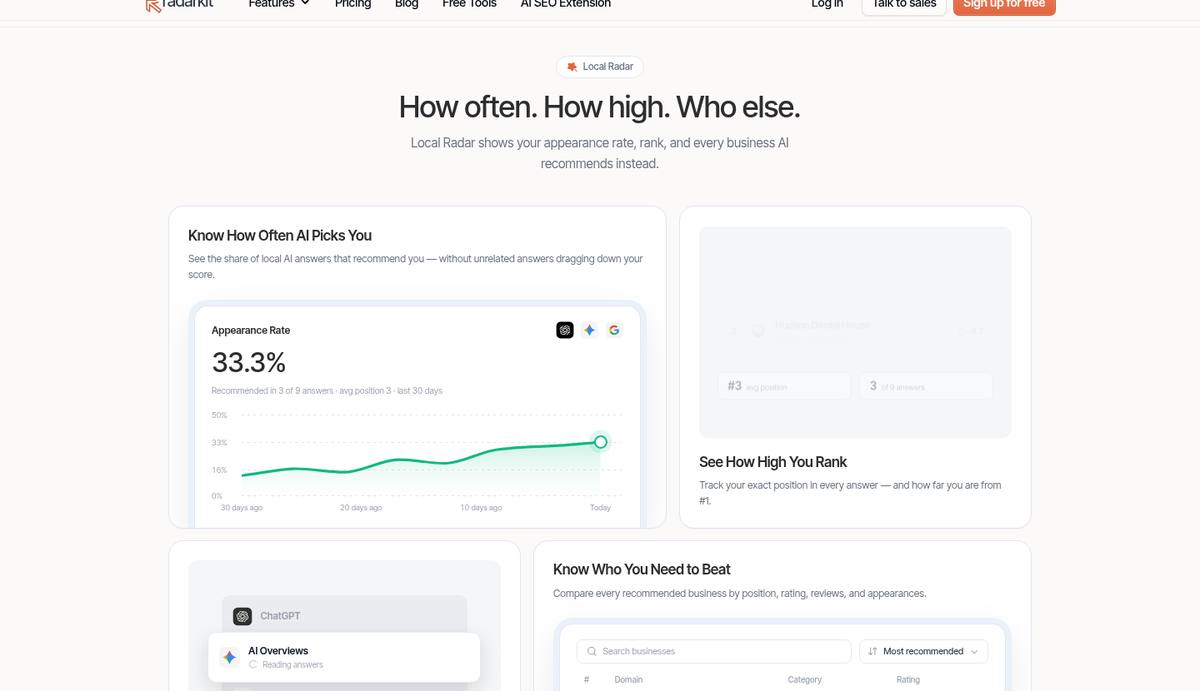
The feature that fits this topic best is Local Radar. It tells you if assistants suggest your business, how often you appear, where you usually land, and which other companies get named instead. Rivals are listed with their category, star rating and number of reviews, which makes it easy to spot who is winning a town.
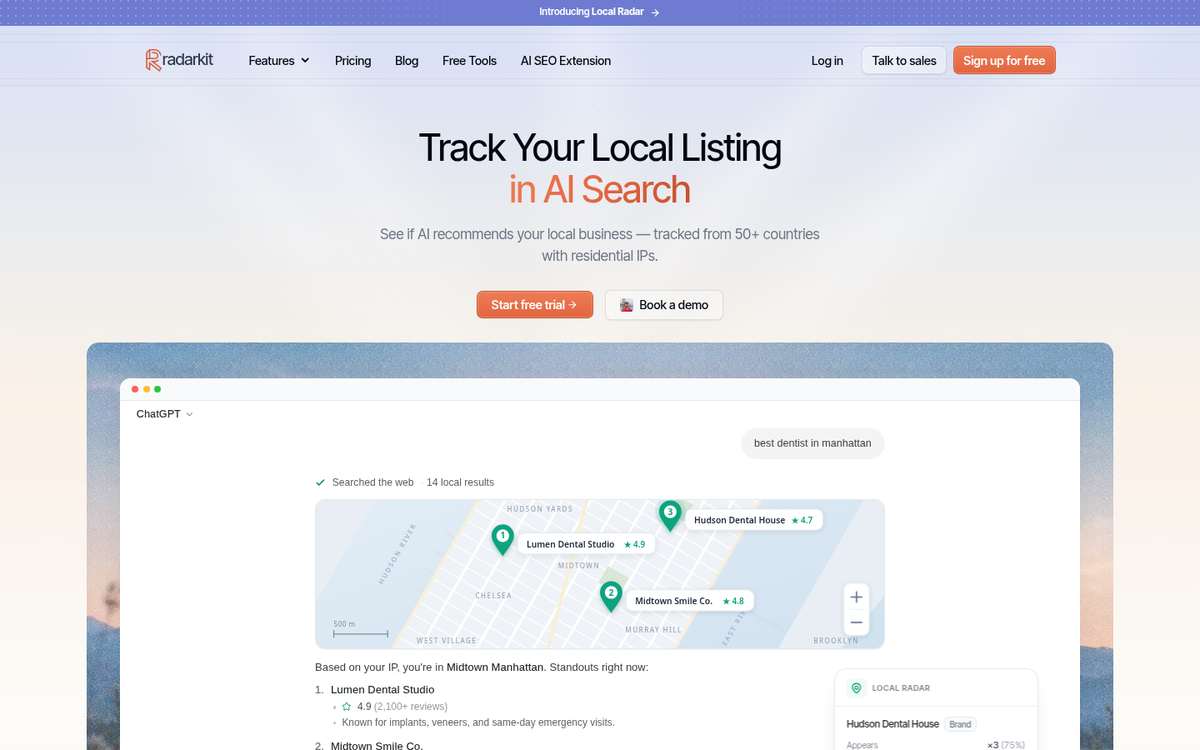
For a service-area company, that view replaces most of the manual log. Filters let you narrow results to one listing platform, Yelp for instance, and you can open any rival to view the prompts where it comes out on top. Local Radar keeps running on its own schedule, so new rounds appear without anyone opening a chat window.
One practical note: self-serve plans track from 50+ countries, while state and city targeting sits in the Enterprise plan. On self-serve plans, put the town name in the prompt, as described in point 4, and you get town-level answers in a simple way.
RadarKit Key Features for Mobile and On-Site Businesses
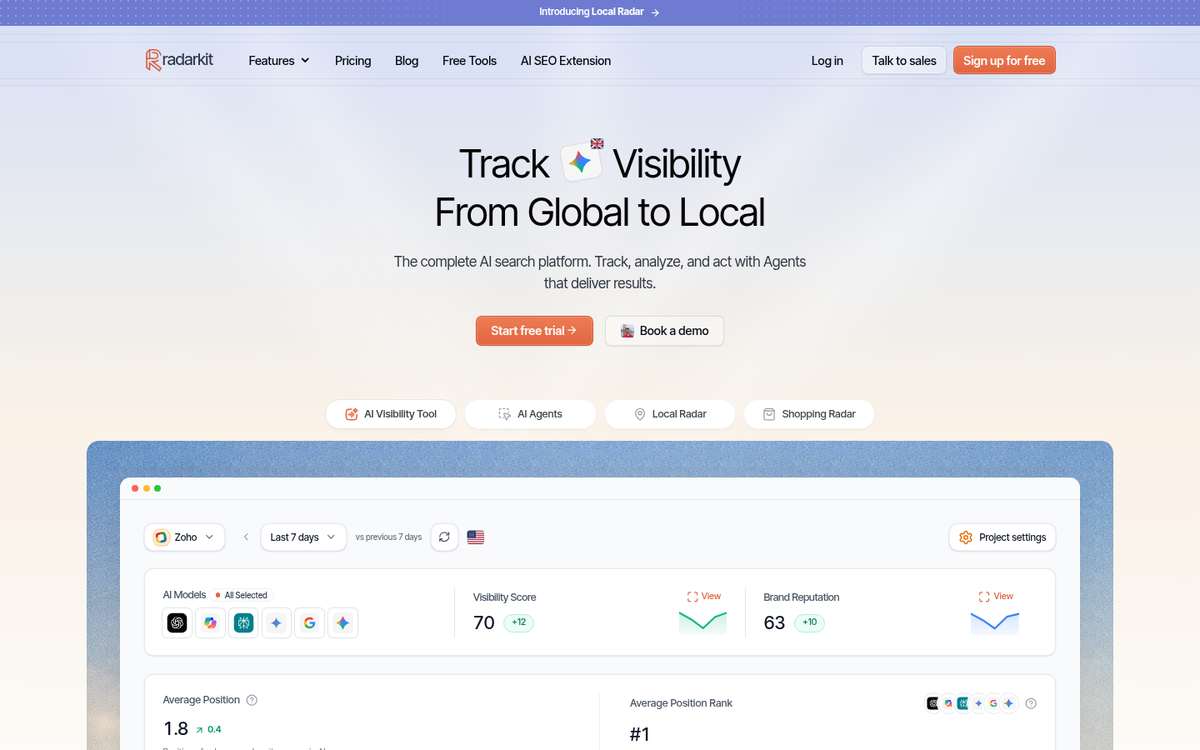
- Local Radar for town checks: Shows how often a town answer includes you, your usual place in that answer, and the rival firms suggested beside you (each tagged with a category, a score out of five and a review tally). You can slice the view by listing site and open the prompts each firm wins.
- Citation Data: Lists the pages behind each answer, whether they were cited or only read, marks which of them link to your website, and ranks the content types assistants quote most often.
- Page Radar: Pick a single page, for example a town page, and watch which assistants quote it, prompt by prompt.
- Competitors and Share of Voice: View the other brands and domains that show up next to you, ranked by share of voice and typical position.
- Real-interface answer capture: Questions are typed into the same consumer screens your customers use for all six engines, routed through home internet connections in over fifty countries.
- Prompt topics and scheduling: Sort the questions buyers ask under topic labels. RadarKit reruns them on a timetable, and a manual button fetches new answers on demand.
- Query Fanout: Lists the queries a model typed into the web on its own before it wrote a reply, and shows what share of replies involved any searching.
- Visibility Score: Gives you a single percentage for how widely you are named across tracked questions and engines, set beside the prior period.
- Average Position: Track where your name lands in a list of suggestions and how that stacks up against rival domains.
- Sentiment: Tags the tone of each mention as positive, mixed or negative, both across engines and engine by engine, and lists wording that keeps coming back.
- Brand Reputation: A separate score follows the overall tone assistants use about your company as time passes.
- Reddit Agent: Brings up Reddit posts that answers keep citing for your trade and highlights threads where nobody has mentioned your company yet.
- Outreach Agent: Builds a list of websites that cite rival firms, prepares pitch emails in your tone, and mails them through your own Gmail only after you sign off, with follow-ups handled too.
- Content creation: The Content Agent reads what assistants already cite for a prompt, along with Google rankings, fanout queries and related questions from Google, and then writes a draft in your voice. Output options cover standard blog posts, ranked lists, versus pages, alternatives roundups, FAQ pages and first-person reviews.
- Content optimization: Hand over a page you already have, get a rework built around the entities and searches assistants rely on, then edit and push it to WordPress.
- Plan Agent and Search Console: Search Console connects on every tier. The Plan Agent blends those search queries with RadarKit citation records, finds openings, and hands a to-do list to the other agents.
- Chat Agent: Type a question such as “which town slipped this week?” and get a plain answer pulled from your live project numbers.
- AI Traffic Analytics: Connect Google Analytics 4 in read-only mode to place visits from assistants beside your visibility trends.
- Shopping Radar: Records which products, sellers, prices and star ratings show up in AI shopping carousels, and in what order.
- Ads Radar: Keeps a record of sponsored results that sit beside AI replies: who paid, the ad text, where the click leads, the creative and how often it runs.
- Full history: Old results stay available on every tier, and the date picker sets any stretch of days beside the stretch that came right before.
- Exports, branded PDFs and Client Portal: Save raw answers, cited sources, rival lists, rankings and radar results to a file. Monthly PDF reports carry your own logo, and a read-only Client Portal or shared report link keeps clients updated.
- Projects and workspaces: Keep separate brands or regions apart in their own projects, starting at two projects on the cheapest tier and rising to an unlimited number for Enterprise customers.
- Project settings and team seats: One settings area stores your brand kit, the other ways people spell your company and rival names, your timezone and user roles. Higher tiers add teammates, and Enterprise brings SSO.
- API and MCP access: Pull your data through a REST API or an MCP server into tools such as ChatGPT, Claude, Cursor and Codex.
- Free GEO tools: RadarKit gives away an LLMs.txt checker and an LLMs.txt generator, along with its AI SEO extension for the Chrome browser, all usable without an account.
What RadarKit Costs for a Service-Area Team
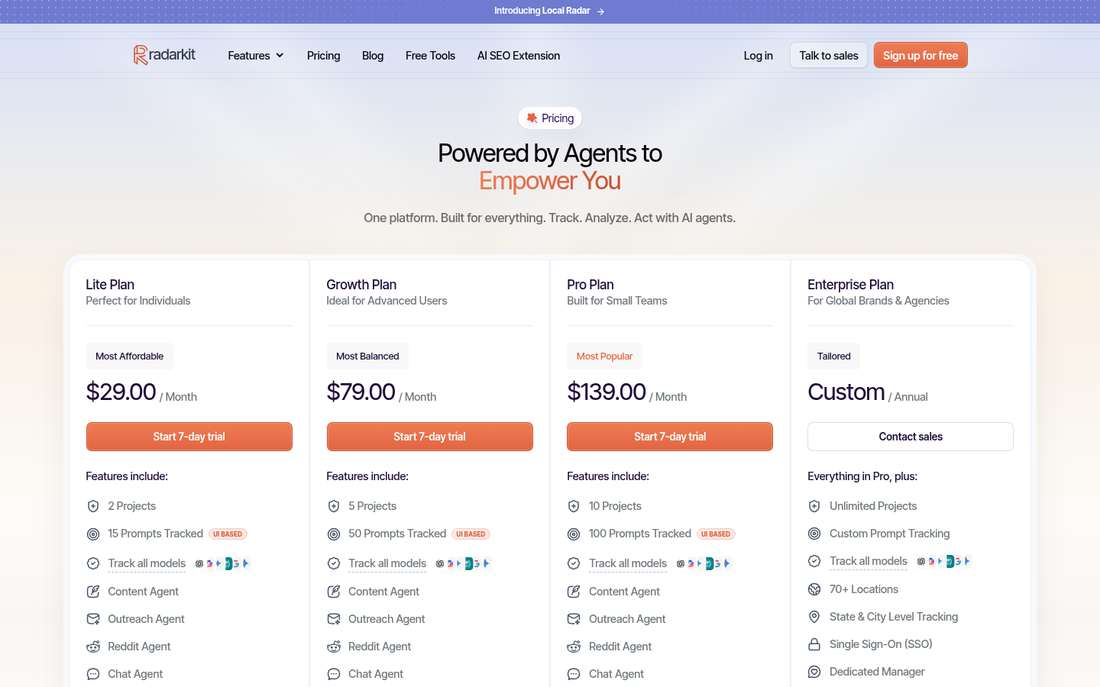
Every self-serve plan tracks all six engines and includes Local Radar, competitor monitoring, the agents, Search Console and GA4 connections, plus MCP and API access. You can review the full table on the RadarKit pricing page.
| RadarKit plan | Cost | Tracked prompts | How often prompts rerun | Answers analyzed monthly | Project limit |
|---|---|---|---|---|---|
| Lite | $29 a month | 15 | Once every three days (72 hours) | 900 | 2 |
| Growth | $79 a month | 50 | Daily | 9,000 | 5 |
| Pro | $139 a month | 100 | Every day or every week | 18,000 | 10 |
| Enterprise | Custom, billed yearly | Custom | Custom | Custom | Unlimited |
A few extra details help with planning. Each month on Lite you get 6 Content Agent articles, 15 Chat Agent messages and a pair of branded PDF reports. Growth raises that to 19 articles, 25 messages, 10 reports and 2 extra seats. Pro offers 32 articles, 50 messages, 20 reports and 5 extra seats. On Enterprise, you also get 70+ locations, targeting down to state and city, SSO, as many seats as you need and your own account manager.
You can try any plan free for seven days without paying anything first. Changed your mind after being billed? Contact support within 48 hours of the charge for a full refund.
For a single service-area business with five towns, Lite covers a small prompt set. Growth is the better fit once you want several prompts per town and daily refreshes.
Which Service-Area Teams Get the Most from RadarKit
RadarKit suits these readers best:
- Owner-run mobile businesses that want to see which towns they win without logging answers by hand.
- Multi-van trades and home service companies that work in several towns and want each one reported separately.
- Agencies with local clients that report on many service areas and want branded PDFs or a client portal.
- Regional brands whose coverage calls for Enterprise targeting at state or city level.
My Closing Advice for Service-Area Owners
Start small. A single business with one service, a short town list and a 28-day window are enough to learn more than most owners ever know about their AI visibility. Keep the prompts fixed, save the real answers and sources, and let the patterns decide the next fix.
When the manual log becomes a chore, move the routine into a tool and spend your time on the fixes instead. Following a service-area business in AI search becomes far easier once each round runs on its own and every town sits on one screen.
Service-Area Tracking Questions Readers Ask
How many towns should a service-area business track at first?
Start with three to five towns, chosen from your job records. Track the towns that bring in most of your revenue plus one or two growth towns, then add more once the routine is steady.
Should I hide my address if customers never visit me?
Google’s guidance says you should hide your address on Google Business Profile if you do not serve customers there. Then list the towns you actually cover and name them on your website, so assistants have clear coverage facts to work with.
Why does one AI engine recommend my business while another does not?
Each engine uses its own mix of sources and live searches. Check the cited pages for the engine that names you, then see whether the other engine relies on directories or threads where you are missing.
Does RadarKit support tracking five or six towns under one project?
Yes. On self-serve plans, write one version of each prompt per town. Local Radar then reports appearance rate, average position and rival businesses separately for every town. State and city level targeting is available on the Enterprise plan.
How often should RadarKit refresh prompts for a mobile business?
For most service-area teams, a daily refresh on Growth or Pro gives a clear trend. Lite refreshes every 72 hours, which works well for a small starter set of prompts.
Is AI recommending your brand?
Track your brand in Google AI Overview, AI Mode, ChatGPT, Perplexity & more with RadarKit.
No payment upfront. Cancel anytime.