Free AI Visibility Reports vs Paid Tracking: Full Comparison

On this page
A free AI visibility report shows whether answer engines name your business on a few questions at one moment. Paid tracking asks your own questions again and again, across several engines and places, and keeps every answer with its sources. One is a quick look. The other is an ongoing record.
Both have a place. The tricky part is knowing which one fits your situation right now, and when it makes sense to move from one to the other. Getting that wrong usually means either paying for data nobody reads or making decisions on a single sample that happened to be unusual.
In this guide, I compare the two across seven points: location coverage, engine coverage, source evidence, reporting, workflow, pricing with prompt limits, and best fit. A worked example, a home services company with four locations, runs through every point. Each point ends with a short list of checks you can run on your own business. At the end, I share how I use RadarKit, the tracker I co-founded, for the paid side of this work.
What Is a Free AI Visibility Report?
A free AI visibility report is any no-cost check that tells you how answer engines treat your brand. Most of them run a small set of questions, look for your name in the replies, and return a short summary or score.
They come in three common forms.
One-Off Snapshot Checks
You enter your domain or brand name, the tool asks a handful of questions in one or two assistants, and you get a result within minutes. The questions are usually picked by the tool, based on your category. It is the fastest way to learn whether the engines know you at all.
Free Audits
A free audit adds some analysis on top of the snapshot. It might score how clearly your pages describe your services, check a few technical signals, or list competitors that appeared in the answers. Audits are often a door into a paid service, so read them as a starting point rather than a full study.
Manual Prompt Checks
This is the version you run yourself. You open each assistant in a private browser window, type the questions your customers ask, and record the answers in a sheet. It costs nothing but time, and you get full control over the wording, which is a real advantage.
What Is Paid AI Visibility Tracking?
Paid tracking is a tool that runs your chosen questions on a schedule, across several engines, and stores every reply. It turns single checks into a dataset. Over a few weeks, that dataset shows trends, rivals, cited pages and the effect of the changes you make.
The key word is repetition. Answer engines tend to reword their replies from one run to the next, and the businesses they list can shift too. A single result is one sample. If you want to understand why sample size matters so much here, my guide to AI visibility sampling walks through it in detail.
Free AI Visibility Report vs Paid Tracking at a Glance
| Point | Free report | Paid tracking |
|---|---|---|
| Location coverage | Usually one fixed origin | Chosen country, and on some tiers state or city |
| Engine coverage | Often one or two assistants | Several engines on every run |
| Source evidence | Mention or score, few sources | Full answer text with cited pages |
| Reporting | One page in time | History, period comparison, exports |
| Workflow | Manual effort for repeats | Scheduled collection |
| Prompt limits | Questions set by the tool | Your own questions, capped by plan |
| Best fit | First look, curiosity, small budgets | Active work, several locations, client reporting |
Worked Example: A Home Services Company With Four Locations
To make the comparison concrete, I will use one example throughout. It is an illustration built to show how each approach behaves, not a real client result.
- Business: a home services company offering plumbing and heating repair
- Locations: four branches in four nearby towns
- Service in focus: emergency boiler repair
- Questions: 12 customer-style prompts, such as “emergency boiler repair near me,” “who fixes a boiler on a Sunday,” and town-specific versions of each
- Engines: six in total, covering Perplexity, Copilot, Gemini and ChatGPT plus both answer features inside Google
- Window: four weeks
The owner starts with a free check. It runs eight questions picked by the tool in two assistants and says the company was named in a few answers. The next sections show what the owner learns, and misses, by comparing that result with paid tracking on the same 12 questions.
The same setup works for a cleaning service, a veterinary group, a car wash chain or a regional accounting firm. Change the service and the prompts, and every point still applies.
Point 1: Location Coverage When the Prompts Match
Local answers depend on where the question appears to come from. Ask “emergency boiler repair near me” from one town and the engine might list three businesses. Ask from the next town and the list can change completely.
Where Free Reports Run From
Most free reports send their questions from a single origin, often wherever the tool’s servers sit. That location might be in another region or even another country. The result is accurate for that spot, but it might say little about your branches.
Manual checks run from your own device and network, so they reflect your office location. That helps for the branch you sit in and not much for the other three.
How Paid Tracking Handles Location
Paid trackers let you choose the origin of each run, usually by country. Some higher plans add state or city targeting. A few also let you build location into the question itself, such as “boiler repair in [town name],” which helps on any plan.
For the home services example, the owner tracks the 12 questions with each town named in the wording, from the right country. That gives a fair read of all four branches, rather than just the head office.
What to Check
- Find out where your free report sent its questions from.
- Run three questions by hand from a private window, then compare the businesses named.
- Add town names to your question list so each branch is covered.
- If you need true city origins, check which plan tier includes them before you buy.
Point 2: Engine Coverage When the Prompts Match
Your customers spread across many assistants. Some ask ChatGPT, some read the Google AI Overview above the results, some use Copilot in their browser, and others prefer Perplexity or Gemini.
Free Reports Often Cover a Few Engines
A free snapshot usually checks one or two engines. That is enough to confirm whether you appear somewhere. It is not enough to see where you are strong and where you are missing.
Paid Tracking Covers Several Engines Per Run
Paid tracking normally asks every question in every supported engine on each run. In the worked example, 12 questions across six engines makes 72 answers per run. The free check, with eight questions in two engines, produced 16.
That bigger set often reveals the most useful finding of all: the company might appear often in one engine and rarely in another. That points to specific gaps, such as a missing listing on a source one engine trusts heavily.
How Answers Are Collected Matters Too
Some tools collect answers through a developer connection to the model. Others open the public chat window, the way a person would. The public apps often search the web, add local cards, and show sources, so the two methods can return different answers. I compared both methods in my article on API answers vs browser answers, and it is worth asking any tool, free or paid, which method it uses.
What to Check
- List which engines your free report covered.
- Ask the same three questions in each engine by hand and note the differences.
- During any trial, confirm that every engine runs on every question.
- Ask how answers are collected, and prefer the method that matches what customers see.
Point 3: Source Evidence and Citations
A mention tells you that you were named. Sources tell you why. That second part is what turns data into a plan.
What Free Reports Show
Free reports usually focus on the mention itself and maybe a competitor list. Few of them store the full answer with every cited page. Manual checks can capture sources, but only if you copy every link into your sheet each time.
What Paid Tracking Shows
Paid tracking tends to save each reply in full, along with the pages the engine cited or read. Over four weeks, those pages add up to a clear picture of which sites shape local recommendations.
In the worked example, the owner might find that a regional trade directory and one review platform appear again and again in boiler repair answers. That finding gives a concrete next step: check both listings, complete every field, and ask happy customers for reviews where it counts. If you want a full method for this, my walkthrough to build a local AI citation report lays it out step by step.
Extra Evidence Around the Answer
Some paid tools also capture what sits around the answer: local business cards, product carousels, sponsored placements, and the web searches the engine ran before it replied. Those extras help explain why a rival keeps winning, especially in busy local markets.
What to Check
- Does the report save the full answer text?
- Can you see every cited page, and sort by how often each appears?
- Can you spot which cited pages carry a link to you?
- Are local cards and the engine’s own searches recorded?
Point 4: Reporting and History
A free AI visibility report is a single page. It cannot show a trend, because a trend needs at least a few points over time.
Building a Trend With Free Checks
You can build a rough trend by running free checks every week and logging the results. It works, but it is fragile. The questions drift as you tweak them, the engines you check change, and one busy week breaks the chain.
How Paid Tools Report
Paid trackers keep a history of every run and let you put one stretch of dates beside the stretch before it. Before-and-after questions become easy. Did the new service page help? Did fixing the directory listing change anything? You can see it in the numbers.
Many paid tools also offer exports, branded reports and shared dashboards. Those matter when a manager, partner or client needs the results without logging in to a new tool.
For the home services company, the history shows how each branch moves week by week. If you are starting from scratch, set a fixed starting point first. My walkthrough to set a local AI visibility baseline covers that.
What to Check
- Can you compare two date ranges side by side?
- Are past runs kept for the life of the account?
- Can you export results or share a read-only report?
- Do the reports show per-engine and per-location views?
Point 5: Workflow and Team Time Limits
Cost is not only money. Hours spent collecting data are hours not spent fixing what the data shows.
The Time Cost of Free Checks
In the worked example, checking 12 questions in six engines by hand means 72 answers per round. Copying each answer and its sources into a sheet could easily take a couple of hours. Repeat that weekly for four weeks and the owner has spent a full working day on data entry.
Free tools save some of that time, but they limit what you can change. You usually cannot pick the questions, add engines, or rerun the exact same set on a schedule.
The Workflow of Paid Tracking
Paid tracking runs on its own schedule. You set the questions once, and the tool does the collection. Your time goes into reading the results, spotting patterns and making changes.
That shift matters most for small teams. A business with one marketer, or an agency with many clients, often finds that the hours saved are worth more than any single feature.
Workflow Limits to Watch in Paid Plans
Paid plans have their own limits. Look at how many projects you can run, how many team seats are included, how many reports or exports you get each month, and whether there are caps on adding or changing questions. These limits shape your weekly routine more than the headline price.
What to Check
- Estimate the hours a manual round takes for your question set.
- Count how many brands, branches or clients need separate projects.
- Check seat limits if more than one person will use the tool.
- Note any monthly caps on reports, exports or agent tasks.
Point 6: Live Pricing and Prompt Limits
Pricing is where most comparisons start, but it makes more sense once you know what each option delivers.
What Free Costs
A free report costs no money. It does cost time, and it fixes the scope for you. That trade is fine for a first look. It becomes expensive when you need repeated, consistent data.
How Paid Plans Are Priced
Paid trackers usually price on a few levers: tracked prompts, refresh frequency, engines included, projects, seats and locations. Two plans with similar prices can differ a lot on these levers, so compare the full table, not just the monthly cost.
A Simple Formula for Comparing Plans
Multiply prompts by refreshes per month by engines. The result is the number of answers the plan collects. In the worked example, 12 prompts refreshed daily across six engines gives about 2,160 answers in 30 days. The same prompts refreshed weekly give a little over 300. That number is the real measure of how much evidence you are buying. If you want to go deeper on refresh rhythm, I compared the two options in daily vs weekly AI prompt tracking.
Costs Beyond the Headline Price
For businesses with several branches, costs can grow with each extra location or project. My guide to the costs in a multi-location AI tracking plan lists the line items worth checking before you sign up.
What to Check
- Work out answers per month for each plan you consider.
- Confirm that every engine is included, not sold as an add-on.
- Check whether location choice depends on the plan tier.
- Look for a free trial so you can test with your own questions first.
Point 7: Best Fit
With the six points above in mind, the choice becomes clearer. It depends on what you are trying to learn.
When a Free AI Visibility Report Is Enough
A free AI visibility report fits well when you have never checked before, when you only need a yes-or-no answer, or when you have not yet made changes worth measuring. It is also a sensible first step before any trial, because it helps you spot the questions and engines that matter.
When Paid Tracking Fits Better
Paid tracking fits when you are actively improving your visibility, when you run several branches or brands, or when you report results to someone else. Each of those needs history and repeat runs, which only scheduled tracking provides.
Best Fit Table
| Your situation | Best fit |
|---|---|
| First time checking presence in AI answers | Free snapshot check |
| Quick look at rivals in one market | Free audit or manual check |
| Testing the wording of customer questions | Manual prompt checks |
| Proving that site or listing changes worked | Paid tracking |
| Several branches or brands | Paid tracking with projects |
| Reporting to managers or clients | Paid tracking with exports and shared reports |
How to Run a Fair Side-by-Side Test
If you want to settle the question with your own data, run a short test. It takes about a week of attention spread over four weeks.
- Write 10 to 15 questions your customers really ask, including town names for each branch.
- Run a free AI visibility report and save the result.
- Run the same questions by hand in each engine from a private window, and save the answers with sources.
- Start a trial of a paid tracker and load the exact same questions.
- Compare which businesses were named, which pages were cited, and how much the answers changed between runs.
- Decide based on what the extra data showed you, not on the feature list.
Keep the wording, the engines and the location identical across every run, so the only thing that differs is the method.
Signs You Have Outgrown Free Reports
- You run the same checks by hand every week.
- You want to know whether a change on your site made a difference.
- You manage more than one branch, brand or client.
- Someone asks you for a trend, not a single number.
- You keep seeing the same rival and want to know which pages help them.
Questions to Ask Before Paying for Tracking
- Which engines run on every question, and how are answers collected?
- Where do the questions come from, and can I choose the country, state or city?
- Are the cited pages saved with each answer?
- How long is history kept, and can I compare periods?
- How many prompts, projects and seats does each plan include?
- Is there a free trial, and what happens when it ends?
RadarKit: Paid Tracking I Use After a Free Check
I co-founded RadarKit, a platform for tracking AI search. It opens the public app of each engine, types your questions the way a customer would, and saves each full answer with its sources. That is the method I prefer, because it reflects what people actually see.
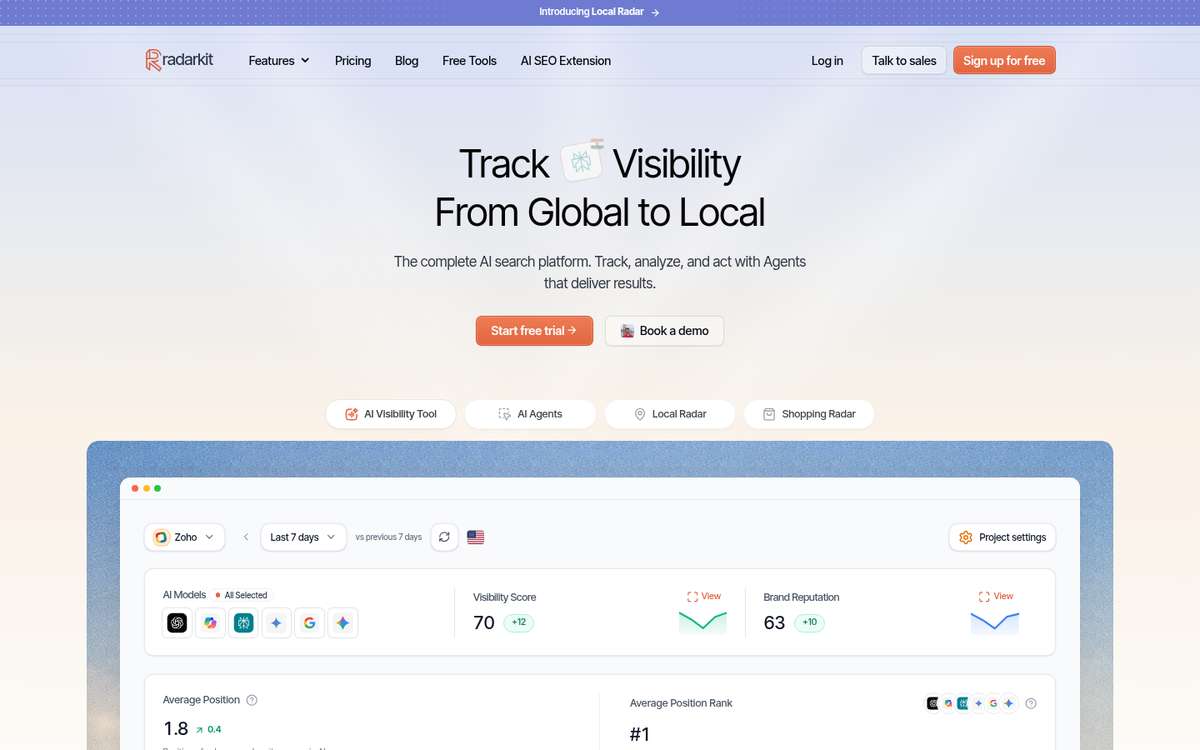
How RadarKit Fits the Free vs Paid Choice
RadarKit does not have a free-forever plan. You get a 7-day free trial on each self-serve plan, and nothing is charged upfront, so you can load the questions from your free check and see what repeated tracking adds. RadarKit also has free tools that need no signup, including LLMs.txt utilities and a Chrome extension.
In the home services example, the owner would load the 12 boiler repair questions, pick the country, and let the trial collect answers across all six engines for a week. The history and cited pages would then show whether the free check told the full story.
Local Tracking in RadarKit
Local Radar shows whether engines recommend your business, your appearance rate and position, and every other local business named, with ratings and review counts. On self-serve plans, questions leave from residential connections in over 50 countries, while picking a state or city origin is an Enterprise option.
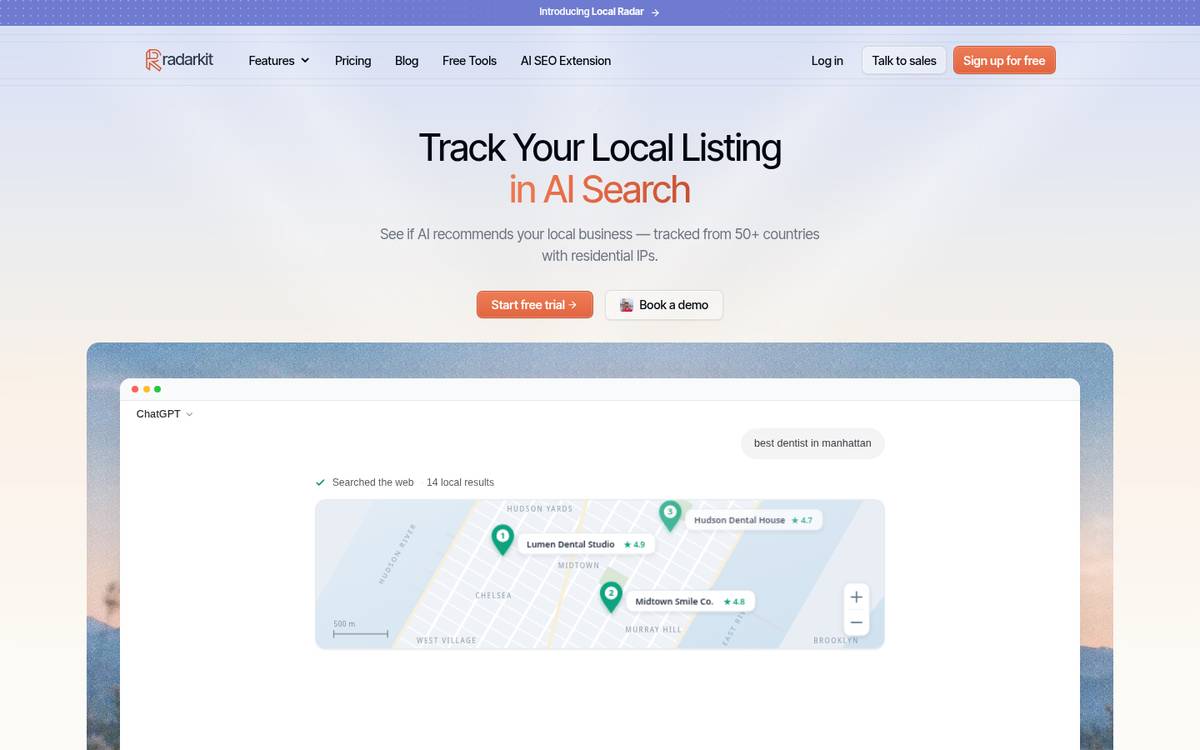
RadarKit Key Features
- AI engine tracking: RadarKit types each question into the public screens of Copilot, Gemini and ChatGPT, then Perplexity and both Google answer features, just as a shopper would, using residential connections in 50+ countries, so results stay close to what locals see.
- Prompts and topics: Customer questions sit inside topics and are rerun on the schedule your plan sets, and any one of them can be run on the spot for a fresh answer.
- Visibility Score: The score reflects the portion of tracked question and engine combinations where your brand gets named, and it shows how that moved since the last period ended.
- Brand Reputation: A dedicated score tracks how engines talk about your brand across time.
- Average Position: Whenever you appear, your place in the list is stored and compared with competing domains.
- Sentiment: Mentions are sorted into positive, mixed and negative, overall and per engine, with recurring phrases surfaced.
- Local Radar: It covers whether you are recommended, appearance rate, position, and each rival business named, showing its category, its rating and how many reviews it has. A filter lets you keep only one listing source, say Yelp or a Google Business Profile, and you also see which questions each business wins. Self-serve plans run at country level, and Enterprise adds state and city targeting.
- Shopping Radar: AI product carousels are logged with product, store, price, rating and position, plus how frequently your items show up and which merchants come out ahead.
- Ads Radar: Ads next to AI answers are recorded with advertiser, headline, description, landing page and creative, and how often each one appears.
- Citation Data: You can tell cited pages from consulted ones, check which ones point back to you, and find the content formats engines cite most.
- Page Radar: Watch a single page, a guest post included, and learn which engines cite it and on which questions it surfaces.
- Query Fanout: The searches an engine runs before it replies are saved, along with the share of replies where an engine went looking on the web first.
- Competitors and Share of Voice: Other brands and domains in the same answers are listed with their share of voice, average position and overall rank in one table.
- Create Content: The Content Agent reviews cited pages, top Google results, fanout queries and the People Also Ask box, then writes articles in formats like listicles, comparison pieces, alternatives roundups, question-and-answer pages and first-person reviews, all in the tone your brand uses.
- Optimize Content: An existing article can be reworked around the entities and fanout queries engines already reference, then edited and pushed live on a WordPress site.
- AI Traffic Analytics: A read-only link to Google Analytics 4 places AI-driven visits beside your visibility numbers.
- Agent Analytics: A report lists the AI bots that visit your website.
- Plan Agent and Google Search Console: You can hook up Search Console on any tier. The Plan Agent then reads it beside your citation records, spots what is missing, and hands out tasks to the other agents.
- Outreach Agent: It spots sites that reference your rivals, writes emails that sound like you, sends them from your Gmail after approval, and later sends a polite follow-up.
- Reddit Agent: It brings up Reddit discussions that engines lean on in your niche and shows where your brand is absent.
- Chat Agent: Ask it something simple, like which rival gained ground this week, and it replies from your current data.
- API and MCP access: All plans come with REST endpoints plus an MCP server, which means your data can flow into tools such as Claude, Cursor, Codex or ChatGPT.
- Exports, branded PDFs and the Client Portal: Any of your saved data, from replies and sources to rankings, rival lists and radar output, downloads as a file. Branded PDF reports are included each month (Lite gets 2, Growth 10, Pro 20), and clients can open a live Client Portal or a report link that they can view but never change.
- Full history: Every plan stores all past data, so any chosen period can sit next to the period that came before.
- Projects and workspaces: Separate projects for locations or brands are capped at 2 on Lite, 5 on Growth and 10 on Pro, with unlimited projects on Enterprise.
- Project settings and team seats: Here you store the brand kit, spelling variants of your name and your rivals’ names, the timezone, and who gets which role. Growth includes 2 extra seats, Pro includes 5, and Enterprise offers single sign-on with no cap on seats.
- Free GEO tools: Without making an account, anyone can use RadarKit’s LLMs.txt checker, its LLMs.txt generator, and its browser extension for AI SEO.
RadarKit Pricing
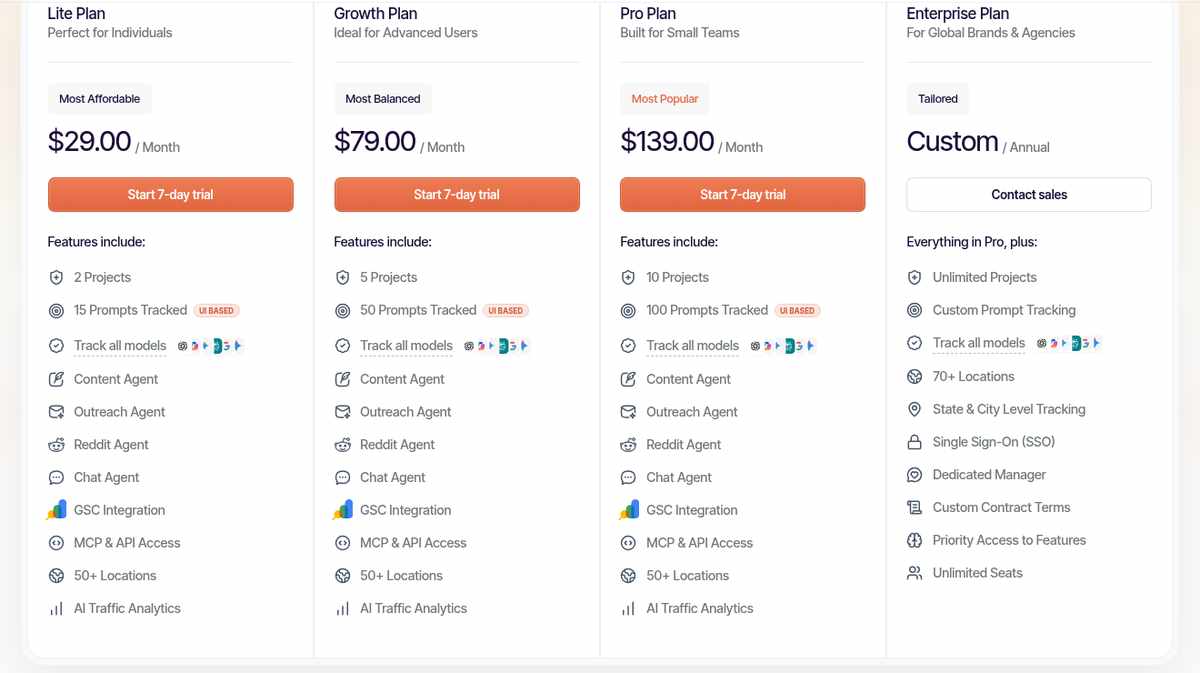
You can see every plan line by line on the RadarKit pricing page.
| Plan | Monthly cost | Projects | Tracked prompts | Answers collected monthly | Refresh |
|---|---|---|---|---|---|
| Lite | $29 | 2 | 15 | Around 900 | Once every 72 hours |
| Growth | $79 | 5 | 50 | Around 9,000 | Once a day |
| Pro | $139 | 10 | 100 | Around 18,000 | Once a day |
| Enterprise | Custom, on a yearly contract | Unlimited | Custom | Custom | Daily or weekly |
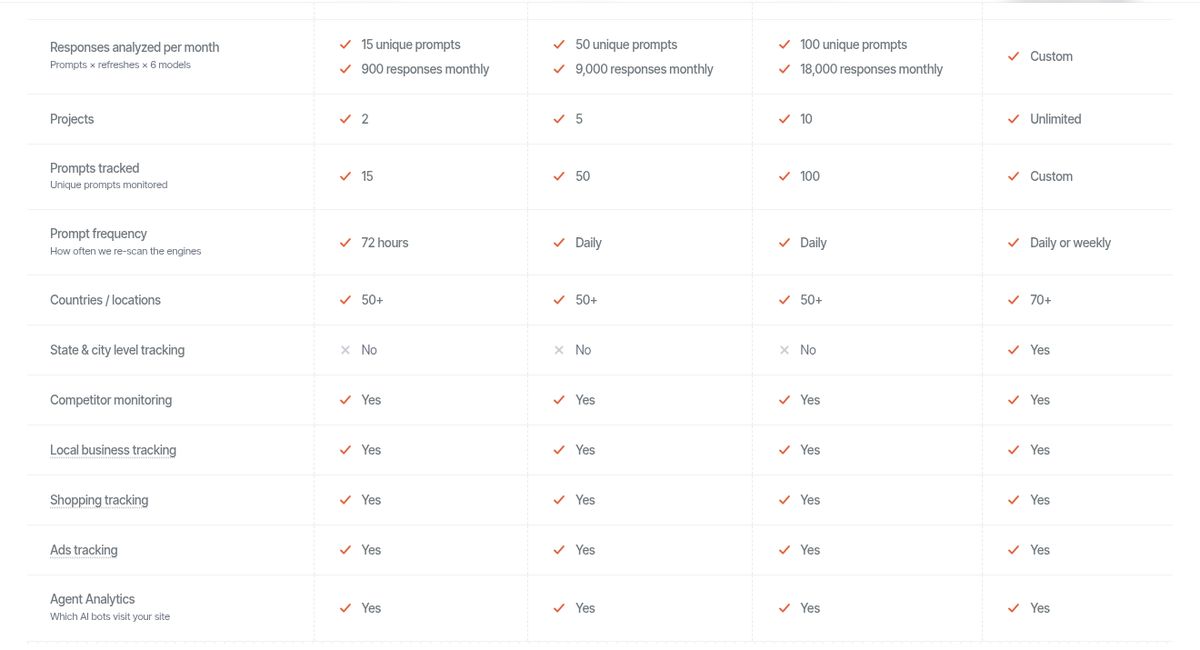
Every plan includes all six engines, competitor monitoring, local, shopping and ads tracking, full history, and MCP and API access. A free week comes first on the three monthly tiers, and nothing is billed when you start. If you are charged and decide it is not for you, RadarKit gives a full refund when you contact the team within 48 hours. Enterprise buyers get more than 70 locations, state-level and city-level origins, SSO login, unlimited seats and a named account manager.
Best For
- Lite: a single business ready to move past free checks at a low monthly cost.
- Growth: owners and small agencies who want daily answers on a focused question set.
- Pro: teams with several brands, branches or clients on a daily schedule.
- Enterprise: larger brands that need state or city targeting, custom prompt volume and contract terms.
My Personal Experience With RadarKit
I use RadarKit when a free check raises a question I cannot answer from one result. The part I lean on most is the cited pages view, because it turns “we are missing” into “these three pages are shaping the answer.” The trial is the easiest way to see whether that extra layer is worth it for your business.
Common Mistakes When Comparing Free and Paid Options
- Treating a single free result as a final score.
- Comparing a free check with paid tracking on different questions.
- Ignoring where the questions were sent from.
- Paying for tracking before deciding which questions matter.
- Skipping the trial and judging a paid tool by its feature list alone.
- Collecting data every day but never reviewing it.
Final Thoughts
A free AI visibility report and paid tracking answer different questions. The free report tells you where you stand right now. Paid tracking tells you whether that is changing, why, and what to do about it.
For most local businesses, the best order is to start free, learn which questions and engines matter, and then use a trial to see what repeated runs add. If the evidence shows real work to do, paid tracking gives you the record to prove that the work paid off.
FAQs
What is the difference between a free AI visibility report and paid tracking?
A free report checks a few questions once, usually from one location and in one or two engines. Paid tracking reruns your own questions on a schedule across several engines and keeps every answer with its sources.
Can I rely on free checks for a small local business?
Yes, for a first look or a steady market. If you start making changes and want to see their effect, you will need repeated runs, which is where paid tracking helps.
How many questions should I track?
Most local businesses do well with 10 to 25 questions that reflect how customers ask for their service, with town names for each location.
Does RadarKit offer a free plan or trial?
RadarKit does not have a free-forever plan. Lite, Growth and Pro each begin with a free 7-day trial that asks for no payment at the start, and its LLMs.txt tools and Chrome extension are free without signup.
Which RadarKit plan fits a business with several locations?
Growth or Pro usually fits, with daily refreshes and 5 or 10 projects. If each branch must be tracked from its own state or city, Enterprise includes that.
Is AI recommending your brand?
Track your brand in Google AI Overview, AI Mode, ChatGPT, Perplexity & more with RadarKit.
No payment upfront. Cancel anytime.