Daily vs Weekly AI Prompt Tracking: Full Comparison

On this page
Daily vs weekly AI prompt tracking is a choice about refresh rhythm: how often a tool goes back to answer engines such as ChatGPT, Perplexity, Gemini, Copilot and the two Google AI surfaces and asks your tracked questions again. Daily tracking re-asks every question once per day. Weekly tracking re-asks about once every seven days.
That one setting shapes far more than the shape of a chart. It controls how many locations and questions your budget covers, how many samples each number rests on, which short-lived sources you catch, and how much reading lands on your desk each week.
This guide compares the two cadences across seven points. A single worked example, a regional moving company, runs through each point, and every point ends with something you can check in your own data. At the end, you will find a simple way to pick your next step from the evidence, plus a full look at RadarKit, the tracker I co-founded, which offers both refresh rhythms across its plans.
What Is Daily vs Weekly AI Prompt Tracking?
Prompt tracking means saving the answers that AI assistants give to questions your customers ask. You pick the questions, the engines and the location, and a tool asks on a schedule. Cadence is the gap between two runs of the same question.
How Daily Prompt Tracking Works
With a daily schedule, each question is asked in each chosen engine every day. Over a month, that gives you around 30 saved answers per question per engine. Because the samples stack up quickly, the monthly average becomes steady, and a sudden shift shows up within a day.
How Weekly Prompt Tracking Works
With a weekly schedule, each question runs about every seventh day. That leaves four or five saved answers per question per engine each month. Costs drop sharply per question, but every number in your report rests on fewer samples, and short events between runs go unseen.
Cadences Between the Two
Daily and weekly are not the only choices. Some plans refresh every two or three days. These middle settings give quicker feedback than weekly at a lower cost than daily, and they often suit small businesses testing the waters.
Why Refresh Rhythm Matters for AI Answers
Classic search positions tend to hold for days at a time. AI answers do not behave that way. The same question, asked in the same engine an hour apart, can return a different list of businesses, a different order, and a different set of cited pages.
Several things drive that movement. Engines generate each answer fresh, many run a live web search first, and the request location changes which local businesses get named. Outside changes add to it, such as a new review, an updated listing, or a fresh roundup article.
So every saved answer is a single sample. To see a real pattern, you need many samples. There are two ways to get them: ask more often, or ask more questions. Nearly every trade-off in this guide comes back to that choice. If you want the statistics side in more depth, my guide to AI visibility sampling covers it question by question.
Worked Example: A Moving Company Tested Over 28 Days
To keep the comparison grounded, here is one illustrative setup. It is a walkthrough, not a case study, so the outcomes below are examples of what to look for rather than reported results.
- Business: a regional moving company with three branches
- Service: local home moves, with packing as a side service
- Region: the three towns the branches serve, named in some prompts, with “near me” phrasing in others
- Prompts: 14 questions, such as “affordable movers for a two bedroom apartment” and “last minute movers this weekend”
- Engines: the full set of six, so Google AI Overviews, Google AI Mode, Copilot, Gemini, Perplexity and ChatGPT
- Date range: 28 days
Each full run of 14 prompts in six engines creates 84 answers. Daily runs for 28 days produce 2,352 answers. Weekly runs produce 336. The simplest test is to run daily, then take every seventh day as a stand-in for a weekly tracker. That way, both views come from identical data.
Before you start, set a baseline so you have something to measure against. My walkthrough on setting a local AI visibility baseline walks through fixing your prompts, engines and locations before any comparison.
The same plan fits a veterinary clinic, a law firm, a fitness studio chain, an auto shop or a hotel. Change the service and the questions, and every step still applies.
Daily vs Weekly AI Prompt Tracking: Full Comparison
Point 1: Location Coverage for the Same Prompts
Every tracking plan has a ceiling, usually expressed as answers per month. Cadence decides how that ceiling gets spent across places.
Spending a Fixed Budget on Places
Imagine a plan that allows close to 9,000 saved answers each month over six engines. On a daily schedule, that covers 50 questions. On a weekly schedule, the same ceiling stretches past 300 questions, since each question needs only a handful of runs.
For the moving company, 50 daily questions means the 14 core prompts plus a few variants. Over 300 weekly questions means every town by name, each service, and several phrasings of each.
Town Names in Prompts vs Request Origin
Location enters a prompt two ways. You can type the town into the question itself, or the tool can send the request from an IP in that area. Both shape the answer. Wider weekly coverage gives you room to test town names across many phrasings, while daily coverage gives you more samples per town.
What to Check
- Which towns did the daily list leave out because of budget?
- Did the weekly slice miss a rival that appeared in one town for several days?
- Would a wider weekly list have surfaced a town where you are invisible?
Point 2: Engine Coverage for the Same Prompts
Engines are the second dimension of breadth. Each extra engine multiplies the number of answers you need.
Why Dropping Engines Is a Poor Saving
It is tempting to cut engines so daily runs fit the budget. The catch is that customers spread out. Some ask ChatGPT, some use Copilot on a work laptop, and many see Google AI Overviews without opening a chat app at all.
An engine you stop tracking is an engine where you cannot see changes. For most local businesses, slowing the cadence is a smaller loss than losing sight of an engine entirely.
Engines Behave Differently
Engines also change at different speeds. One might shuffle its list of local businesses often, while another stays steady for weeks. Daily data shows which engines move fast. Once you know, you can keep fast movers on frequent runs and slow movers on weekly runs.
What to Check
- Which engine changed the most from run to run in your daily data?
- Did any engine rarely change at all?
- Would weekly runs have been enough for the steady engines?
Point 3: Run-to-Run Variation and Sample Size
This point decides how far you can trust any number on your dashboard.
Daily Data Is Detailed but Jumpy
On a daily chart, a business can appear on one day, vanish the next, and return at a different spot the day after. That is ordinary variation, not a signal. Across a month, though, those many samples produce a steady average you can rely on.
Weekly Data Is Smooth but Thin
Only a handful of samples per question make each weekly number fragile. A single unusual run can tilt the month. The chart looks calm partly because there are so few points to plot.
How to Read Either One
Report appearance rate over a window, such as “named in 19 of 28 answers,” rather than single-run results. Compare windows of equal length. Hold prompts, engines and locations fixed during the test. My guide on tracking local AI visibility changes shows how to separate real shifts from normal noise.
What to Check
- How much did appearance rate swing day to day for your top questions?
- Did the weekly slice give the same 28-day appearance rate as the daily data?
- Which questions were steady enough to move to a slower schedule?
Point 4: Source Evidence and Citations
Answers rest on pages: directories, review sites, local news, forum threads, roundup articles and your own website. Those sources rotate, sometimes quickly.
Catching Short-Lived Sources
Daily runs log a new source on the day it first appears. Suppose a “best movers in the region” roundup gets cited heavily for six days and then fades. Daily data shows the full window. A weekly run might land on it once, or miss it completely.
Those windows matter. A page that engines lean on right now is a strong target for outreach or a listing request. Building a local AI citation report from your daily data turns those sources into a clear action list.
Ads, Local Cards and Product Tiles
Some engines now place sponsored results, local business cards or product tiles near the answer. These parts often change faster than the text. If you want a fair read on how often a rival buys placement on your questions, daily runs give a far better picture.
Query Fanout
Many engines run their own web searches before answering. Those background searches change as well. Daily records show which searches repeat and which come and go, which is useful when you plan new pages.
What to Check
- How many cited pages appeared in daily data but never in the weekly slice?
- Did any of those pages deserve outreach?
- Did ads or local cards appear often enough to matter for your business?
Point 5: Reporting, Alerts and Noise
More data does not always make a better report. The right cadence depends on who reads the results and how they react.
Owner Reports
A business owner who sees a daily chart can overreact to one bad morning. Weekly averages calm that down. If the report goes to an owner, show weekly or rolling seven-day figures, even when you collect daily.
Alerts for Big Moves
Daily collection does make alerts possible. A sudden drop across several engines, or a new rival appearing in most answers, is worth knowing about quickly. Weekly collection can only flag that a week later.
The Practical Mix
Collect at the fastest rhythm your plan allows. Alert on large changes. Report weekly. That pattern gives you speed when something breaks and calm summaries the rest of the time.
What to Check
- Did any daily movement lead to a decision during the test?
- Was the weekly summary enough to explain the month?
Point 6: Workflow and Team Time Limits
Cadence also shapes the work your team takes on.
Solo Owners and Small Teams
If one person checks results once a week, daily data adds little. A slower cadence with a wider set of questions usually delivers more value for that person’s time.
Agencies and Multi-Location Teams
An agency with many local clients, or a brand with many branches, benefits from daily collection with weekly reports. Account managers get detail when a client asks about a specific day, and reports stay short.
Tool Limits That Affect Workflow
Check seats, exports, branded reports, history length and API access before choosing. Daily data loses much of its value if the tool keeps only a short history, because you cannot compare one period with the last. If you track many branches, my breakdown of multi-location AI tracking plan costs lists the line items to price.
What to Check
- Who will read the results, and how often?
- Can your tool compare one date range with the previous one?
- Can you export or share reports without extra work?
Point 7: Pricing, Prompt Limits and Best Fit
The last point puts the cost side in plain numbers.
The Cost Formula
Answers per month equal prompts times runs per month times engines. For the moving company, 14 prompts in six engines run daily over a 30-day month equals 2,520 answers. Weekly runs drop that to about 364. That gap explains why slower plans can include more prompts at the same price.
When Daily Is Worth Paying For
- A new branch or location opening
- A rebrand or website relaunch
- A seasonal peak, such as summer moving season or holiday travel
- An active review or reputation fix
- A content push aimed at a specific group of questions
When Weekly Is Enough
- A steady local market with few new rivals
- A tight budget
- Pages get updated monthly or less often
- Nobody has time to read daily data
Best Fit Table
| Situation | Suggested cadence | Reason |
|---|---|---|
| New location or launch | Daily | Fast feedback on each change |
| Steady market, small budget | Weekly or every few days | More prompts and places for the money |
| Agency with many clients | Daily collection, weekly reporting | Detail on demand, calm client reports |
| Reputation fix in progress | Daily | Shows when answers begin to shift |
| Long-run benchmark | Weekly | Clean trends over many months |
| Large brand, many cities | Mixed by prompt group | Spend frequency where decisions happen |
When a Mixed Cadence Makes Sense
With daily vs weekly AI prompt tracking, you do not have to pick one rhythm for everything. A mixed setup puts money questions on frequent runs and the long tail on slower runs.
For the moving company, that might mean the five questions tied to bookings run daily, while the other nine, plus extra town variants, run weekly. The budget then covers more ground, and the questions that drive revenue keep their fast feedback.
Tools differ here. Some let you set cadence per prompt group, some set it per plan, and some only offer one rhythm. Ask before you buy.
Signals That Should Change Your Cadence
Cadence is not a one-time choice. Revisit it when the situation changes.
- Move to daily when you open a location, launch a page, start a review fix, or see a rival appear suddenly.
- Move back to slower runs once results stay steady for two or three weeks.
- Widen your question set when weekly data has stayed flat for a long stretch.
- Narrow it when nobody acts on the extra questions.
Questions to Ask Any Tracking Vendor About Refresh Rhythm
Before choosing a tool, get clear answers to these questions:
- How often does each plan re-run prompts, and can I change it?
- Can I run a single prompt on demand?
- How many total answers per month does my plan include?
- Are all engines included on every plan, or do they cost extra?
- Does the plan keep full history, and can I compare date ranges?
- Can I export raw answers and cited sources?
- Are local business cards, ads and product tiles captured on every run?
Reading the 28-Day Results and Choosing Your Next Move
At the end of the test, lay the daily data and the weekly slice side by side. Look at three things: appearance rate per question, cited sources, and rivals named.
If the daily data surfaced things the weekly slice missed, such as a short-lived source, a rival that appeared for a stretch, or a burst of ads, then daily runs are earning their cost for those questions.
If both views told the same story, move those questions to a slower rhythm and put the money you free up toward extra towns, services and phrasings. Either way, your next step comes from evidence rather than habit.
RadarKit: Prompt Tracking With Both Refresh Rhythms
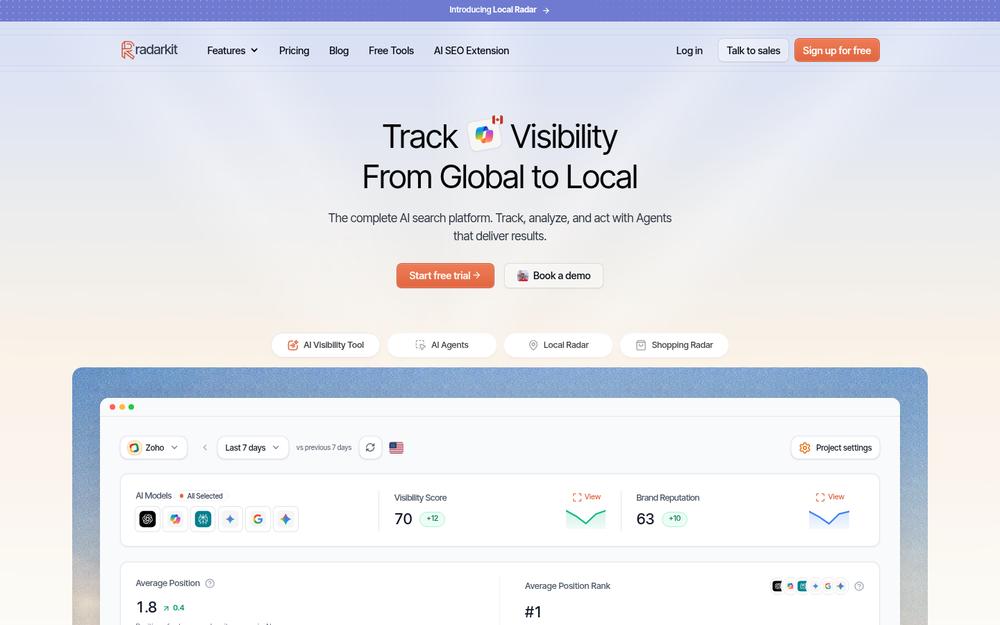
RadarKit is the AI search tracking platform I co-founded. It opens each engine’s public app or search page, types your questions as a shopper might, then stores each complete reply with its sources, local cards, product tiles and ads.
How RadarKit Handles Refresh Rhythm
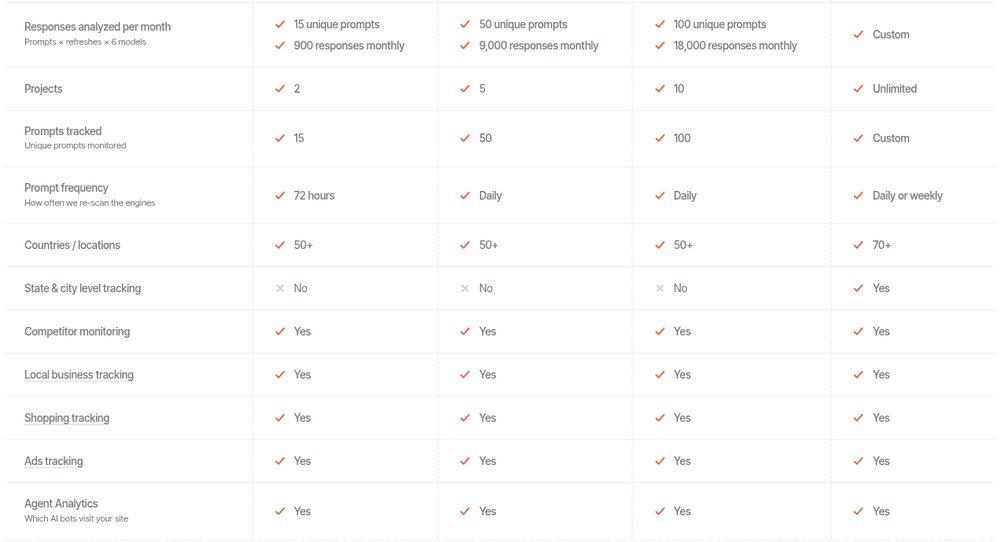
Cadence comes with the plan. The Lite tier re-scans once every 72 hours, the Growth and Pro tiers re-scan every day, and Enterprise customers pick daily or weekly. On top of the schedule, a manual run fetches a fresh answer for any one prompt whenever you need it.
Every plan keeps full history, and the dashboard compares a date range with the previous one. That makes the “collect often, report weekly” pattern easy to run.
Local Tracking in RadarKit
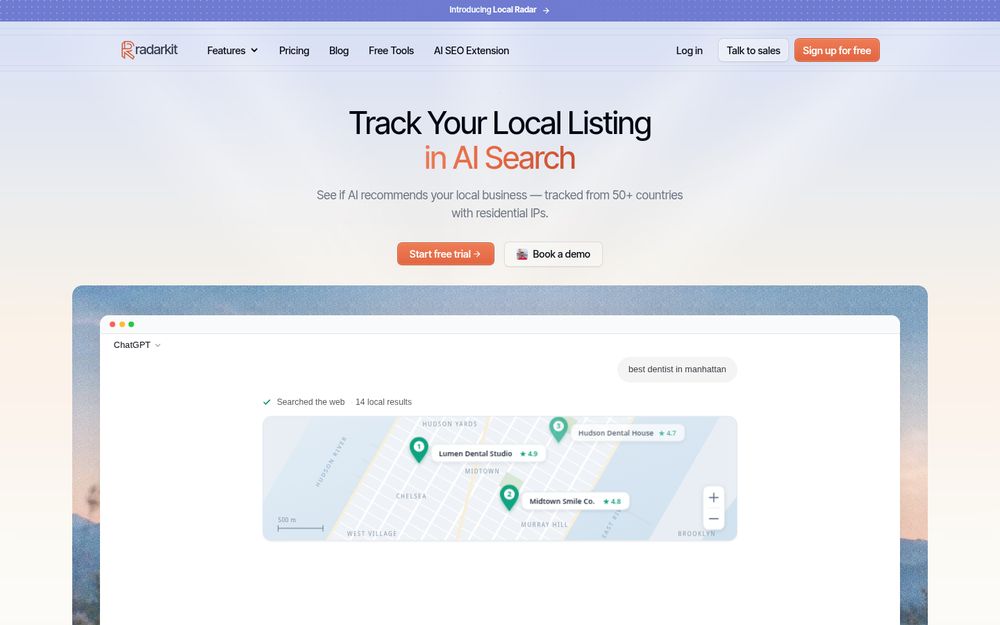
Local Radar tells you if answer engines suggest your business, your appearance rate, your rank, and the other businesses named in its place. Self-serve tiers collect from residential connections at country level (50+ countries are available), while choosing a state or city origin is reserved for Enterprise.
RadarKit Key Features
- AI engine tracking: RadarKit enters each question into Gemini, Perplexity, ChatGPT and Microsoft Copilot, along with Google AI Overviews and Google AI Mode, through residential connections in over 50 countries.
- Prompts and topics: Each customer question is filed under a topic, refreshed on your plan’s rhythm, and can be checked straight away with a manual run.
- Visibility Score: This metric is the portion of your prompt and engine pairs that name your brand, shown with the change from the prior period.
- Brand Reputation: A dedicated score follows how the overall portrayal of your brand develops.
- Average Position: Each time your brand is listed, its rank is recorded and compared against rival domains.
- Sentiment: Mentions are classed as positive, mixed or negative, both in total and for each engine, with recurring descriptions highlighted.
- Local Radar: It reports appearance rate, rank, and all competing businesses an answer names, including category, rating and review totals, and lets you filter by listing source such as Yelp or Google Business Profile. Enterprise adds state and city origins.
- Shopping Radar: Product carousels inside answers are recorded with product name, merchant, price, star rating and placement.
- Ads Radar: Sponsored units shown with answers are logged, covering the advertiser, headline, description text, destination page and creative.
- Citation Data: You see which pages are cited and which are only consulted, which ones carry a link to your site, and the content formats engines cite most often.
- Page Radar: Point it at a single URL, including a guest post you wrote elsewhere, to find out which engines reference it and on which questions.
- Query Fanout: Behind each reply, the hidden web searches an engine performs before it answers are captured, along with how often engines bother to search in the first place.
- Share of Voice and Competitors: Every rival brand or domain that turns up alongside you is ranked by voice share, mean position and overall standing.
- Create Content: Starting from the pages engines cite for a prompt, plus Google’s top results, fanout queries and People Also Ask, the Content Agent produces blog posts, listicles, comparisons, alternatives pages, FAQs or first-person reviews in your own brand voice.
- Optimize Content: Submit a live article and it is rewritten around entities and fanout searches that engines already reference, then edited and published to WordPress.
- AI Traffic Analytics: Linking Google Analytics 4 with view-only rights displays AI referral visits alongside your visibility data.
- Agent Analytics: This report shows which AI bots are visiting your website.
- Plan Agent and Search Console data: Any tier can link Google Search Console, and the Plan Agent reads those queries next to your citations, finds gaps, and turns them into jobs for the content, outreach and Reddit agents.
- Outreach Agent: It locates sites that cite your competitors, writes pitches that match your brand, sends each one from your Gmail once you approve it, and follows up later.
- Reddit Agent: This agent opens Reddit discussions that engines cite in your market and highlights where your brand is not part of the conversation.
- Chat Agent: A conversational assistant answers plain-language questions about your project from live RadarKit data.
- API and MCP access: For technical users, every tier comes with REST endpoints and an MCP server, which lets tools like Cursor, Codex, Claude or ChatGPT pull in your project data.
- Exports, branded PDFs and the Client Portal: Saved answers, cited sources, competitor tables, rankings, fanout logs and radar results can all be exported, create branded PDF reports (2, 10 or 20 monthly by tier), and clients can open a live, read-only Client Portal or a shareable report link.
- Full history: Past runs stay stored on all tiers, and the dashboard can set any chosen period against the one right before it.
- Projects and workspaces: The number of separate projects for brands or branches is capped at two on Lite, five on Growth and ten on Pro, with no cap on Enterprise.
- Project settings and team seats: This area holds your brand kit, alias lists for you and your rivals, timezone and user permissions. Growth includes two additional seats, Pro includes five, and Enterprise brings unlimited seats with SSO sign-in.
- Free GEO tools: A pair of LLMs.txt utilities (a validator and a generator) sit alongside a Chrome add-on built for everyday AI SEO work, and none of them requires a login.
RadarKit Pricing
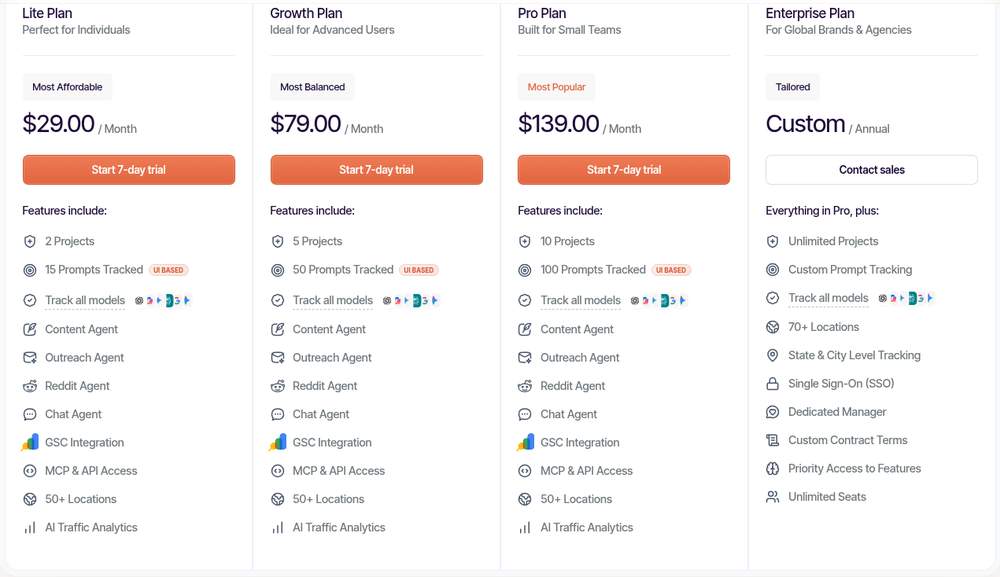
Full plan details are on the RadarKit pricing page.
| Plan | Cost | Refresh rhythm | Tracked prompts | Saved answers monthly | Projects |
|---|---|---|---|---|---|
| Lite | $29 a month | Once every 72 hours | 15 | Around 900 | 2 |
| Growth | $79 a month | Every day | 50 | Around 9,000 | 5 |
| Pro | $139 a month | Every day | 100 | Around 18,000 | 10 |
| Enterprise | Custom annual contract | Daily or weekly | Set per contract | Set per contract | Unlimited |
There is no extra charge for any engine, since every tier tracks all six. The three monthly tiers come with a free 7-day trial. Growth adds 2 extra seats, Pro adds 5 seats and faster support, and Enterprise adds 70+ locations, city and state origins, SSO login and a dedicated account manager.
Best For
- Lite: owners who want an affordable start on a slower, every-three-days rhythm.
- Growth: single-location firms and small agencies wanting a fresh answer every day on core questions.
- Pro: teams tracking several brands or many branches on a daily rhythm.
- Enterprise: bigger brands requiring city-level origins, or wanting control over a daily versus weekly schedule.
Common Mistakes When Choosing a Cadence
- Reacting to a single run instead of a window of runs.
- Changing questions in the middle of a test, which breaks the comparison.
- Dropping whole engines just to fit daily runs into the budget.
- Paying for daily data that nobody reviews.
- Treating three or four weekly runs as a firm trend.
- Never revisiting the choice after a launch or fix ends.
Final Thoughts
Daily runs give you speed and deep samples. Weekly runs give you breadth and calm reports. That is the real shape of daily vs weekly AI prompt tracking once you strip away the marketing. Neither wins for every business, so the smartest move is a short test on your own questions, followed by a decision based on what the data shows.
For most local service businesses, a mixed rhythm works best: frequent runs on the questions that bring bookings, slower runs on the rest, and weekly reviews for everyone. If you want to see how collection method changes results too, my comparison of API answers vs browser answers covers that side.
FAQs
What is the main difference between daily and weekly prompt tracking?
Daily tracking re-asks each question every day, so you get about 30 samples per engine each month and catch short changes. Weekly tracking re-asks about once every seven days, which lowers cost per question and lets the same budget cover more questions, towns and services.
Is weekly tracking enough for a local business?
For a steady market with a small budget, it often is. Weekly runs over a wide set of questions describe a stable market well. During launches, review fixes or busy seasons, daily runs on core questions are worth adding.
How many runs do I need before trusting a trend?
More runs give a steadier picture. A 28-day window works well, since it holds 28 daily runs or four weekly runs. Compare windows of equal length and keep your questions fixed so the comparison stays fair.
How often does RadarKit refresh tracked prompts?
The schedule depends on the tier: every 72 hours on Lite, every day on Growth and Pro, and a choice of daily or weekly on Enterprise. A manual run is available for any prompt between scheduled refreshes.
What RadarKit plan works for a company with several branches?
Growth covers 5 projects with daily refresh, and Pro covers 10 projects with daily refresh and 100 prompts. If you need state or city targeting for each branch, that comes with Enterprise.
Is AI recommending your brand?
Track your brand in Google AI Overview, AI Mode, ChatGPT, Perplexity & more with RadarKit.
No payment upfront. Cancel anytime.