How to Set a Local AI Visibility Baseline: 5 Steps
On this page
A local AI visibility baseline is a starting record of how often AI assistants mention or recommend your business for location-specific questions. It gives you a consistent way to compare future results instead of relying on occasional searches.
For example, if you run a dental practice in Austin, you might track prompts such as “best family dentist in Austin” and “emergency dentist in Austin.” Your baseline should record whether your practice appears, which competitors are recommended, and what sources support the answers.
Why a Local Baseline Matters
AI-generated local recommendations can change based on the question, location, language, and AI platform. A business that appears in one city may not appear in another, even when customers ask a similar question.
A useful baseline answers three questions:
- How often does AI mention my business?
- How often does AI recommend my business?
- Which competitors and sources appear instead of or alongside my business?
Without a baseline, it is difficult to know whether your local SEO, content, reviews, listings, or reputation work is improving your presence in AI answers.
What Should You Measure?
For your baseline, focus on a few clearly defined metrics:
- Mention rate: The percentage of recorded answers that name your business.
- Recommendation rate: The percentage that recommend your business, rather than simply mentioning it.
- Answer position: Where your business appears when the response provides an ordered list.
- Citation rate: How often answers cite your website.
- Competitor presence: Which competing businesses appear alongside or instead of yours.
- Information accuracy: Whether descriptions of your services, location, and business details are correct.
Keep mentions, recommendations, and website citations separate. They answer different questions about your visibility.
How to Set a Local AI Visibility Baseline: 5 Steps
Step 1: Define Your Locations
Start with the places that matter most to your business. A single-location company might begin with its city and nearby service areas, while a multi-location brand might choose several priority markets.
Create a simple tracking list:
- Primary city
- Important neighborhoods
- Nearby service areas
- Language used by customers
- Priority countries, if applicable
Recommended starting point: Choose one to three locations. Expand after your measurement process is consistent.
Also distinguish between a location written into a prompt and the location from which the prompt is tested. Record both when your setup allows it.
Step 2: Build Your Prompts
Create a fixed set of questions that reflect the services you sell and the decisions your customers make. For a manageable first baseline, consider 10–20 prompts.
| Prompt category | Example |
|---|---|
| General discovery | “Recommend a dentist in Austin.” |
| Service-specific | “Which Austin dentists offer emergency appointments?” |
| Customer-specific | “Best family dentist in Austin for nervous patients.” |
| Comparison | “Which dental practices in Austin should I compare?” |
| Branded research | “What services does [Business Name] offer in Austin?” |
Separate branded questions from non-branded discovery questions. Someone asking about your business by name is different from someone asking AI to help them choose a provider.
Keep the wording unchanged during each reporting period. If you add new prompts later, label them separately rather than silently changing your original baseline.
Step 3: Standardize Your Tests
Choose the AI platforms you want to monitor and document how you will test them. Use the same approach each time so your comparisons remain meaningful.
Record these settings:
- AI platform and available model information
- Exact prompt wording
- Target location and language
- Date and time
- Whether the session is signed in
- Whether a fresh conversation is used
- Whether browsing or search features are enabled
Suggested approach: Run each prompt more than once across a defined measurement window. Treat the resulting sample as an observation of your visibility—not a guarantee of what every customer will see.
Step 4: Capture Your Baseline
Collect your initial results before making the changes you want to evaluate. Save the full answers alongside your scores so you can review context later.
Use a spreadsheet or tracking dashboard with these fields:
| Field | What to record |
|---|---|
| Prompt | The exact question tested |
| Location | Target market and testing location, if known |
| Platform | AI assistant used |
| Business mention | Yes or no |
| Recommendation | Yes or no, using a consistent definition |
| Position | Numbered position, or “not applicable” |
| Competitors | Other businesses named |
| Citations | Sources included in the answer |
| Accuracy | Incorrect or outdated business details |
| Evidence | Saved response or screenshot |
For example, if your business appears in 12 of 40 recorded answers, its mention rate for that sample is 30%. Do not label that figure as recommendation rate unless all 12 appearances meet your recommendation criteria.
Step 5: Review and Re-measure
Use your baseline to decide what to investigate first. Prioritize commercially important prompts where your business is absent, competitors appear repeatedly, or your business details are wrong.
Potential actions to investigate include:
- Correcting inconsistent business information
- Improving service and location pages
- Clarifying opening hours, service areas, and booking details
- Addressing unanswered customer questions
- Reviewing the sources cited in competitor recommendations
Choose a regular reporting schedule, such as weekly checks with a monthly review. Keep a change log so you can compare visibility movements with the dates of your updates.
Treat changes as signals to investigate rather than automatic proof that one edit caused an improvement.
Example Baseline Scorecard
The figures below are illustrative planning examples, not industry benchmarks.
| Metric | Example baseline | Example goal |
|---|---|---|
| Mention rate | 30% | 40% |
| Recommendation rate | 20% | 30% |
| Website citation rate | 10% | 20% |
| Priority prompts with no appearances | 8 of 20 | 4 of 20 |
| Answers containing incorrect details | 5 | 0 |
Set goals around your own starting position, business priorities, and measurement scope.
Yes. You can enter prompts, save responses, and score them in a spreadsheet. Use a written testing procedure so future checks follow the same rules.
Radarkit for Local Baselines
Radarkit offers Local Radar across 50+ countries, helping businesses monitor local AI recommendations, appearance rates, answer positions, and competing businesses.
The platform reports tracking across ChatGPT, Gemini, Perplexity, Microsoft Copilot, Google AI Mode, and Google AI Overviews.
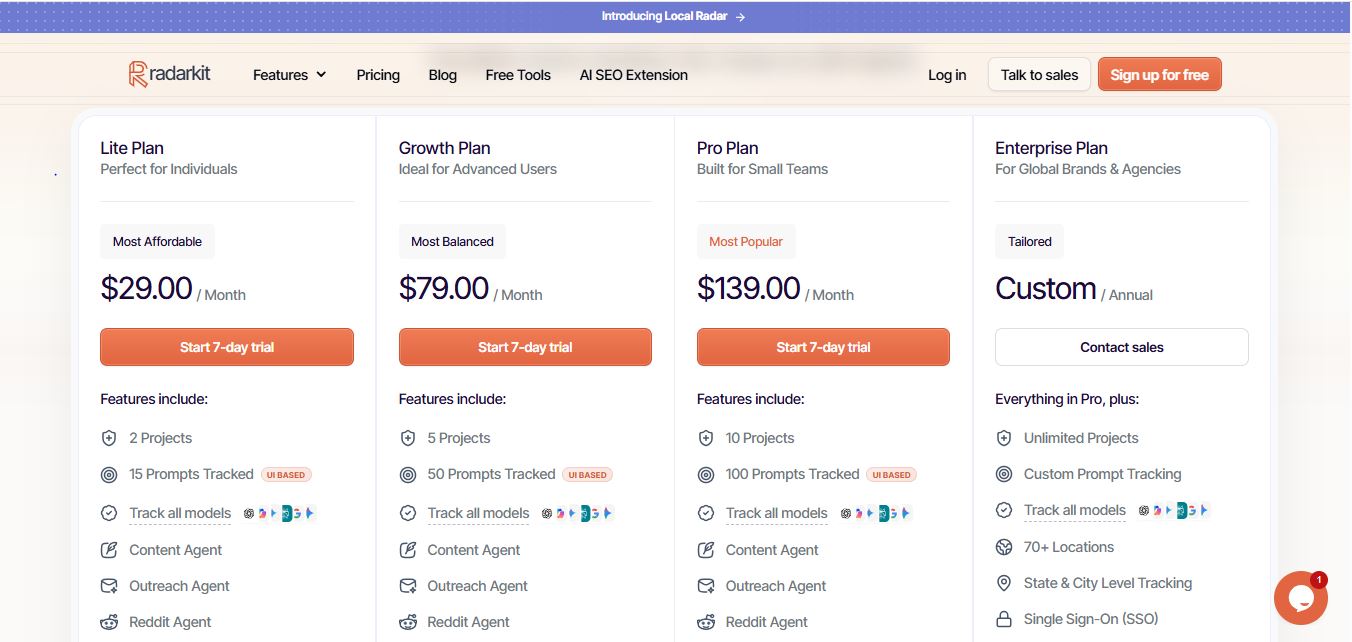
Radarkit Starting Prices
| Plan | Starting price | Projects | Tracked prompts |
|---|---|---|---|
| Lite | $29/month | 2 | 15 |
| Growth | $79/month | 5 | 50 |
| Pro | $139/month | 10 | 100 |
| Enterprise | Custom annual pricing | Custom scope | Custom scope |
These are the published plan prices and allowances; confirm current terms before subscribing.
Lite refreshes every 72 hours, while Growth and Pro refresh daily; a seven-day trial is listed for those three plans.
Using Local Radar
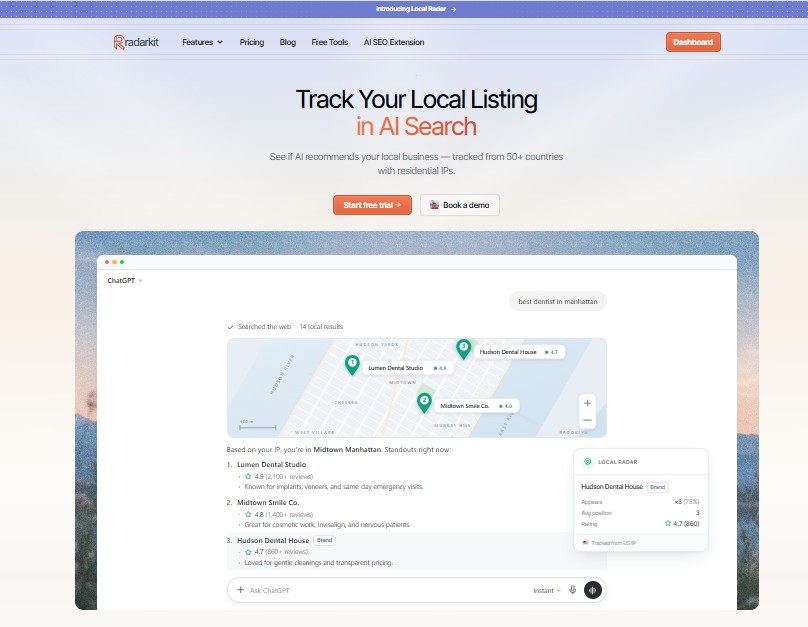
For your initial setup, select your priority locations, add a fixed prompt set, and record your first measurement period before making changes.
Radarkit’s Local Radar reports the businesses AI recommends, including appearance frequency, position, ratings, and review counts, giving you a structured starting point for local competitor analysis.
FAQ
What is local AI visibility?
For this baseline, local AI visibility means whether—and how—your business appears in AI answers to location-specific questions. Measure business mentions, recommendations, and citations separately.
How many prompts should I track?
Start with a manageable set, such as 10–20 high-intent prompts per priority market. This is a planning recommendation, not a required minimum.
How long should baseline collection take?
Consider collecting results over two to four weeks if your schedule allows. For a faster initial audit, use a shorter window and clearly label its dates and sample size.
Can I track visibility manually?
Yes. You can enter prompts, save responses, and score them in a spreadsheet. Use a written testing procedure so future checks follow the same rules.
Is a brand mention a citation?
No. For your reporting, count a mention when the answer names your business and a website citation when it references your website as a source.
What if my business never appears?
Record zero visibility for the tested sample rather than assuming your business is absent everywhere. Then investigate your priority prompts, business information, relevant content, and the competitors appearing in those answers.
Does tracking guarantee better visibility?
No. Treat tracking as measurement, not a guarantee of recommendations, rankings, leads, or revenue.
Is AI recommending your brand?
Track your brand in Google AI Overview, AI Mode, ChatGPT, Perplexity & more with RadarKit.
No payment upfront. Cancel anytime.