How to Build a Multi-Location AI Report: 5 Steps

On this page
A multi-location AI report shows how visible, accurate, and competitive each store is across AI platforms such as ChatGPT, Gemini, Perplexity, Copilot, Google AI Mode, and Google AI Overviews. Instead of blending every location into one average, the best report compares locations side by side so managers can see which stores need listing fixes, content improvements, review growth, or local outreach.
I personally use RadarKit for this type of reporting because its Local Radar makes it easier to track AI visibility by city, compare locations, and monitor the competitors and sources appearing in local AI answers.
How to Build a Multi-Location AI Report: 5 Steps
Step 1: Define Locations, Markets, and Goals
Start by listing every physical location with its own address, city, service area, Google Business Profile, website location page, and review profiles. Treat each storefront as its own reporting unit—not just a branch of the brand.
Define the reporting hierarchy before collecting data:
- Location: Individual store, such as “Downtown Austin.”
- Region: A group of stores, such as “Texas” or “Pacific Northwest.”
- Brand: The full company or franchise portfolio.
- Market: City, metro area, state, or country where AI answers may differ.
Set a clear goal for the report. For example: identify the three locations losing the most AI recommendation share, find inaccurate business information, or measure whether new local pages improved visibility.
Step 2: Create a Consistent Prompt Set
Use the same core prompts for every location, with only the city or neighborhood changed. This keeps results comparable across stores.
A strong starter set includes:
- “Best [product category] store in [city].”
- “Where can I buy [product] near [neighborhood]?”
- “Is [Store Name] good for [customer need]?”
- “What are [Store Name]’s hours, address, and return policy?”
- “Compare [Store Name] and [Competitor] for [product category] in [city].”
If you operate in multiple countries or serve customers in more than one language, treat each country-language pair as a separate market. Write prompts in the language local buyers actually use, rather than relying only on translated versions.
Step 3: Collect AI Visibility Data by Location
Run every prompt across the AI platforms your customers use. Use a private browser session and repeat important prompts at least three times, because AI answers can vary from one response to the next.
For each location and prompt, record:
- Whether the store was mentioned
- Its position in AI recommendations
- Whether AI cited the store’s website, Google Business Profile, reviews, directories, or local articles
- Which competitors appeared
- The sentiment and accuracy of the description
- Incorrect hours, addresses, products, services, or policies
- The third-party sources AI used most often
Store the results in a spreadsheet or reporting platform with one row per location, prompt, AI platform, and date. This makes trends and location-level gaps easier to analyze.
Step 4: Build Location and Roll-Up Views
Create two report views: one for each store manager and one for brand or franchise leadership. The location report should be short and action-focused, while the roll-up should compare performance across the portfolio.
Include these metrics:
| Metric | What It Shows |
|---|---|
| Mention rate | Percentage of prompts where the location appears |
| Citation rate | Percentage of answers citing the store’s owned or trusted profiles |
| Average position | Where the location ranks among AI recommendations |
| Accuracy score | Percentage of answers with correct business details |
| Competitor share | How often competitors are recommended instead |
| Source gap | Local directories, guides, or review sites AI cites but the store is missing from |
For leadership, add filters by region, brand, city, and AI platform. Rank locations from strongest to weakest, but avoid presenting one blended company-wide score without showing the spread between locations.
Step 5: Turn Findings Into an Action Plan
A report is only useful if each location receives clear next steps. Assign every issue to an owner, set a deadline, and track the result in the next reporting cycle.
Common actions include:
- Correcting business name, address, phone number, hours, and service details.
- Improving location pages with clear product, service, parking, and FAQ information.
- Updating Google Business Profiles and key local directories.
- Requesting reviews on the platforms AI cites most often.
- Creating local content for high-demand questions that currently favor competitors.
- Pursuing mentions in city guides, local media, community sites, and relevant roundups.
Review the report monthly for the first quarter, then move to quarterly reporting once the main issues are under control.
RadarKit for Multi-Location AI Reporting
I personally use RadarKit for multi-location AI reporting. Its Local Radar tracks business appearances, competitor positions, ratings, review counts, and citation sources in AI-generated answers across different cities and markets.
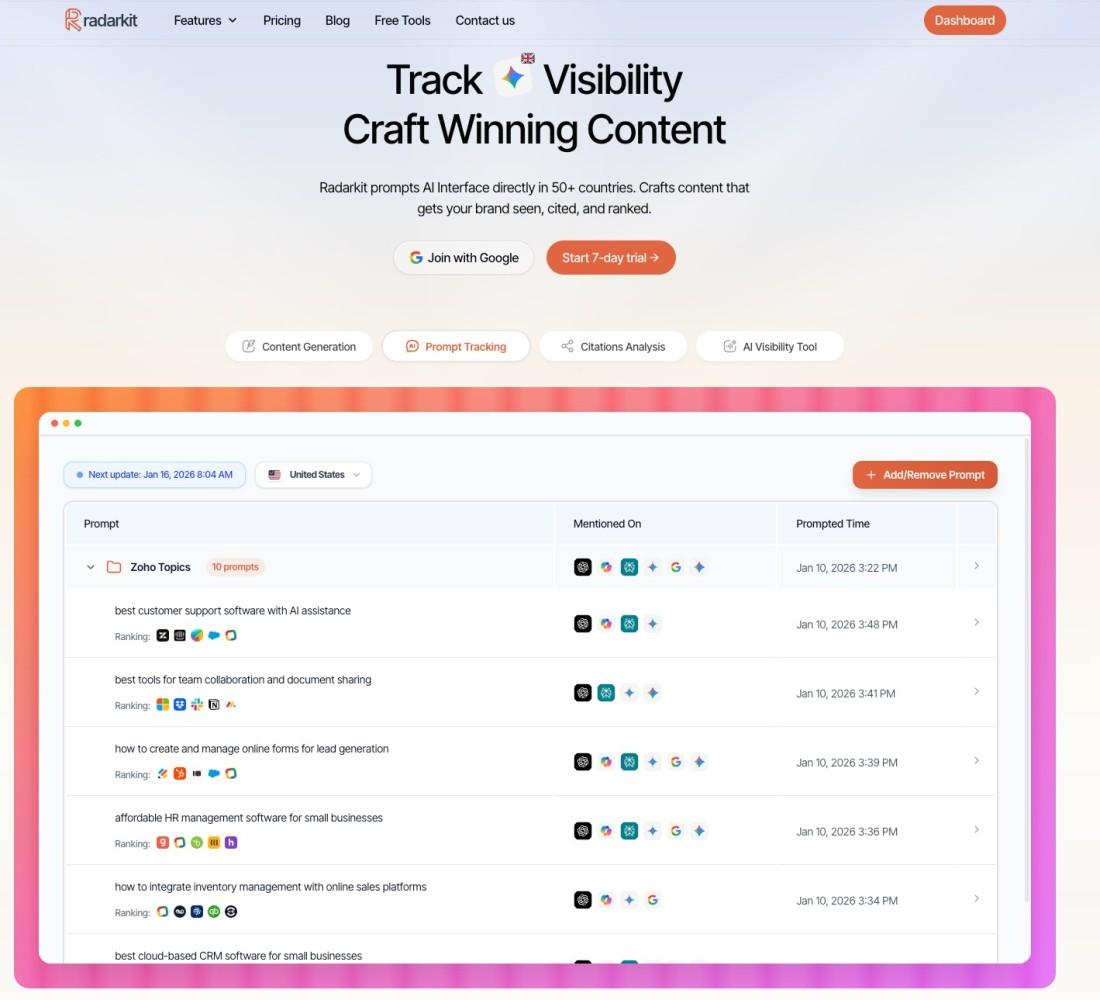
RadarKit monitors major AI surfaces, including ChatGPT, Gemini, Perplexity, Copilot, Google AI Mode, and Google AI Overviews. It runs prompts through residential IPs in selected cities, helping brands see the location-specific answers local shoppers are likely to receive.
Coverage and Starting Price
RadarKit’s standard plans include Local Radar coverage across 50+ countries. Enterprise extends coverage to 70+ locations and adds state- and city-level tracking, custom prompt tracking, unlimited projects, and API access.
| Plan | Starting Price | Best For |
|---|---|---|
| Lite | $29/month | Small brands testing AI visibility with 2 projects and 15 prompts |
| Growth | $79/month | Growing multi-location brands needing 5 projects and 50 prompts |
| Pro | $139/month | Larger brands tracking 10 projects and 100 prompts |
| Enterprise | Custom annual pricing | Franchises and multi-market brands needing 70+ locations and API access |
For a small multi-location retailer, the $29/month Lite plan is a practical entry point. It includes Local Radar, local business tracking, competitor monitoring, and coverage across 50+ countries, with a 7-day free trial available.
FAQs
What is a multi-location AI report?
A multi-location AI report measures how often AI assistants mention, recommend, and accurately describe each store location. It also compares locations, regions, competitors, and citation sources in one structured view.
Why should each location be reported separately?
AI answers can differ by city, neighborhood, language, and local sources. Reporting each location separately prevents a strong store from hiding weak performance at another location.
Which metrics matter most?
Focus on mention rate, citation rate, average position, accuracy errors, competitor share, and the third-party sources AI cites. These metrics show both visibility and the quality of the information AI uses about each store.
How many prompts should a multi-location report include?
Start with 5–10 core prompts per location, then expand to 15–30 once you know which customer questions matter most. Keep the same prompt structure across locations so the results remain comparable.
How often should the report be updated?
Run a full report monthly for the first three months, then quarterly once major listing, content, and review issues are resolved. Increase frequency during seasonal campaigns, new-store launches, or reputation problems.
Is AI recommending your brand?
Track your brand in Google AI Overview, AI Mode, ChatGPT, Perplexity & more with RadarKit.
No payment upfront. Cancel anytime.