How to Read Promptwatch AI Crawler Logs: 3 Checks
On this page
Promptwatch’s Crawler Logs show which AI bots visit your site, how often they come, which pages they fetch, and whether those requests succeed. Reading them well means looking beyond raw crawl counts: focus on crawler health, page-level pickup, and whether crawling connects to AI citations.
This guide follows a practical, checklist-style approach: turn AI-search data into short, repeatable workflows for auditing crawlability, finding content opportunities, and improving AI visibility.
How to Read Promptwatch AI Crawler Logs: 3 Checks
Check 1: Confirm the right AI crawlers can access your site
Start by checking whether the important AI crawlers are reaching your site at all. A healthy pattern is regular crawl activity from the bots relevant to your visibility goals—such as GPTBot, ClaudeBot, PerplexityBot, and Google’s AI crawlers—with mostly successful responses.
In the Overview tab, filter by crawler and status code. Mostly 200 responses indicate that the bot can fetch your content; a cluster of 403 responses often means a firewall, bot-fight rule, or CDN security setting is blocking it, while 404 spikes usually point to moved or deleted pages.
What to do:
- Review the Top Crawlers and crawl-trend data weekly.
- Filter for
403and500responses by crawler. - Compare the blocked bot’s user agent with your CDN or firewall rules.
- After changing a rule, use the 24-hour view to confirm the crawler returns successfully.
If a major AI crawler disappears from your logs, treat it as an AI-visibility risk: if the bot cannot read the page, it cannot use that page as a source in an answer.
Check 2: Identify which pages AI systems actually read
Crawl volume alone does not tell you much. The more useful question is: which pages are AI systems choosing to fetch, and are those the pages you want them to understand?
Open the Top Pages tab and sort by requests, first crawled, last crawled, success rate, or error rate. This shows your most-crawled paths and helps you see whether AI crawlers are focusing on pricing pages, documentation, service pages, blog posts, or product pages.
For new content, filter by the new section’s path and set the date range to begin on the publish date. The First Crawled value then gives you a practical measure of discovery time—how long it took an AI crawler to find the page.
A simple weekly review:
- Look at the top 10–20 crawled paths.
- Check whether they match your priority commercial or informational pages.
- Flag important pages with low or zero crawler activity.
- Check whether those pages have clear internal links, updated dates, descriptive titles, and useful source-worthy content.
- Export the table to CSV if you want to track changes over time.
This turns crawler logs into a content prioritization signal: pages that are repeatedly crawled are more likely to be part of the content AI systems can learn from and cite.
Check 3: Connect crawling to citations and visibility
The final check is to connect crawler activity to outcomes. Promptwatch correlates crawler logs with AI visibility and citation data, so you can see whether crawl activity precedes brand mentions or citations across AI platforms.
For example, if PerplexityBot starts crawling a new comparison guide and the page later appears in Perplexity answers, that is a positive signal. If the page is crawled frequently but never cited, review whether it directly answers the prompts your customers use, includes original data or expertise, and is structured so AI systems can extract the answer easily.
Promptwatch’s Visitor Analytics can also help connect the other side of the funnel: crawler logs show AI systems fetching a page, while visitor analytics shows whether an AI citation sends real people to your site.
Use this quick decision framework:
| Signal | Likely meaning | Action |
|---|---|---|
Frequent crawls, mostly 200s |
AI systems can access the page | Keep the page fresh and internally linked |
| No crawls on an important page | Poor discovery or low perceived importance | Improve internal linking, update content, and submit through available discovery channels |
Many 403s for one bot |
Likely firewall or bot-blocking issue | Review CDN/security rules |
Many 404s |
Broken or moved URLs | Fix redirects and update internal links |
| Crawls but no citations | Content is accessible but not answer-worthy | Strengthen expertise, specificity, sources, and prompt alignment |
Setup checklist
Before interpreting the logs, make sure your log source is connected. Promptwatch supports direct integrations for Cloudflare, Akamai, AWS CloudFront, Fastly, Google Cloud CDN, Netlify, and Vercel; other servers can use manual HTTP log forwarding.
- Create a project-specific API key in Settings → API Keys.
- Connect your CDN, hosting platform, or server log pipeline.
- Confirm crawler events appear in Analytics → Crawler Logs.
- Review crawler access, top pages, and citation correlation weekly.
Crawler log data is retained indefinitely from the day your integration begins sending data, although the dashboard view is limited to 90-day date ranges at a time.
Where Radarkit fits
Promptwatch is strong for understanding how AI crawlers interact with your website. Radarkit is useful when you want to understand how your brand appears in AI answers, especially across locations and local prompts.
Radarkit’s Local Radar runs prompts from city-level residential IPs so you can see which businesses AI recommends in a specific location, along with rank, ratings, and local competitors. The platform states that Local Radar tracks local business visibility across 50+ countries.
Radarkit monitors ChatGPT, Google AI Mode, Google AI Overviews, Microsoft Copilot, Gemini, and Perplexity through real chat interfaces rather than APIs.
Radarkit pricing
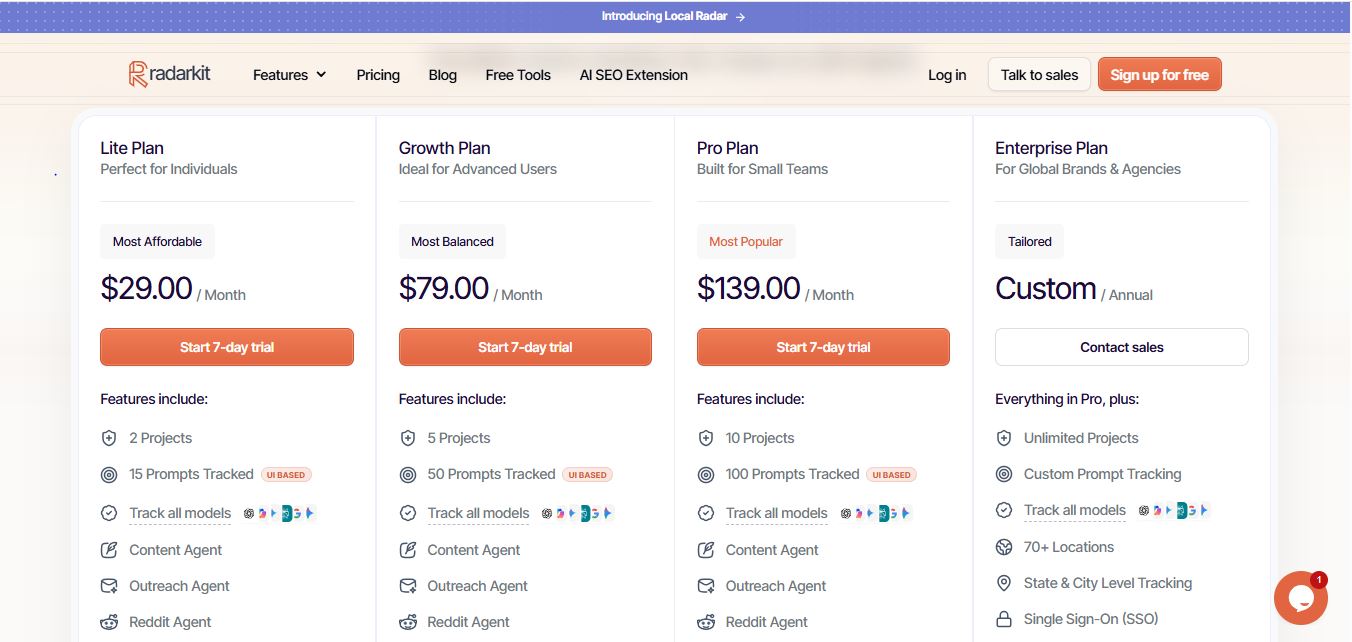
Radarkit’s starting price is $29 per month for the Lite plan, which includes 2 projects, 15 tracked prompts, AI traffic analytics, and 50+ locations. Higher plans include the Growth plan at $79 per month, Pro at $139 per month, and a custom Enterprise plan with 70+ locations and state- and city-level tracking.
Every paid plan includes a 7-day free trial, and subscriptions can be canceled at any time.
I personally use Radarkit for AI visibility and local AI tracking. Its starting price is $29/month, and its Local Radar covers 50+ countries, making it especially useful for businesses that need to monitor how AI recommends them in different cities and markets.
FAQs
What are Promptwatch AI crawler logs?
Promptwatch AI crawler logs are server-side HTTP request records showing when AI bots—such as GPTBot, ClaudeBot, PerplexityBot, and Google’s AI crawlers—visit your website. They include the crawler name, timestamp, requested page, response status, method, query string, and referrer.
Why do AI crawler logs matter for SEO?
They show whether AI systems can discover and read your content. If important pages are not crawled, AI platforms may have less opportunity to understand, retrieve, or cite them in answers.
What does a 403 status code mean in Promptwatch?
A 403 usually means the AI crawler was blocked by a firewall, bot-protection rule, CDN setting, or access restriction. Check your Cloudflare, WAF, or hosting security rules if you see repeated 403 responses for a specific bot.
What does a 404 status code mean in Promptwatch?
A 404 means the crawler requested a page that could not be found. This often happens after a URL change, deleted page, incorrect internal link, or missing redirect.
How often should I check Promptwatch crawler logs?
For most sites, review crawler logs weekly. Check more frequently after publishing important content, migrating pages, changing hosting, or updating firewall and CDN rules.
What is the difference between crawler logs and AI citations?
Crawler logs show when AI bots fetch pages from your site. Citations show when AI systems actually reference or link to your brand or pages in generated answers. Both matter: crawling is the access step, while citations are the visibility outcome.
Can I see which pages AI crawlers visit most?
Yes. Promptwatch’s Top Pages view shows request volume, first and last crawl dates, success rate, and error rate for each page path. This helps you identify which content AI systems prioritize.
Does Radarkit support local AI tracking in many countries?
Yes. Radarkit’s Local Radar supports local business visibility tracking across 50+ countries, allowing you to monitor AI recommendations in specific cities and markets.
Which tool should I use: Promptwatch or Radarkit?
Use Promptwatch when your priority is technical AI crawlability: whether AI bots can access your pages, which pages they fetch, and whether errors are blocking them. Use Radarkit when your priority is AI answer visibility, prompt tracking, citations, and local AI recommendations. Many teams benefit from using both.
Is AI recommending your brand?
Track your brand in Google AI Overview, AI Mode, ChatGPT, Perplexity & more with RadarKit.
No payment upfront. Cancel anytime.