How to Track Two Local Brands with Similar Names: A Practical Guide
On this page
Tracking two local brands with similar names means checking, answer by answer, whether AI assistants keep each business separate when customers ask about them. When similar names share a word or two, an assistant (Copilot, Gemini, Perplexity, ChatGPT or one of Google’s AI features) can swap phone numbers, merge reviews or recommend one company when a customer was looking for the other.
This guide walks through seven points you can repeat for any pair of businesses with similar names, whether you own one of them or manage both. It works for a salon and a spa, two law offices, a garage and a tire shop, or a bakery and a cafe. The goal is simple: set one clear test, collect real answers with their sources, compare the two brands fairly and pick your next move from what the evidence shows.
My own tool for this job is RadarKit, since its Local Radar view records every business an assistant recommends, along with its position, rating and review count, from residential IPs in 50+ countries. Plans start at $29 per month, and every self-serve tier opens with a 7-day free trial. More on that further down.
Why AI Answers Mix Up Brands With Similar Names
Assistants do not store a neat profile for each company. They read the question, run web searches, pull pages that match the words in the name and then write a reply. When two businesses with similar names show up in those search results, the reply has to decide which details belong to which company.
Shared Words, Different Businesses
Picture a home cleaning company called Bluebird Cleaning Co. and a dry cleaner across town called Blue Bird Cleaners. A human sees two different services right away, even with similar names on the signs. A language model sees the same two words, the same town and the word “cleaning” or “cleaners” in both. That overlap between similar names is enough to cause trouble in a short question.
How Assistants Pick Which One You Mean
Three things steer the choice: the words in the question, the pages pulled in at answer time and whatever the model learned about each name earlier. A detailed question (“deep house cleaning in Riverton”) gives strong clues. A short one (“Is Bluebird good?”) leaves the model guessing, and it often leans toward whichever name it has seen more often online.
What Counts as a Mix-Up in a Local Answer
Before you track anything, agree on what you are looking for. Every answer about two local brands with similar names falls into one of a few outcomes.
| Outcome | What it looks like in the reply | Why it matters |
|---|---|---|
| Correct | The right business, with its own phone, address and service | This is the result you want to grow |
| Swapped | Your name appears with the other company’s details | Customers call or visit the wrong place |
| Blended | Facts from both businesses merged into one description | Reviews, hours or services get muddled |
| Missing | Neither the right name nor a mix-up, just other businesses | You lose the recommendation completely |
| Both named, kept apart | Each brand listed with its own details | Fine, as long as the right one fits the question |
Keeping these five labels fixed is what turns a pile of screenshots about similar names into data you can compare.
The Walkthrough Setup: One Business, One Service, One Town, Fourteen Days
To keep this practical, the rest of the guide follows a single example. The names and town are made up for illustration, and the answers quoted below are samples of the kind of replies you will see, not results from a real study.
- Business you are tracking: Bluebird Cleaning Co., a home cleaning company
- Look-alike brand: Blue Bird Cleaners, a dry cleaner in the same town
- Service: deep house cleaning
- Location: Riverton, a mid-sized town
- Date range: 14 days, with every question asked on the same schedule
You can swap in any pair. A roofing firm and a gutter company, a family law office and a tax attorney, or two coffee shops with near-identical names all follow the same pattern.
How to Track Two Local Brands with Similar Names in 7 Points
The seven points below run in order. Each one produces something you need for the next, so skipping ahead usually means redoing work later.
1. Write an Identity Card for Each Look-Alike Brand
Start by writing down the facts that belong to only one business. Similar names hide the difference, but the details underneath rarely match. These become your answer key when you read replies later.
For each brand, record:
- Exact business name as it appears on the storefront and website
- Website domain
- Street address and service area
- Main phone number
- Google Business Profile category
- Core services, in plain words
- Founding year or owner name, if public
- Common misspellings and short forms customers use
For our pair, the cards might show that Bluebird Cleaning Co. lists “house cleaning service” as its category and has a phone number ending in 4410, while Blue Bird Cleaners lists “dry cleaner” and ends in 8823. Those two small facts are often all you need to tell which business a reply is really describing.
Keep the cards in a shared sheet. If you work for an agency, get the client to confirm every line, because one wrong digit here will throw off every later count.
2. Lock the Service, Town and Tracking Window
The second point is to fix the test conditions so results stay comparable. Change the town or the service halfway through and the numbers for your similar names stop meaning anything.
Pick one service that real customers ask about. For Bluebird, “deep house cleaning” is a high-intent service. Pick one location and put the town name inside each question, since self-serve tracking tools usually set location at country level. Then pick a window of at least two weeks, so you capture the normal day-to-day swing in answers.
Write these choices at the top of your sheet. When someone asks later why the numbers moved, you can point to a test that stayed the same from the first day to the last. For more on fixed starting points, read up on setting a local AI visibility baseline before you begin.
3. Build a Prompt Set That Tests the Name Clash
A good prompt set tests the confusion between similar names in three distinct ways. You want questions where only one name fits, questions where both could fit and questions where no name is given at all.
Questions That Use the Name Alone
These test whether the assistant knows who is who without any help:
- “What are Bluebird’s hours?”
- “Is Bluebird Cleaning any good?”
- “Blue Bird phone number”
Short questions like these are where similar names get swapped most, so they are the most useful early warning.
Questions That Pair the Name With Place and Service
These add context and show whether clues fix the problem:
- “Does Bluebird Cleaning Co. in Riverton offer deep house cleaning?”
- “Reviews for Bluebird house cleaning in Riverton”
If answers here come back clean while name-only questions fail, the confusion is mild and fixable.
Questions With No Brand Name at All
These show whether you get recommended when someone simply needs the service:
- “Best deep house cleaning service in Riverton”
- “Who can do a move-out clean in Riverton this week?”
The split between named and unnamed questions matters a lot here. This breakdown of branded vs unbranded local prompts explains why the two groups tell such different stories. Aim for 10 to 15 questions in total, split roughly evenly across the three groups.
4. Read Every Answer Against the Identity Cards
Now run each question in each assistant, on schedule, and read every reply next to your identity cards. Do not skim for the name. Check the details attached to it.
A Sample Reply That Swaps Details
Suppose you ask “What are Bluebird’s hours?” and get something like this: “Bluebird is open 7am to 6pm on weekdays and offers same-day shirt pressing. Call 555-8823.” The name looks right, but the services and phone number belong to the dry cleaner. That reply gets the Swapped label.
A Sample Reply That Keeps Things Apart
Ask “Does Bluebird Cleaning Co. in Riverton offer deep house cleaning?” and the reply might say: “Yes. Bluebird Cleaning Co. offers deep cleans, move-out cleans and recurring visits. Their number is 555-4410.” Every detail matches the right card, so this one is Correct.
Log each reply about both similar names with the date, assistant, question, label and a short note. The note matters later, because “phone swapped” and “reviews merged” point to different fixes.
5. Trace the Sources Behind Each Name
Labels tell you what went wrong with the similar names. Sources tell you why. For each reply, copy every page the assistant cited or linked into your sheet, then tag the business that page truly describes.
You will often find a pattern. A directory listing might file both businesses under one entry. An old local news story might mention “Bluebird” without saying which one. A review site might show the dry cleaner’s profile when someone searches for house cleaning.
Sort the sources into buckets: your website, the other brand’s website, directories, review sites, social accounts and local press. If one directory keeps appearing next to swapped replies, you have found a strong lead. There is a tidy collection method in this post on tracing cited pages in local searches.
6. Score Both Brands Side by Side
After 14 days, total up your log. A simple scorecard keeps the comparison honest and easy to share.
| Measure | Bluebird Cleaning Co. | Blue Bird Cleaners |
|---|---|---|
| Replies labeled Correct | count | count |
| Replies labeled Swapped | count | count |
| Replies labeled Blended | count | count |
| Unbranded questions where the brand was recommended | count | count |
| Average position when recommended | number | number |
| Sources that mix the two businesses | list | list |
Fill in your own counts for both similar names. Then look for the gap that matters most. A brand that wins on unbranded questions but gets swapped on short named questions has a very different problem from one that never gets recommended at all.
Break the numbers out by assistant too. It is common for one engine to keep businesses with similar names apart while another blends them, and that tells you where to focus first.
7. Pick the Next Fix From What the Evidence Shows
The last point is choosing one action, based on the pattern in your scorecard rather than a guess.
When the Assistant Swaps Details
Swaps usually trace back to a few sources that file both companies with similar names together. Fix those first: correct the directory listing, ask the site owner to split the entries and make sure your own pages spell out the complete business name, street address and phone number as plain text.
When the Reply Blends Both Businesses
Blending tends to happen when your identity is thin online. Strengthen your About page with a clear sentence such as “Bluebird Cleaning Co. is a home cleaning company in Riverton, founded in 2016.” Keep your Google Business Profile category exact. This list of Google Business Profile checks for AI search is a useful companion here.
When You Are Missing From Unbranded Answers
If the name confusion is under control but you rarely appear for “best deep house cleaning in Riverton,” the work shifts to visibility. Study which businesses do get named and why. The steps in finding competitors in local AI answers help you see who holds those spots.
Make one change, then rerun the same prompt set for both similar names over a fresh 14-day window. Comparing the two windows shows whether the fix worked.
Clearer Signals That Help Assistants Separate Two Names
Some habits help any business that shares similar names with a neighbor. None of them require naming the other company.
- One written form of your name everywhere: use the same spelling and spacing on your site, profiles and directories.
- Matching address and phone: keep them identical across every listing.
- A plain identity sentence: state what you do, where and since when, near the top of your homepage and About page.
- Organization or LocalBusiness markup: include your address, phone and sameAs links to your official profiles.
- A short note where helpful: “We have one location in Riverton” on a contact page clears up a lot of guesswork.
- Distinct service words: describe your services the same way each time so the category stays clear.
If you went through a name change in the past, older pages can add to the mix. This piece on following AI mentions once a business renames itself covers cleaning up those leftovers.
How Long Before a Fix Shows Up in Answers
Assistants refresh their view of similar names on their own timelines. A corrected directory page needs to be crawled again, and some engines search the live web more often than others. In practice, give each fix at least two full tracking windows before judging it.
Expect progress on similar names to be uneven. One engine might start keeping the brands apart within a couple of weeks while another takes longer. That is normal, and it is the main reason to keep the same questions running on a fixed schedule rather than checking by hand once in a while.
RadarKit for Separating Similar Brand Names in AI Answers
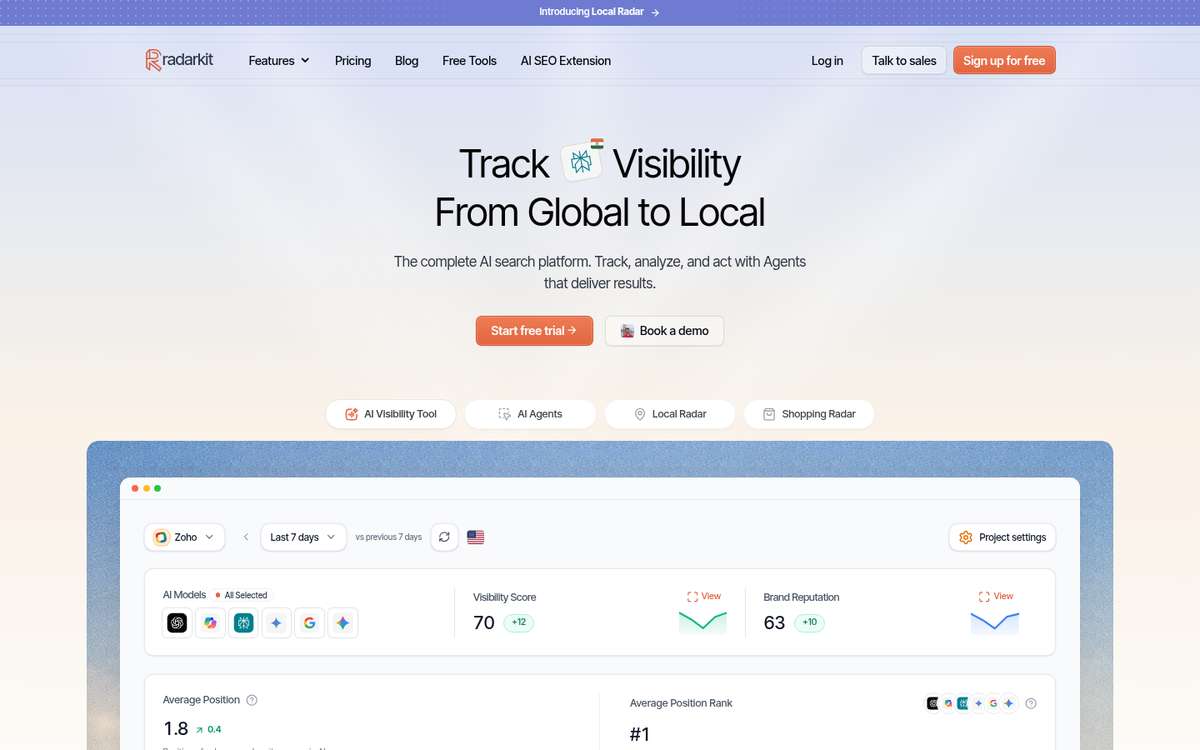
RadarKit is an AI search visibility platform built to record what assistants actually tell customers. It types your questions into the live chat windows of ChatGPT, Gemini and Perplexity, plus Microsoft Copilot and Google’s two answer surfaces (AI Mode and AI Overviews), and saves each reply next to the pages it drew from. For a pair of businesses with similar names, that saved trail is the raw material for every label and source check in this guide.
Local Radar and the Look-Alike Problem
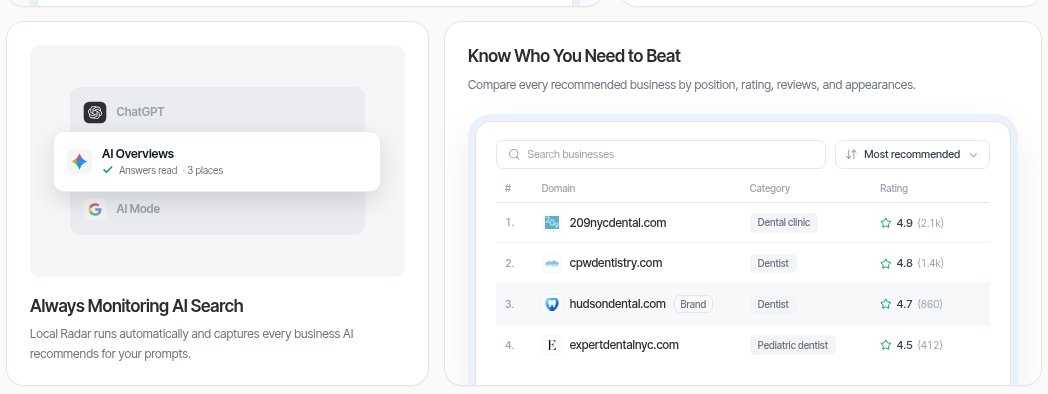
Local Radar answers three local questions at once: does an assistant recommend you, how high do you sit, and who else made the list. Each entry in that list also shows its business type, its stars and how many people have reviewed it, so a clash between similar names is easy to catch. If a dry cleaner turns up for a house cleaning question, the category column flags it straight away.
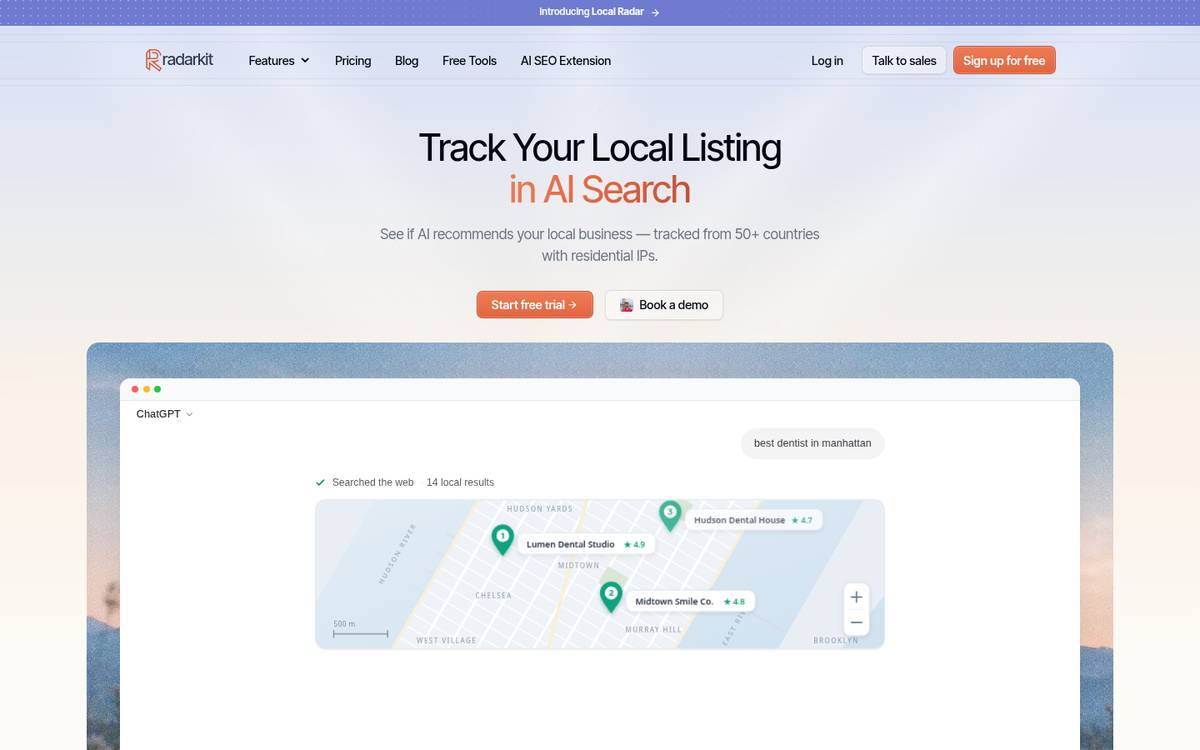
Its appearance rate ignores replies unrelated to the topic you asked about, which keeps the percentage honest. A platform filter lets you narrow results to Yelp, Google Business Profile and other listing sources. Lite, Growth and Pro collect answers through residential IPs spread over 50+ countries, while targeting a specific state or city is reserved for Enterprise. That is why point 2 suggests writing the town name into each question on the self-serve tiers.
RadarKit Key Features That Help With Name Clashes
- Aliases in project settings: park every misspelling, short form and nickname of both similar names here, next to your brand kit, timezone and team roles.
- Local Radar: shows your appearance rate and rank, then names each rival business with its category, stars and review total, filterable by listing site.
- Citation Data: splits the pages behind a reply into cited and merely read, notes whether each one carries a link to your site and shows which page formats assistants quote most often.
- Page Radar: pin a single URL, such as a directory profile that lumps two firms together, and watch which models cite it on which questions.
- Prompts and topics: keep name-only, name-plus-town and unbranded questions in their own topics, run them on a timer or test one instantly.
- Six assistants per run: ChatGPT and Gemini, Perplexity and Copilot, and both Google answer surfaces, queried through real chat windows from residential IPs in 50+ countries.
- Visibility Score: the percentage of tracked questions and models where you appear, plotted against the period before.
- Average Position: the slot you hold in each recommendation list, set beside other domains.
- Brand Reputation: a score showing how the tone of assistant descriptions about you shifts over the weeks.
- Sentiment: reads the tone of every mention (positive, mixed, negative) for each engine and in total, then gathers the descriptions that keep repeating.
- Competitors and Share of Voice: a ranked table of brands and domains sharing your answers, with voice share and typical position.
- Query Fanout: reveals the searches an engine quietly fired off before its answer, plus how often it bothers searching in the first place.
- Shopping Radar: for retail brands, logs which products, sellers, prices and star ratings fill the AI shopping carousel, and in which order.
- Ads Radar: the paid placements beside AI answers, down to advertiser, headline, copy, landing page and creative.
- Agent Analytics: a log of the AI crawlers that visit your website.
- Content Agent (Create Content): gathers what assistants already cite for a question, along with Google rankings, fanout lookups and the People Also Ask box, then produces a draft that sounds like you.
- Optimize Content: reshapes an existing article around the entities assistants already favor, ready to publish to WordPress.
- AI Traffic Analytics: connects to Google Analytics 4 with view-only rights, so visits sent by assistants sit beside your visibility trend.
- Plan Agent and Search Console: reads your Search Console queries next to RadarKit citation records, notices what is missing and builds a queue of jobs that the other agents then pick up.
- Outreach Agent: spots websites that write about rivals, prepares emails in your brand style and, once you say yes, sends and follows up from your Gmail account.
- Reddit Agent: surfaces the Reddit threads that assistants rely on and the ones where you never come up.
- Chat Agent: lets you quiz your own project data in everyday language.
- MCP server and REST API: pipe the same numbers into Claude, Cursor, Codex or ChatGPT.
- Reports and sharing: file exports of answers, sources and radar data, branded PDF reports, a live view-only Client Portal and shareable report links.
- Unlimited history: nothing gets deleted on any plan, and you can set one date window beside the window before it.
- Multiple projects: Lite allows two projects, Growth raises that to five, Pro to ten and Enterprise removes the limit, so an agency can give each similar-name client its own space.
- Free GEO tools: RadarKit’s free corner includes an LLMs.txt validator, a matching file builder and its own browser add-on for AI SEO checks, with no login required.
RadarKit Plans and What Each Costs
The pricing page lists four tiers. Local Radar and all six assistants come with every self-serve tier.
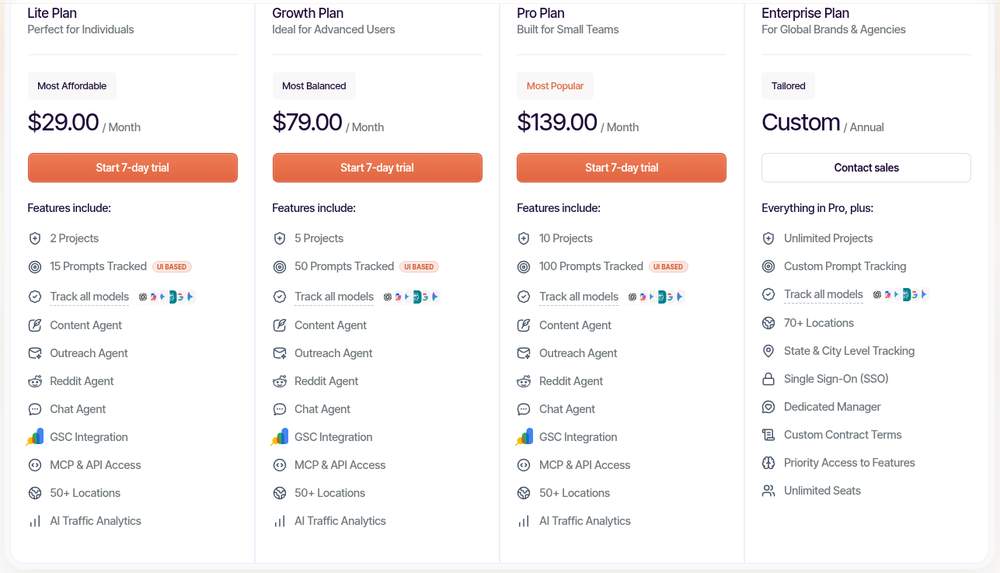
| Plan | Monthly cost | Projects | Questions tracked | How often answers refresh |
|---|---|---|---|---|
| Lite | $29 | 2 | 15 | Once every three days (72 hours) |
| Growth | $79 | 5 | 50 | Once a day |
| Pro | $139 | 10 | 100 | Once a day |
| Enterprise | Quoted per client, yearly contract | No limit | Set per contract | Daily or weekly |
You can try Lite, Growth or Pro free for 7 days without entering payment details first. Enterprise brings 70+ locations, tracking by state and city, single sign-on, unlimited seats and a named account manager.
Who Gets the Most From RadarKit on This Job
- Owners who share similar names with a neighbor: Lite comfortably handles a 10 to 15 question set for one town.
- Agencies that represent both businesses: Growth or Pro gives each brand a separate project plus daily refreshes.
- Chains and franchises: Enterprise suits teams that want each branch measured from its own city.
How I Run Name-Clash Checks in RadarKit
My routine is short. I add the client’s misspellings and short forms as aliases, add the look-alike as a competitor, load the three groups of questions as separate topics and let them run for two weeks. Then I open Local Radar to see which business won each question, and Citation Data to find the pages that keep mixing the names.
Slip-Ups That Blur Two Similar Brands in Your Data
- Counting similar names without the details: a mention is only a win if the phone, address and service match your card.
- Changing questions midway: even small wording changes break the comparison.
- Testing one assistant only: engines handle similar names very differently.
- Fixing three things at once: you will not know which change helped.
- Ignoring the other brand’s side: their mix-ups often point to the same shared source as yours.
Where to Go From Here With Two Similar Names
Tracking two local brands with similar names is mostly about discipline, not tools. Write an identity card for each one, lock the service, town and window, ask the same balanced set of questions and label every reply against the facts. Then let the sources show you where the confusion starts and fix one thing at a time.
Done this way, a fuzzy worry about similar names (“people keep calling the wrong Bluebird”) turns into a clear record you can act on and measure again.
FAQs About Tracking Brands With Similar Names
Why do AI assistants confuse local businesses with similar names?
Assistants match words in the question to pages on the web. When two businesses share words in their names and sit in the same town, the pages pulled in can describe either one, so details get swapped or blended.
How many questions should I track for two brands with similar names?
Ten to 15 is a good start: a few name-only questions, a few that add place and service, and a few with no brand name at all.
How long should the tracking window be?
At least 14 days. Shorter windows catch random swings rather than real patterns.
Can RadarKit track both brands with similar names at once?
Yes. Set the second business up as a tracked competitor carrying its own alias list, or open a dedicated project for each one. Project limits run from 2 on Lite up to 10 on Pro.
Does RadarKit show which sources caused a name mix-up?
Yes. Open Citation Data on any answer to see the cited and consulted pages, and you will quickly find the listings that keep pairing businesses with similar names.
Want to know if assistants keep your name straight?
RadarKit records every local answer and source, so look-alike mix-ups never hide in the noise. Nothing to pay at signup, and you can cancel whenever you like.
Is AI recommending your brand?
Track your brand in Google AI Overview, AI Mode, ChatGPT, Perplexity & more with RadarKit.
No payment upfront. Cancel anytime.