How to Run a Fair AI Visibility Tool Comparison: A Practical Guide
On this page
A fair AI visibility tool comparison puts every tool on your shortlist through the same test: one business, one service, one location, one prompt set and one date range. When those inputs stay fixed, any difference in the results comes from the tools themselves, not from how the test was set up.
That sounds obvious, but most trials skip it. One tool gets a few branded prompts in English, another gets a longer list from a different city, and the results land on different days. Then someone compares two dashboards and picks the one with the higher score. The higher score usually reflects the setup, not the product.
I use RadarKit for this kind of work because it records the answers people see in the real chat interfaces, along with the sources behind them, from 50+ countries. This guide is about the method, though. It explains how to run a fair AI visibility tool comparison in seven steps, using one illustrative business from start to finish, the exact checks to run, and how to turn the evidence into a next action.
What Is a Fair AI Visibility Tool Comparison?
An AI visibility tool tells you how often AI assistants mention, recommend or cite your business when customers ask questions. A comparison checks which tool gives you numbers you can trust and act on for your own situation.
The word “fair” carries the weight here. A fair test controls everything except the tool. It is the same idea as a taste test where every cup comes from the same pot: if the coffee tastes different, the cups were not the reason.
In practice, a fair test has four parts:
- A written decision and pass rules, agreed before any data comes in
- Fixed inputs that every tool shares
- Manual spot checks that compare each tool’s record with the real answer
- One scorecard that grades every tool the same way
Treat the whole exercise as measurement, not a guarantee of recommendations, rankings, leads or revenue. A good tool shows you what AI says. It does not control what AI says.
Why Two Tools Rarely Show the Same Numbers
Before you start, it helps to know why two honest tools can report different results for the same brand. None of these reasons means a tool is wrong. They simply mean the tools measured different things.
- Collection method: Some tools record answers from the consumer chat interface a customer uses. Others call a model through its API. The two routes can return different answers, which is why it pays to understand how API answers and browser answers differ before you trust a local report.
- Location: Local answers depend on where the question comes from. A run from a national data center can look nothing like a run from the city you serve.
- Refresh rate: A tool that rechecks prompts daily collects more answers than one that rechecks every few days, so its averages settle faster.
- Counting rules: One tool might count any mention. Another might count only a clear recommendation. A third might blend mentions, position and sentiment into one score.
- Natural variation: AI assistants write every reply fresh. The same question can name different businesses an hour later.
A fair test does not try to remove these differences. It makes them visible, so you can choose the tool whose method fits the way your customers search.
What You Need Before You Start
You do not need a data team for this. A small business owner or a marketing lead can run the whole thing with a few simple items:
- A shortlist of two or three tools, each with an active trial
- A shared spreadsheet for the test brief, prompt set, spot checks and scorecard
- About 20 to 30 minutes a day during the test window for spot checks
- One person who owns the decision at the end
Trials are often short. RadarKit gives you a free 7-day trial and asks for no card or payment to start, so a one-week window works well. Keep every tool on the same window, even if one trial allows more time.
The Example Business Behind Every Step
To keep each step concrete, this guide follows one made-up business. The details are illustrative, and the numbers later in the guide are examples of how to record and read results, not real data. The same method works for a cleaning service, a law office, a gym, a veterinary practice or a group of salons.
| Setting | Value in the example |
|---|---|
| Business | An auto glass repair company with three service areas (illustrative) |
| Service | Windshield replacement |
| Location | Denver, Colorado, with Aurora and Lakewood as secondary areas |
| Prompts | 12 unbranded customer questions |
| Engines | The six assistants every tool on the shortlist supports |
| Date range | 7 days, with the same start and end time for every tool |
| Shortlist | Two tools, called Tool A and Tool B in this guide |
Naming the tools as Tool A and Tool B is deliberate. The goal is to test the method, so the labels should not push the reader toward a favorite before the evidence is in.
How to Run a Fair AI Visibility Tool Comparison: 7 Steps
Here is the full process at a glance. Each step gets its own section below.
- Write the decision and the pass rules first
- Lock one business, service, location and date range
- Freeze one prompt set for every tool
- Match engines, locations and run times
- Spot check real answers and sources by hand
- Score every tool on the same scorecard
- Read the evidence and pick your next move
How to Run a Fair AI Visibility Tool Comparison: A Practical Guide
Step 1: Write the Decision and the Pass Rules First
Start with a one-page brief. Write down the single decision the test should support, such as “Which tool will we use to report monthly AI visibility for our three service areas?” A clear question stops the test from drifting into a general product tour.
Then write the pass rules. These are the conditions a tool must meet to stay in the running. For the auto glass example, the brief could say:
- At least 9 out of 10 spot checks match what the real answer showed
- Every recorded answer shows the full response text and the sources it cited
- Results can be filtered by engine and by location
- Data can be exported into the team’s monthly summary
- The plan that covers 12 prompts and daily refreshes fits the budget
Share the brief with everyone involved before the trials start. Rules written after the results arrive tend to favor whichever tool someone already liked.
Step 2: Lock One Business, Service, Location and Date Range
The direction for this step is simple. Pick a single business, a single service, a single market and a single date range, then leave all four untouched until the test ends.
For the example, that means the auto glass company, windshield replacement, Denver as the main market and a 7-day window. Aurora and Lakewood stay as secondary checks only. If you add a second service halfway through, or swap Denver for another city, the early results and the late results stop being comparable.
Record these settings in the brief:
- The exact business name and any common short versions customers use
- The service in plain words, the way a customer would say it
- The city, and the country and language settings each tool uses
- The start date, end date and time zone for the window
- Two to five local competitors you expect to see in answers
Brand name variants matter more than people think. If one tool knows the short version of your name and the other does not, the second tool will miss mentions and look weaker for a reason that has nothing to do with its quality.
Step 3: Freeze One Prompt Set for Every Tool
Your prompts are the measuring stick. Every tool must use the exact same wording, or the comparison falls apart.
Write questions a real customer would type, and focus on unbranded ones, since those show whether AI recommends you when nobody has named a business yet. The difference between branded and unbranded local prompts is worth reading if you are new to prompt sets. For the example, the set could include:
- “best windshield replacement in Denver”
- “who replaces cracked windshields near Aurora today”
- “mobile auto glass repair Lakewood CO reviews”
- “how much does windshield replacement cost in Denver”
- “is it worth repairing a chip or replacing the whole windshield in Denver”
Save the set as version 1, with the date, and lock it. If a prompt truly needs to change, create version 2 and start a new baseline. Never mix results from two versions.
A common temptation is to edit a prompt because one tool returned an odd answer. Leave it alone and note the concern in the log. An odd answer is still a result, and it often teaches you something about the engine.
Step 4: Match Engines, Locations and Run Times
Two tools can only be compared on what they both do. List the engines each tool supports and keep only the shared ones in the test. If one tool covers six assistants and another covers four, the fair test uses the four they share, and you note the extra coverage as a separate point on the scorecard.
Next, match the location. If a tool can run prompts from your country only, while another can run them from inside your city, record that difference. Local answers change with location, so a tool that cannot match your market will give you a different picture of local visibility.
Then match timing as closely as you can:
- Run each prompt on the same days in every tool
- Use the same time zone and roughly the same time of day
- Keep the refresh rate equal, or note it if one plan refreshes less often
- Turn off any feature that adds or rewrites prompts automatically during the test
Finally, ask each vendor how answers are collected. Write down whether the tool records the consumer chat interface or an API response, whether results come from a logged-out session, and how often runs repeat. If a detail is not published, write “not disclosed” rather than guessing.
Step 5: Spot Check Real Answers and Sources by Hand
This step is where the evidence in an AI visibility tool comparison comes from. The brief asks you to show the exact checks with real answers and sources, and that is what a spot check does.
Each day, pick three or four prompts at random. Ask each one yourself in a fresh, logged-out browser session on the engine being tested, from the target city if you can, close to the time the tools ran it. Then compare what you saw with what each tool recorded.
For every spot check, log these fields:
- Prompt, engine, city and the time you ran it
- The businesses named in the answer, in order
- Whether your business appeared, and in what position
- The sources the answer cited or linked
- What Tool A recorded for the same prompt and engine
- What Tool B recorded for the same prompt and engine
- Whether each tool’s record matches the live answer
What a Spot Check Log Looks Like
The table below shows the format with illustrative entries. Use your own real answers when you run the test.
| Prompt and engine | What the live answer showed | Sources cited | Tool A record | Tool B record |
|---|---|---|---|---|
| “best windshield replacement in Denver” on ChatGPT | Three local shops named; the example company second | A Yelp category page, a local news roundup, the company’s Google Business Profile | Match: same three shops, same order | Partial: company listed, sources missing |
| Same prompt on Perplexity | Four shops named; the example company absent | Two directory pages and a competitor’s service page | Match | Match |
| “mobile auto glass repair Lakewood CO reviews” on Google AI Overviews | Two shops named; the example company first | A review site and the company’s own reviews page | Match | No record for that day |
Exact matches are not always possible, since each run is a fresh answer. What you want to see is that the tool captured the same kind of answer: similar businesses, similar order, and the same sources. A tool that regularly shows a very different answer from the one you saw, or drops the sources, will be hard to act on later.
Sources deserve extra attention. The pages AI cites tell you why a competitor wins, and they shape your next move. This walkthrough on tracking down the pages AI cites in local answers goes deeper on that side.
Step 6: Score Every Tool on the Same Scorecard
Once the window closes, grade each tool on one sheet. Agree on the weights before you look at the totals. A simple version for the auto glass example:
| Criterion | What to check | Weight |
|---|---|---|
| Answer accuracy | Share of spot checks where the record matched the live answer | 30% |
| Source evidence | Full answer text and cited pages saved for every record | 20% |
| Local fit | Can it run from the market you serve, and filter by location | 15% |
| Competitor view | Names the rival businesses in each answer, with position | 10% |
| Reporting | Exports, history, shareable reports for your team or clients | 10% |
| Cost per answer | Monthly price divided by the answers collected for your prompt set | 15% |
Cost per answer is a useful number that most trials ignore. Divide the monthly plan price by the number of answers it collects for your prompts and engines. A cheaper plan that refreshes less often can cost more per answer than a pricier plan with daily runs.
For a fuller set of checks on how a tool collects and stores answers, the guide on checking an AI visibility tool’s data quality pairs well with this scorecard.
Step 7: Read the Evidence and Pick Your Next Move
The last step is to read the evidence and decide. The direction here is to compare results and choose the next action from what the test showed, not from a gut feeling or a sales call.
Read the Results in the Right Order
Start with the pass rules from Step 1. Any tool that failed one is out, no matter how good its dashboard looks. Then compare total scores for the tools that passed.
Next, look at the gaps behind the totals. In the illustrative example, say Tool A matched 24 of 26 spot checks and saved sources every time, while Tool B matched 17 of 26 and missed sources on several records. Tool B falls below the 9 in 10 pass rule, so it drops out even though its plan costs a little less. Tool A gives you evidence you can act on.
Look at the Visibility Picture Itself
A fair test does two jobs at once. Besides choosing a tool, it gives you a first honest read on your own visibility. In the example, the spot checks showed the company doing well in Lakewood but missing from several Denver answers, where directory pages and a local news roundup kept getting cited.
That turns into a short action list:
- Ask for listings on the directory pages AI keeps citing for Denver
- Build a stronger windshield replacement page for Denver with clear prices and service areas
- Encourage recent customers in Denver to leave detailed reviews
- Re-run the same prompt set in four weeks to see whether anything moved
Decide, Then Set the Baseline
Pick the tool, write one paragraph explaining why, and attach the scorecard. Then keep the same prompt set running in the chosen tool. The test window becomes your starting point, and this baseline guide for local AI visibility shows what to do with it next.
If no tool passed, that is still a useful outcome. It tells you to widen the shortlist or adjust the pass rules, rather than settling for numbers you cannot trust.
Common Mistakes That Make a Comparison Unfair
Most unfair tests come from small shortcuts rather than bad intent, and each one can tilt an AI visibility tool comparison toward the wrong tool. Watch for these:
- Different prompt lists per tool. Even one extra prompt changes the averages.
- Different windows. A tool tested over a holiday weekend sees different answers than one tested on weekdays.
- Judging from one screenshot. One answer is a snapshot. Look at rates across many runs.
- Ignoring location. A national run says little about a city-level business.
- Counting the dashboard, not the evidence. A clean chart without the answer text behind it cannot be checked.
- Changing rules mid-test. Adjusting the scorecard after seeing totals defeats the purpose.
- Skipping cost per answer. Monthly price alone hides how much data you actually get.
If you plan to compare tools across several cities later, comparing AI visibility across cities shows how to keep each market’s prompts consistent.
RadarKit for a Fair AI Visibility Tool Comparison
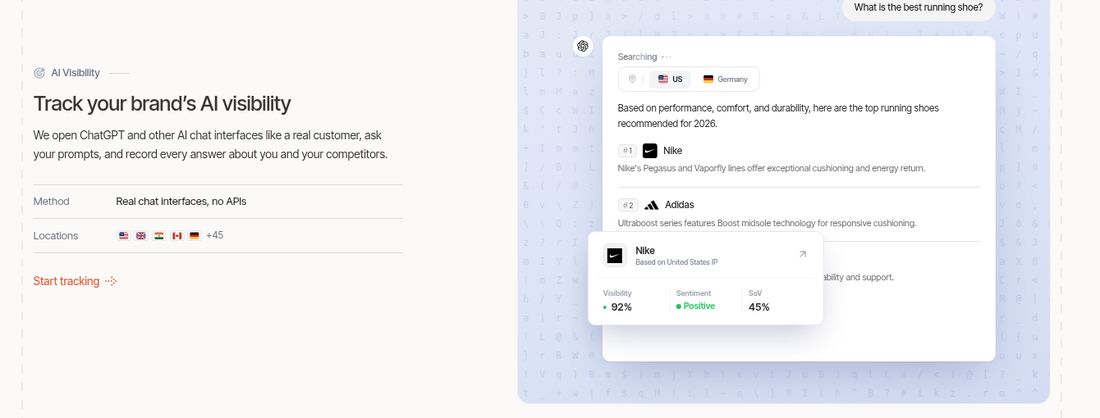
RadarKit is an AI visibility platform for brands, local businesses, online stores and agencies. It sends your prompts through the consumer versions of ChatGPT, Google AI Overviews, Perplexity, Gemini, Google AI Mode and Microsoft Copilot over residential IPs, and records every answer along with the businesses and sources it names.
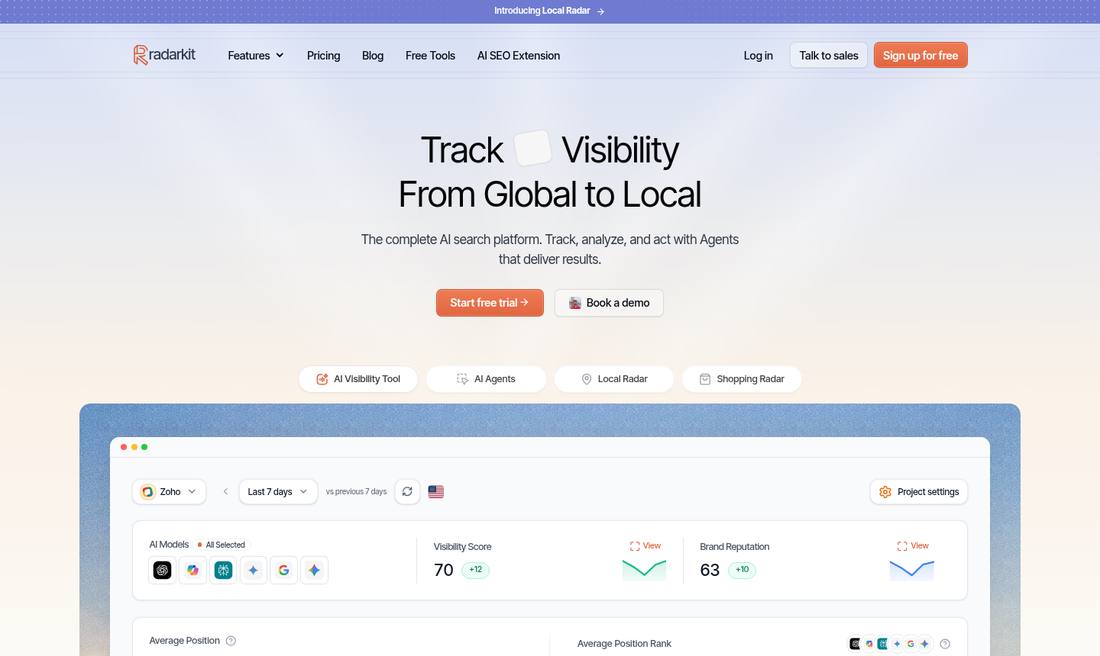
For a fair test, that collection method matters. Because RadarKit records what the consumer chat interface shows, its records are easy to line up against your own spot checks in Step 5. Each saved answer keeps the full text and the cited pages, which covers the source evidence part of the scorecard.
Here is how it maps to the steps in this guide:
- Step 2: One project per business, with country selection across 50+ locations on self-serve plans
- Step 3: Prompts grouped into topics, with the same wording kept run after run
- Step 4: All six assistants tracked on every plan, with a known refresh rate per plan
- Step 5: Full answer text, citations and competitor names saved for each run
- Step 6: Exports and full history for the scorecard and your report
- Step 7: Citation Data and Local Radar show which sources and rival businesses to act on
RadarKit Key Features
- Six assistants, real interfaces: RadarKit types your prompts into ChatGPT, Gemini, Google AI Overviews, Perplexity, Google AI Mode and Microsoft Copilot the way a person would, through residential IPs covering 50+ countries.
- Prompt library by topic: Customer questions sit in topic groups. They rerun on your plan’s schedule, and any single prompt can be rerun right away when you want a fresh read.
- Visibility Score: The percentage of tracked prompts and models where your brand shows up, plotted against the prior period so the direction is clear.
- Brand Reputation: Follows the tone and framing AI uses for your brand, so slow shifts in how it talks about you become easy to spot.
- Average Position: Your typical spot in the recommendation list whenever you are named, set beside the spots other domains hold.
- Sentiment view: Every mention is graded as positive, mixed or negative for the whole project and for each model, with a short list of the words engines repeat about you.
- Local Radar: For local searches it reports your appearance rate and position, then lists every competing business in the answer with its category, star rating and number of reviews. You can narrow results to one listing platform, for example Google Business Profile or Yelp, and see which prompts each business wins.
- Shopping Radar: Logs the product carousels AI shows, with product name, store, price, rating and placement, plus how often your items appear and which stores win most.
- Ads Radar: Stores each sponsored slot that appears with an AI reply. For every one you get the brand behind it, its headline, its supporting text, the page it sends people to, the visual, and a count of appearances.
- Citation Data: Splits cited pages from pages an engine merely read, marks the ones with a link to your site, and highlights which content formats earn citations.
- Page Radar: Watch any single URL, guest posts included, and learn which models cite it and for which questions it gets pulled in.
- Query Fanout: Reveals the searches a model fired off behind the scenes before writing, and how frequently each model searches.
- Competitors and Share of Voice: Every brand and domain sharing your answers lands in one leaderboard, scored by share of voice, typical placement and overall rank.
- Content Agent: Studies what engines cite for a prompt, what Google ranks, the fanout searches and related People Also Ask questions, and turns that into a draft written in your brand voice. Formats range from how-to posts and listicles to comparisons, alternatives pages, FAQs and first-person reviews.
- Content optimization: An older article can be reworked to cover the topics and fanout searches engines reward today, then edited and pushed live to WordPress.
- GA4 traffic view: Read-only Google Analytics 4 access places AI referral sessions beside your visibility numbers.
- Agent Analytics: Reports which AI bots are visiting your website, included on every plan.
- Plan Agent with Search Console: Linking Google Search Console works on every tier. From there the Plan Agent cross-reads those queries against your citation records, finds the gaps, and queues up jobs that the remaining agents can pick up.
- Outreach Agent: Finds websites citing rival brands, drafts emails in your brand style, sends them from your Gmail after your approval and handles follow-ups.
- Reddit Agent: Opens the Reddit threads that AI leans on in your category and points out discussions where your brand is absent.
- Chat Agent: Type a plain question, such as which prompts slipped this week, and get a reply drawn from your live project data.
- REST API and MCP server: Pull RadarKit data straight into ChatGPT, Claude, Cursor or Codex, on every plan.
- Reports and sharing: Download responses, sources, competitor lists, rankings, fanout searches and radar results whenever you need them. Branded PDF reports come with every paid tier (Lite gets 2 a month, Growth gets 10, Pro gets 20), and a live view-only Client Portal or read-only report link keeps clients up to date.
- Complete history: No plan deletes old data, and any date range can be set against the period before it.
- Several projects: Useful when you look after more than one location or brand. The project ceiling climbs from 2 (Lite) to 5 (Growth) to 10 (Pro), and Enterprise removes the ceiling entirely.
- Settings and seats: Keep a brand kit, name aliases for you and rivals, a timezone and team roles in one place. Growth includes 2 extra teammates, Pro includes 5, and Enterprise opens unlimited seats plus SSO login.
- Free GEO tools: Even without an account you can test or build an LLMs.txt file with the free validator and generator, or add the AI SEO extension to Chrome at no cost.
RadarKit Pricing
RadarKit sells three self-serve plans plus an Enterprise plan priced per account. Each one opens with a free 7-day trial that needs no upfront payment, and cancelling is possible at any point. Once billing starts, if the tool turns out to be the wrong fit, support refunds the full amount when you ask within 48 hours. Full details are on the RadarKit pricing page.
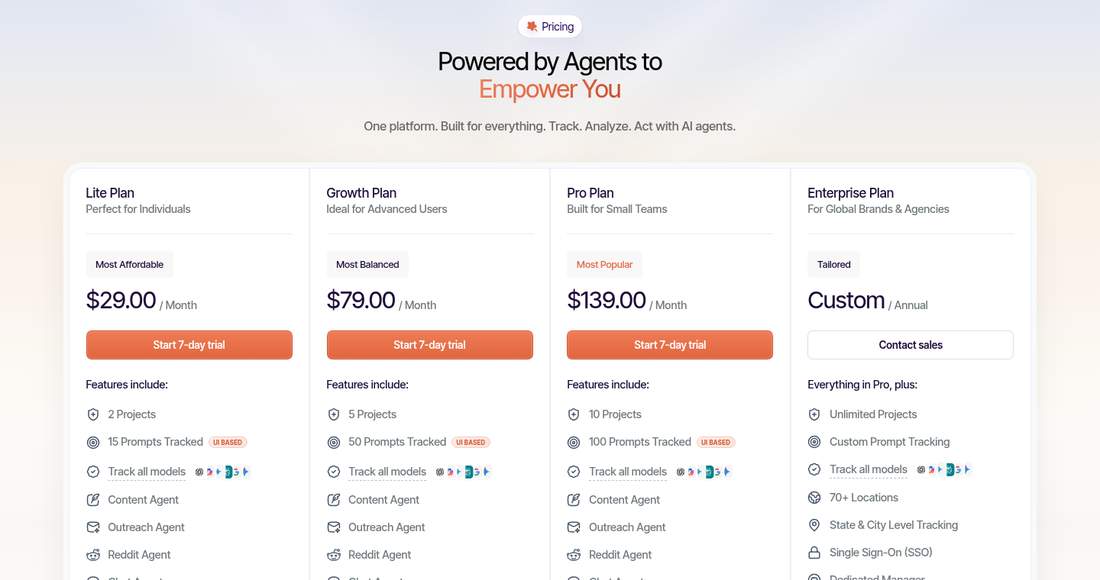
| RadarKit plan | Monthly cost | Tracked prompts | Rerun schedule | Answers analyzed monthly | Projects included |
|---|---|---|---|---|---|
| Lite | $29 | 15 | Once every 72 hours | 900 | 2 |
| Growth | $79 | 50 | Every day | 9,000 | 5 |
| Pro | $139 | 100 | Every day | 18,000 | 10 |
| Enterprise | Quoted on an annual contract | Set with sales | Your choice of daily or weekly | Set with sales | No cap |
A few extra details help with the cost per answer check in Step 6:
- Lite suits one location and a short prompt set. It includes 6 content articles, 10 agent action credits, 15 chat messages and 2 branded PDF reports each month.
- Growth adds daily refreshes, 19 content articles, 20 agent credits, 25 chat messages, 10 branded PDFs and 2 extra seats.
- Pro covers 100 prompts with 32 content articles, 40 agent credits, 50 chat messages, 20 branded PDFs, 5 extra seats and priority support.
- Enterprise is quoted per account and brings 70+ locations, tracking down to the state or city, SSO, unlimited seats, a dedicated account manager and contract terms shaped around you.
All plans track the same six assistants and include competitor monitoring, local business tracking, shopping and ads tracking, Agent Analytics, Search Console and Google Analytics connections, WordPress integration, the Client Portal, full history and MCP and API access.
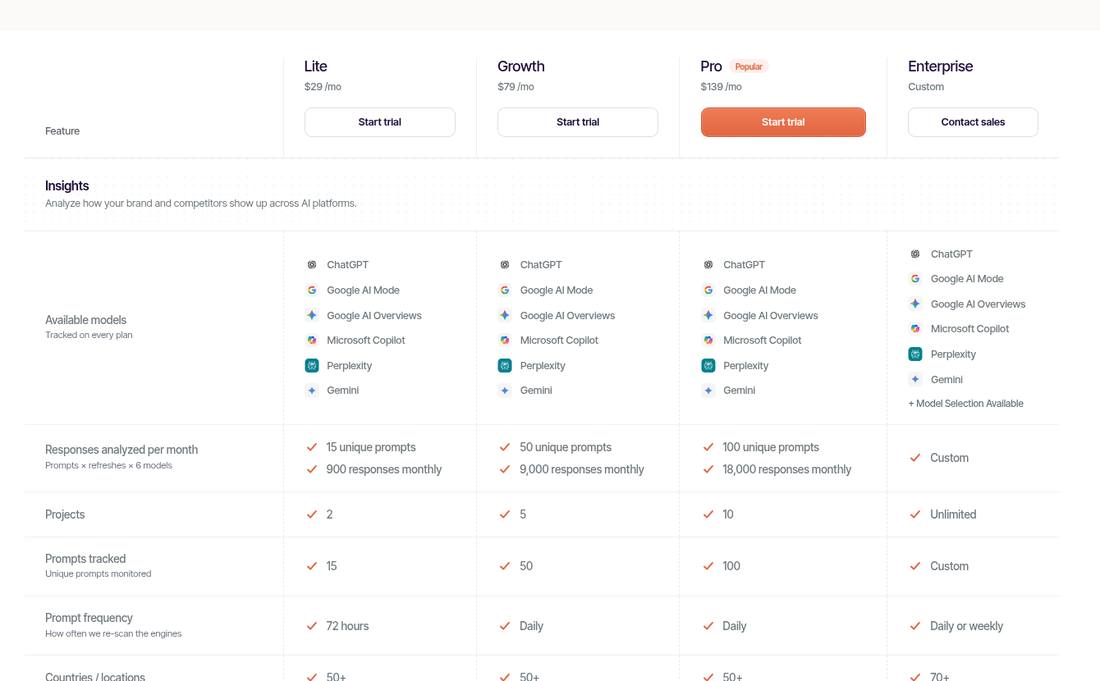
For the auto glass example, 12 prompts with daily runs points to Growth. Over a 7-day trial that plan collects up to 504 answers for the prompt set (12 prompts, 6 assistants, 7 days), which gives the spot checks plenty to line up against.
Best For
- Local and multi-location businesses that want to see what AI tells customers in their market
- Agencies that need source evidence and client-ready reports for each account
- Marketing leads who plan to run a fair test before committing to a yearly budget
- Teams that want visibility data, content tools and outreach in one place
Final Thoughts
A fair AI visibility tool comparison is less about the tools and more about discipline. Write the decision first, lock the business, service, location and date range, freeze the prompts, match the conditions, and check the real answers yourself. When every tool faces the same test, the scorecard does the arguing for you.
The best part is that the work does not go to waste. The prompt set, the spot check log and the sources you collected become the baseline for the tool you choose. If you are still shaping your shortlist, the checks before choosing a local AEO tool make a good starting point.
FAQs
How long should a fair AI visibility tool comparison run?
Seven days is a practical minimum for most local businesses, and it fits inside a typical free trial. Two weeks gives steadier averages if your trials allow it. What matters most is that every tool runs over the same window.
How many prompts do I need for a fair test?
Ten to fifteen unbranded customer questions work well for one service in one city. That is enough to see patterns without making daily spot checks a chore. Keep the same prompts in every tool.
Why do two AI visibility tools show different scores for my business?
They often collect answers in different ways, from different locations, at different refresh rates, and count mentions with different rules. A fair test keeps your inputs fixed so you can see which of those differences matter for your market.
Can I use RadarKit’s free trial to run this comparison?
Yes. RadarKit’s 7-day free trial needs no payment upfront, which matches a one-week test window. Choose the plan that covers your prompt count and refresh rate, so the trial reflects what you would actually pay for.
Does RadarKit show the sources behind each AI answer?
Yes. RadarKit saves the full answer text and the pages each engine cited for every run, and Citation Data shows which cited pages link back to your site. That makes it simple to line its records up against your own spot checks.
Is AI recommending your brand?
Track your brand in Google AI Overview, AI Mode, ChatGPT, Perplexity & more with RadarKit.
No payment upfront. Cancel anytime.