7 Checks Before Choosing a Local AEO Tool: A Practical Guide
On this page
A local AEO tool shows whether AI assistants recommend your business when someone nearby asks for a service you offer. Before you pay for one, run it through seven simple checks so the data matches how your customers really search.
Picture a roofing company in Denver. A homeowner asks ChatGPT, “Who is a good roofer near me for storm damage?” The answer names three companies. A good local AEO tool tells the roofer if they made that list and who else did.
What Is a Local AEO Tool?
AEO stands for answer engine optimization. It is the work of getting your business named in AI answers, not just ranked in blue links.
A local AEO tool asks AI assistants the questions your customers ask, such as “best hair salon in Phoenix” or “family lawyer near me.” It then records:
- Mention: Did your business appear in the answer?
- Position: Were you first, third or last?
- Competitors: Which other local businesses were named?
- Sources: Which pages did the answer cite?
Why the Right Local AEO Tool Matters
Many tools in this space were built for national brands. A plumber, salon or law firm needs a sharper answer: “Does AI recommend us when a customer in our town asks?” The right local AEO tool shows those real local answers.
7 Checks Before Choosing a Local AEO Tool
Score every tool on your shortlist with a yes, a no or a “partly” for each check.
Check 1: Does It Track the AI Engines Your Customers Use?
Your customers do not all use one assistant. Some ask ChatGPT, others see Google AI Overviews or Google AI Mode, and many use Gemini, Perplexity or Microsoft Copilot.
Look for a local AEO tool that covers all six, and check whether each engine is in the base price or sold as an add-on.
Check 2: Does It Read Real Answers From the Right Location?
The same question gets a different answer in Dallas than in Seattle. Ask each vendor two things:
- Where do the questions come from? Location settings or local IPs give you answers closer to what a nearby customer sees.
- Is it the real app or an API? Answers from the live chat screen often differ from answers pulled through a developer API.
Also check how precise the location is. Some plans cover a country, while city targeting sits on a higher tier.
Check 3: Does It Show the Local Businesses You Compete With?
When you compare each local AEO tool, remember that a brand score alone will not help a plumber. You need to see the other plumbers the answer named, in what order, and why.
The best local reports list each competing business with details such as rating, review count and the listing site it came from. My guide on finding competitors in local AI answers shows how to use that list.
Check 4: Does It Show Which Sources the Answer Cited?
AI answers lean on outside pages: Yelp, Google Business Profile, local news, directories, Reddit threads and your own site. The source is the thing you can improve.
Pick a local AEO tool that stores the cited pages for every answer, not just a domain count. For a step-by-step method, read how to find the pages cited for local searches.
Check 5: Does It Fit Your Prompts, Refresh Rate and History?
Prompts are the questions the tool tracks. Count what you need before you look at plans. A single-location HVAC company might need 15 to 30. An agency with ten clients will need far more.
Then check three limits:
- Prompt cap: How many questions does each plan track?
- Refresh rate: Daily, every few days or weekly?
- History: Can you compare this month with the last one?
Track unbranded questions, like “emergency electrician in Tampa,” not only your business name. If you need a starting point, set a local AI visibility baseline first.
Check 6: Does It Connect to Your Data and Help You Act?
Visibility data is more useful next to your traffic. A local AEO tool that links to Google Analytics 4 and Google Search Console lets you see whether more mentions bring more visits. My guide to measuring local AI referral traffic in GA4 covers the GA4 side.
Next, look past the charts. Some tools also help you write content, reach out to cited sites or build client reports.
Check 7: Does the Price Make Sense for One Location or Many?
Price per prompt matters more than the headline price. Divide the monthly cost by the number of prompts and engines you get.
Also look at the trial terms, the refund policy and how easy it is to cancel.
How to Test a Local AEO Tool in a Free Trial
A trial is short, so plan your local AEO tool test before you sign up:
- Write 15 to 20 local questions, most of them unbranded.
- Add two or three competitors you already know.
- Set your country, and your city if the plan allows it.
- Spot-check five answers by hand on day one.
- Check the cited sources and the competitor list.
- Export the data to see if reporting works for you.
3 Best Local AEO Tools
Here are three tools I would put on a local shortlist. RadarKit is the one I use every day, so it gets the most detail.
1. RadarKit
RadarKit asks your prompts in the live screens of ChatGPT, Perplexity, Gemini, Google AI Mode, Google AI Overviews and Microsoft Copilot, from residential IPs in 50+ countries. That means you see close to what a real customer sees.
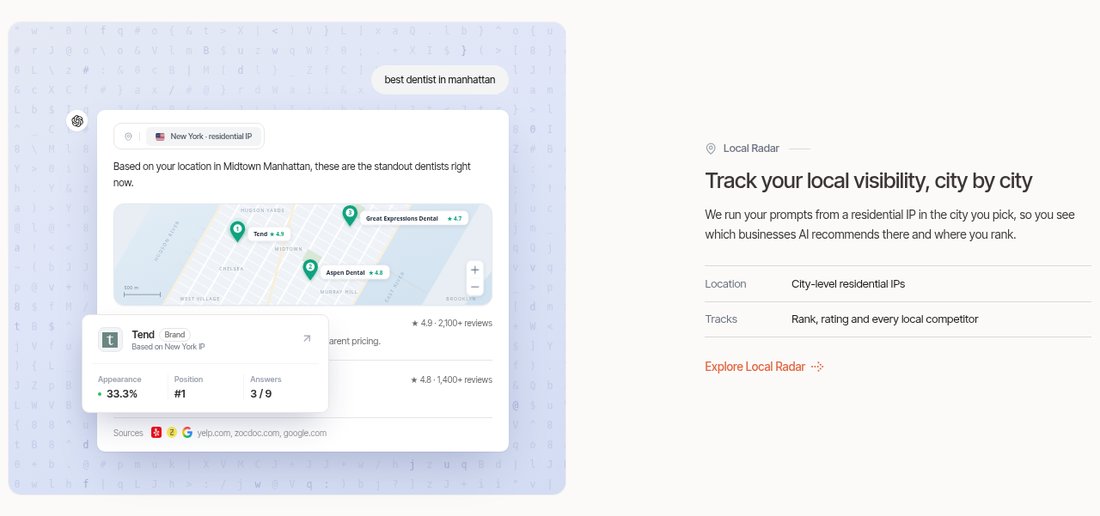
Its Local Radar view is built for service businesses. You can see if AI recommends you, how often you appear, where you rank, and every other business in the answer with its category, rating and review count. You can also narrow it to one listing source, like Google Business Profile or Yelp. My RadarKit Local Radar review walks through it in detail.
On the self-serve plans, location coverage works at the country level. State and city targeting comes with Enterprise.
RadarKit Key Features
- Six AI engines: Every plan checks ChatGPT, Perplexity, Gemini, Copilot, AI Mode and AI Overviews.
- Prompts and topics: Group customer questions by topic, let them run on a schedule, or run one on demand.
- Visibility Score: How often your tracked prompts and models name you, shown as a percent with a trend line.
- Brand Reputation: A score that follows how AI describes your business over time.
- Average Position: Your usual spot in AI recommendation lists, compared with other domains.
- Sentiment: Positive, mixed or negative tags per mention and per model, plus phrases that repeat often.
- Local Radar: Local recommendations, appearance rate, rank, and named rivals with ratings and reviews.
- Shopping Radar: Products, stores, prices, ratings and slots inside AI shopping carousels.
- Ads Radar: Ads that appear beside AI answers, with advertiser, headline, landing page and creative.
- Citation Data: Pages that answers cite or only read, which ones link to you, and top content formats.
- Page Radar: Watch one URL, such as a guest post, to see which models and prompts cite it.
- Query Fanout: The background web searches a model ran before it replied.
- Competitors and Share of Voice: Rival brands and domains with their share, average spot and rank.
- Create Content: The Content Agent drafts articles in your voice, built from cited pages, Google results and People Also Ask.
- Optimize Content: Reshape an older article so it covers the entities and fanout queries AI cites, then publish to WordPress.
- AI Traffic Analytics: A read-only GA4 link puts AI visits next to your visibility data.
- Plan Agent and Search Console: Connect Search Console, and the Plan Agent turns gaps into a task list.
- Outreach Agent: Finds sites that cite rivals, drafts emails and sends them from Gmail after you approve.
- Reddit Agent: Surfaces the Reddit threads AI cites where your business is missing.
- Chat Agent: Ask plain questions about your project and get answers from live data.
- API and MCP: Use your numbers inside Claude, ChatGPT, Codex or Cursor.
- Exports, PDFs and Client Portal: File exports, branded PDF reports and a view-only portal for clients.
- Full history: Keep every past result and compare any period with the one before.
- Projects: Run separate projects for each location or brand.
- Settings and seats: Brand kit, aliases, timezone, roles and extra team seats on higher plans.
- Free tools: Check or build an LLMs.txt file, and try the AI SEO Chrome extension, with no signup needed.
RadarKit Pricing
| Plan | Monthly cost | Projects | Tracked prompts | How often prompts rerun |
|---|---|---|---|---|
| Lite | $29 | 2 | 15 | Every 72 hours |
| Growth | $79 | 5 | 50 | Daily |
| Pro | $139 | 10 | 100 | Daily |
| Enterprise | Custom | Unlimited | Custom | Daily or weekly |
Every plan tracks all six engines and starts with a 7-day free trial with no payment upfront.
2. Peec AI
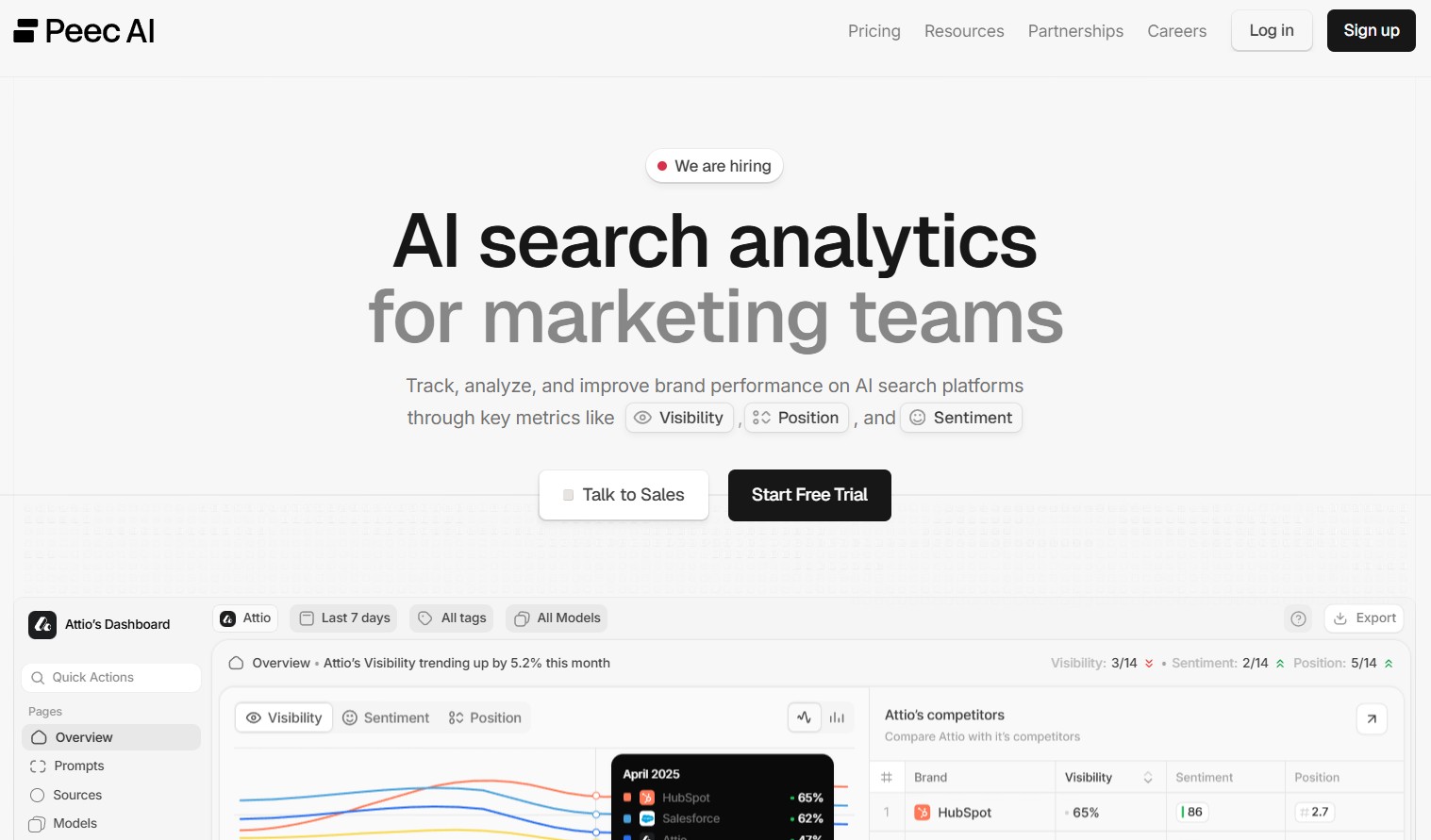
Peec AI is a clean AI search analytics platform that suits marketing teams and agencies.
- Key features: Visibility, position, sentiment and share of voice; source and citation analysis; gap analysis with recommended actions; a Local GEO feature; unlimited users on every plan.
- Engines: You choose three models per plan, such as ChatGPT, Perplexity, Gemini, AI Overviews or AI Mode. Extra models cost more.
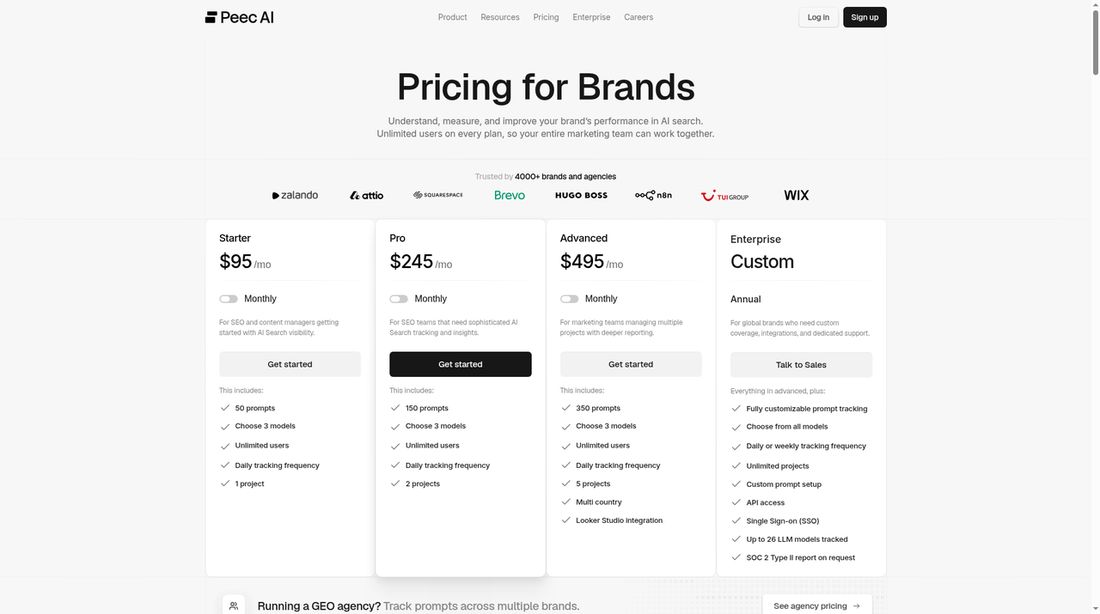
- Pricing: Starter is $95 per month (50 prompts, 1 project), Pro is $245 per month (150 prompts), and Advanced is $495 per month (350 prompts). Enterprise is custom, and annual billing saves 15%.
If you already use it, see how to choose local prompts in Peec AI.
3. Otterly.AI
Otterly.AI is a friendly, low-cost tracker with unlimited brands, countries and team members on every plan.
- Key features: Brand visibility and sentiment, citation source tracking, brand profiling, ChatGPT Ads tracking, prompt research and a GEO audit.
- Engines: ChatGPT, Google AI Overviews, Google AI Mode, Gemini, Perplexity, Copilot and Claude. Each engine uses credits.
- Pricing: Lite is €29 per month (16 prompts), Standard is €189 per month (120 prompts), and Premium is €489 per month (403 prompts). Enterprise is custom, and annual billing saves 15%.
Common Mistakes When Choosing a Local AEO Tool
- Tracking only your business name: Branded questions look great but hide the real gaps.
- Ignoring add-on costs: Extra engines or prompts can change the true price of a local AEO tool.
- Skipping the hand check: Always compare a few answers with what you see yourself.
- Expecting a guarantee: Tracking is measurement. It shows where you stand, not a promise of leads.
Final Thoughts
Choosing a local AEO tool comes down to seven questions: engines, real local answers, competitors, sources, prompt limits, data links and price. Score each tool, test it in a trial, and keep the one whose data matches what your customers see.
For most service businesses, I start with RadarKit because Local Radar shows exactly which businesses AI recommends in your market.
FAQ
What is the difference between a local AEO tool and a rank tracker?
A rank tracker shows your spot in Google results or the map pack. A local AEO tool shows whether AI assistants name your business in their answers.
How many prompts does a small service business need?
Most single-location businesses can start with 15 to 30 questions. Add more as you cover more services or areas.
Does RadarKit track city-level results?
The Lite, Growth and Pro plans cover 50+ countries. State and city targeting is part of the Enterprise plan.
How much does RadarKit cost?
RadarKit starts at $29 per month on Lite, with Growth at $79 and Pro at $139. Each plan includes a 7-day free trial.
Can I use a local AEO tool for more than one location?
Yes. Most tools let you split locations into projects or workspaces, so each area gets its own report.
Is AI recommending your brand?
Track your brand in Google AI Overview, AI Mode, ChatGPT, Perplexity and more with RadarKit.
No payment upfront. Cancel anytime.
About the author: I am Sanjay Singh (Jay), co-founder of Radarkit.ai, AI-search visibility software that helps businesses understand and improve how they appear in LLMs like ChatGPT, Perplexity, Gemini, Claude and Microsoft Copilot.
Is AI recommending your brand?
Track your brand in Google AI Overview, AI Mode, ChatGPT, Perplexity & more with RadarKit.
No payment upfront. Cancel anytime.