How to Find Competitors in Local AI Answers: 5 Steps (2026)
On this page
Finding competitors in local AI answers starts with one simple question: when customers ask AI for a business like yours, who gets recommended instead of you?
AI tools such as ChatGPT, Gemini, Perplexity, Google AI Mode, and Google AI Overviews increasingly answer local questions like “best dentist near me,” “top plumbing company in Chicago,” or “which real estate agency should I choose in Miami?” If your competitors appear in those answers and your business does not, you are losing visibility before customers even reach Google Maps or your website.
This guide explains how to find competitors in local AI answers in five practical steps, understand why they appear, and use those insights to improve your own local AI visibility.
Why Local AI Competitors Matter
Your local AI competitors are not always the businesses ranking above you in traditional Google search.
They are the businesses AI repeatedly recommends for prompts related to your services, city, neighborhood, or customer needs.
For example, if someone asks ChatGPT, “Who are the best dental clinics in Austin?” and the response includes five clinics, those businesses are your AI search competitors. Even if one of them ranks lower than you on Google, it can still win the customer if AI recommends it first.
Tracking these competitors helps you answer important questions:
- Which businesses does AI recommend for my services?
- How often do competitors appear compared with my business?
- Which locations and services do they dominate?
- What sources does AI use when recommending them?
- Where does my business have the biggest visibility gap?
Step 1: Build a List of Local Customer Prompts
Start by creating the questions real customers would ask when looking for a business like yours.
Use conversational prompts, not just short keywords. Customers often ask AI in full sentences, especially when they want a recommendation.
For a dental clinic in Austin, examples include:
- “Who are the best dentists in Austin?”
- “Which dental clinics near me offer teeth whitening?”
- “What is the best dental clinic for dental implants in Austin?”
- “Which dentists in Austin have the best patient reviews?”
- “Where can I find an affordable family dentist in Austin?”
For a plumbing business in Chicago, you might use:
- “Who are the best plumbers in Chicago?”
- “Which plumbing companies offer emergency repairs near me?”
- “What is the best plumbing service for water heater installation in Chicago?”
- “Which plumbers in Chicago have good reviews?”
Organize your prompts by service, location, and customer intent. Include general discovery questions, high-intent questions, comparison questions, and prompts that mention competitor names.
Do not track only branded searches. Unbranded prompts are more valuable because they show which businesses AI recommends to people who have never heard of you.
Step 2: Test Prompts Across AI Platforms
Once you have your prompt list, run it across the AI platforms your customers use.
Depending on your market, test prompts in:
- ChatGPT
- Google AI Overviews
- Google AI Mode
- Gemini
- Perplexity
- Microsoft Copilot
Ask the same question consistently and record every business mentioned in the response.
For each AI answer, note:
- Whether your business appears
- Which competitors are recommended
- The order in which businesses appear
- The services or locations mentioned
- Ratings, reviews, or pricing details included in the answer
- Websites, directories, review platforms, or publications cited
Location matters. AI may recommend different businesses for “best dentist in Austin” than for “best dentist near South Congress.” A business that appears in one neighborhood may be completely missing from another.
AI answers can also change between runs. Run important prompts more than once and look for repeated patterns rather than judging your visibility from a single response.
Step 3: Identify the Competitors AI Recommends Most
After collecting results, create a competitor list based on how often each business appears.
A simple tracking sheet can include:
| Competitor | Appearances | Common prompts | Average position | Services mentioned |
|---|---|---|---|---|
| Competitor A | 14 | Best dentist, implants, reviews | 1.8 | Implants, whitening |
| Competitor B | 11 | Family dentist, affordable care | 2.4 | Family dentistry |
| Your business | 6 | Implants, orthodontics | 3.1 | Implants, orthodontics |
The competitors that appear most often are your primary AI search competitors.
Pay special attention to businesses that appear when your business does not. These are your biggest visibility gaps.
Also look for patterns:
- Does one competitor dominate general “best” prompts?
- Does another appear mainly for emergency services?
- Do certain competitors only appear in specific neighborhoods?
- Are competitors recommended more often for one service than another?
These patterns show you exactly where to focus your improvement efforts.
Step 4: Analyze Why Competitors Appear
Finding competitors is only useful if you understand why AI recommends them.
Review the answers and look for common signals, such as:
- Strong customer reviews and high ratings
- Clear descriptions of services
- Accurate business information
- Strong local directory listings
- Mentions in local news sites, blogs, or industry publications
- Well-structured service pages
- Consistent name, address, phone number, and service-area details
Citation analysis is especially important. If AI repeatedly cites a local directory, review site, comparison page, or local publication when recommending a competitor, review that source.
Ask:
- Is my business listed on that website?
- Is my information accurate and complete?
- Does the page answer questions customers ask?
- Can I earn a credible mention or improve my existing listing?
A citation does not automatically prove that a website caused the recommendation. However, repeated citation patterns can reveal practical places to strengthen your business’s online presence.
Step 5: Close Gaps and Track Changes Over Time
Use your findings to improve your chances of appearing in future AI answers.
Start with the fundamentals:
- Keep your business name, address, phone number, hours, and service areas consistent across major platforms.
- Create clear service pages that explain what you offer and where you serve customers.
- Add helpful FAQs based on the questions customers ask AI.
- Encourage genuine customer reviews and respond professionally.
- Pursue relevant mentions from trusted local directories, publications, and industry websites.
- Improve the pages and sources AI frequently cites for your service category.
Then rerun your prompts regularly.
Compare new results with your original baseline and track:
- Competitor appearances
- Your appearance rate
- Your average recommendation position
- Cited sources
- Visibility by service and location
AI answers fluctuate, so focus on repeated trends over time instead of reacting to one changed result.
Use RadarKit to Find Local AI Competitors Faster
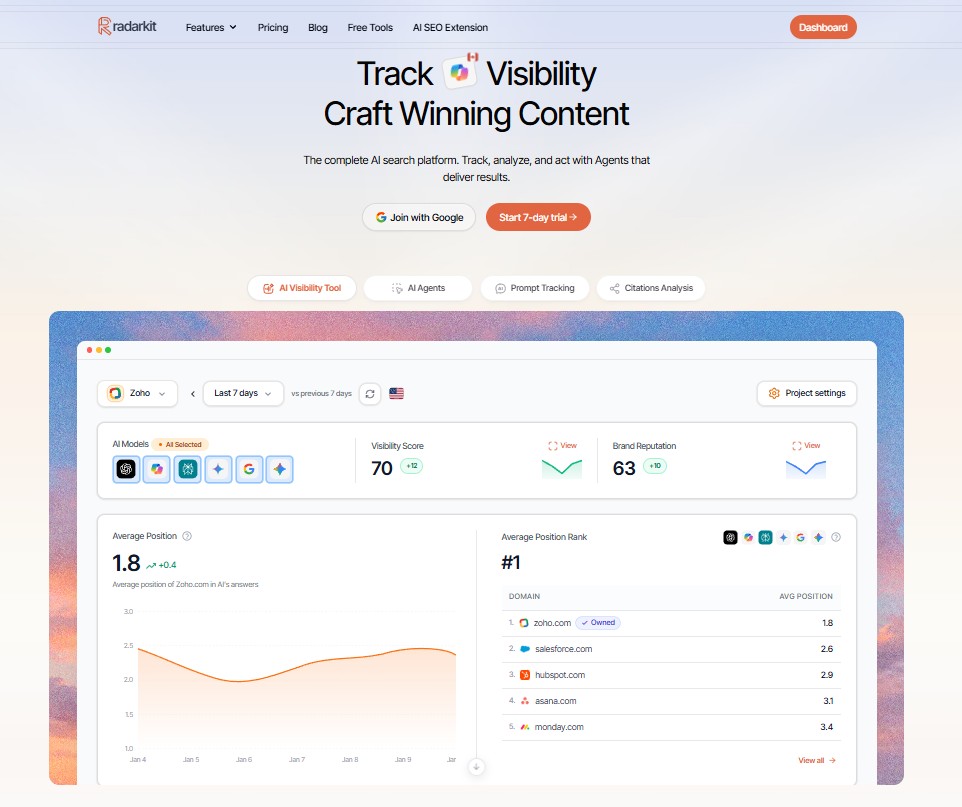
Manually checking prompts across several AI platforms, cities, and competitors becomes difficult very quickly. RadarKit.ai makes the process more structured by tracking AI visibility, local recommendations, competitor appearances, and citation sources in one place.
RadarKit’s Local Radar shows which businesses AI recommends for local prompts, where they appear in captured answers, and which competitors are recommended instead. It supports local AI visibility tracking across 50+ countries using residential IPs associated with the selected location.
With RadarKit, you can:
- Track local AI recommendations by city, neighborhood, or service area
- See which competitors appear most often in AI answers
- Compare your visibility with competitors across prompts and locations
- Review the sources and citations connected to AI recommendations
- Monitor changes in visibility over time
RadarKit tracks major AI platforms, including ChatGPT, Gemini, Perplexity, Microsoft Copilot, Google AI Mode, and Google AI Overviews. Its Lite plan starts at $29 per month and includes 2 projects, 15 tracked prompts, AI traffic analytics, and local tracking across 50+ locations. Higher plans offer more projects, prompts, and tracking frequency.
For local businesses and agencies, RadarKit is a practical choice because it turns scattered AI answers into clear competitor insights. It helps you see not only who AI recommends, but also where your business has the best opportunity to appear.
No tool can guarantee AI recommendations or rankings. But RadarKit gives you the data you need to find competitor gaps, improve your local presence, and measure whether your efforts are working.
Final Thoughts
To find competitors in local AI answers, start with the prompts your customers actually use, test them across major AI platforms, and record every business AI recommends.
Then identify the competitors that appear most often, analyze the sources and signals behind their visibility, and improve your own business information, content, reviews, and local mentions.
The businesses that win in AI search are usually the ones that are easy for AI to understand, verify, and trust. Track your local AI competitors consistently, close the gaps you find, and use a tool like RadarKit to make the process repeatable.
Is AI recommending your brand?
Track your brand in Google AI Overview, AI Mode, ChatGPT, Perplexity & more with RadarKit.
No payment upfront. Cancel anytime.