5 Local Prompts for Hotel AI Tracking
On this page
If your hotel does not appear in these AI-generated recommendations, potential guests may choose a competitor instead.
The solution is to track the local prompts travelers actually use. This guide explains five practical prompt types, how to measure your hotel’s AI visibility, and how RadarKit can help you monitor local recommendations across different markets.
Why Local Prompts Matter for Hotel AI Tracking
Hotel AI visibility measures how often AI assistants mention, recommend, or rank your property when travelers ask relevant questions.
Traditional SEO helps your hotel appear in search engine results. AI visibility tracking helps you understand whether your property is included in conversational recommendations, which competitors appear alongside it, and which websites AI systems cite.
For example, a traveler in New York might ask:
- “Best hotels in Miami near the beach.”
- “Affordable hotels in Chicago with free parking.”
- “Best family-friendly hotels in Orlando.”
- “Hotels near Los Angeles International Airport with airport shuttle service.”
- “Best luxury hotels in Manhattan for a weekend getaway.”
The answers can vary across AI platforms and locations. Tracking the right prompts gives you a repeatable way to measure your visibility and identify opportunities to improve it.
5 Local Prompts for Hotel AI Tracking
1. “Best Hotels in [City]”
This is one of the most important prompt categories for hotels because it targets travelers who are comparing accommodation options in a destination.
Examples:
- “Best hotels in Miami.”
- “Best boutique hotels in New York City.”
- “Best luxury hotels in Chicago.”
- “Best hotels in Los Angeles.”
- “Best beachfront hotels in San Diego.”
What to track:
- Whether your hotel appears in the AI-generated recommendations.
- Whether it appears among the first three suggestions.
- Which competing hotels receive recommendations instead.
- Which travel websites, booking platforms, and local guides are cited.
If your competitors appear consistently but your property does not, investigate the sources supporting their recommendations. Your hotel may need more complete online information, stronger third-party coverage, or clearer content about its location and amenities.
2. “Best Hotels in [Neighborhood]”
Citywide visibility does not always translate into visibility within the neighborhood where your hotel operates.
Travelers often prefer accommodation close to attractions, shopping districts, business centers, or entertainment venues.
Examples:
- “Best hotels in Times Square, New York.”
- “Best hotels in South Beach, Miami.”
- “Best hotels in Downtown Chicago.”
- “Best hotels near Hollywood Boulevard, Los Angeles.”
- “Best hotels in the Gaslamp Quarter, San Diego.”
This prompt category is especially useful for hotels that depend on location-based demand.
Track whether AI assistants recommend your property for the specific neighborhoods you serve. A hotel may appear for a general city search but remain absent from recommendations for a nearby attraction or business district.
Make your hotel’s location easy to understand on your website. Include nearby landmarks, estimated travel distances, transportation options, and accurate address information. Keep the same details across your Google Business Profile and booking platforms.
3. “Best Hotels Near [Landmark or Airport]”
Many travelers choose accommodation based on proximity to a particular destination. These searches can reveal whether AI assistants understand your hotel’s location and practical advantages.
Examples:
- “Best hotels near Miami International Airport.”
- “Best hotels near Central Park in New York.”
- “Best hotels near the Las Vegas Convention Center.”
- “Best hotels near Disneyland in Anaheim.”
- “Best hotels near the Hollywood Walk of Fame.”
What to track:
- Whether your hotel is recommended for the relevant landmark.
- Which competitors appear closest to the requested location.
- Whether AI answers describe your location accurately.
- Which sources support distance, transportation, and amenity claims.
If your property is frequently missing from these answers, create helpful location-specific content on your website. Explain how guests can reach major attractions and clearly state whether you offer airport transfers, parking, or shuttle services.
Only publish amenities and distances that you can verify. Incorrect information can mislead potential guests and damage trust.
4. “Best Hotels for [Guest Type or Occasion] in [City]”
Travelers often choose hotels based on the purpose of their trip rather than price or location alone.
A family may need adjoining rooms and a swimming pool, while a business traveler may prioritize meeting facilities, reliable Wi-Fi, and proximity to an office district.
Examples:
- “Best family-friendly hotels in Orlando.”
- “Best romantic hotels in Miami for couples.”
- “Best business hotels in Chicago near downtown.”
- “Best pet-friendly hotels in Austin.”
- “Best hotels in New York for a weekend getaway.”
This prompt category helps you determine whether AI assistants understand your property’s unique selling points.
For example, if you offer family rooms, children’s activities, or accessible facilities, make those details clear on your website and relevant booking profiles. If you target business travelers, publish accurate information about meeting rooms, workspaces, connectivity, and transport links.
Track which guest types generate recommendations for your property and where competitors have stronger visibility.
5. “Best Affordable or Luxury Hotels in [City] With [Amenity]”
Travelers frequently combine their budget with a specific requirement. These prompts can reveal whether AI assistants understand your hotel’s price positioning and facilities.
Examples:
- “Best affordable hotels in Miami with free parking.”
- “Best luxury hotels in New York with rooftop pools.”
- “Best hotels in Chicago with complimentary breakfast.”
- “Best hotels in Los Angeles with airport shuttle service.”
- “Best hotels in San Diego with ocean views.”
What to track:
- Whether your hotel appears for relevant price and amenity combinations.
- Whether AI accurately describes your facilities and policies.
- Which competing hotels receive stronger recommendations.
- Whether the answer cites your website, booking profiles, or independent travel publications.
Make your pricing information, room descriptions, cancellation policies, and amenities easy to find. Create dedicated website sections for important services instead of hiding essential details inside image galleries or PDFs.
Also check whether your booking-platform listings match your website. Inconsistent information can make it harder for travelers to understand what your hotel actually offers.
Bonus: Reputation and Competitor Prompts
After tracking the five main prompt categories, expand your research with questions such as:
- “Is [Hotel Name] worth staying at?”
- “What do guests like and dislike about [Hotel Name]?”
- “How does [Hotel Name] compare with [Competitor Hotel]?”
- “Which hotels in Miami have the best guest reviews?”
- “Why do travelers choose [Competitor Hotel] over other hotels nearby?”
These prompts help you investigate reputation, recurring guest concerns, competitor strengths, and the sources influencing AI-generated recommendations.
Use the findings to improve the guest experience, respond professionally to feedback, correct inaccurate information, and earn legitimate coverage from relevant travel publications.
Using RadarKit to Track Hotel AI Visibility
Manually testing prompts is useful when you manage one hotel, but it becomes difficult to compare results consistently across multiple locations and AI platforms.
RadarKit is an AI search visibility and Generative Engine Optimization (GEO) platform that helps businesses monitor how they appear in AI-generated answers.
It tracks supported AI experiences, including ChatGPT, Gemini, Perplexity, Google AI Overviews, Google AI Mode, and Microsoft Copilot.
How RadarKit’s Local Radar Helps Hotels
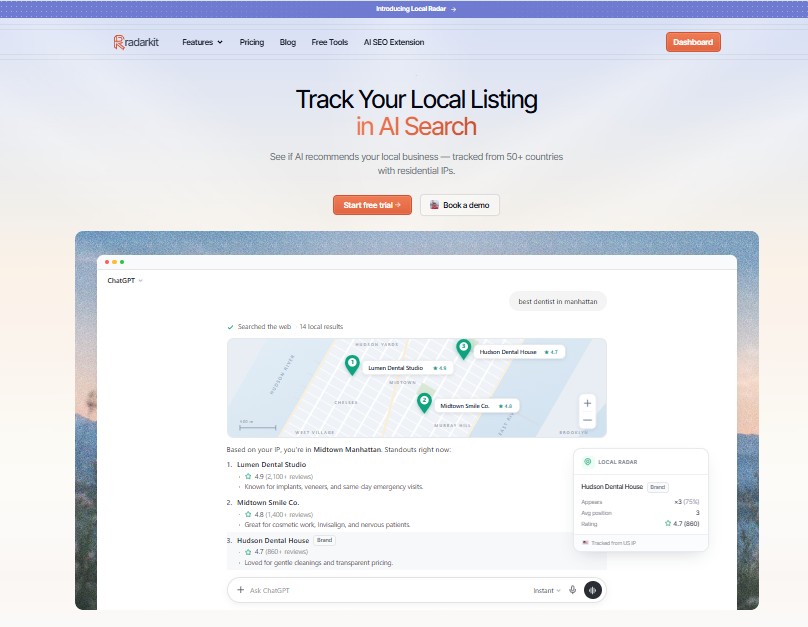
RadarKit’s Local Radar is particularly relevant to hotels that want to understand location-specific AI recommendations.
It uses residential IP-based location tracking to help businesses investigate which properties AI assistants recommend in different geographic markets.
With Local Radar, hotels can monitor:
- Appearance rate: How often the hotel appears in relevant tracked AI answers.
- Average position: Where the hotel appears when it is recommended.
- Competitor visibility: Which competing hotels appear instead or rank higher.
- Ratings and reviews: The review information displayed alongside local recommendations.
- Citation sources: Which websites support or influence the recommendations.
- Geographic differences: How recommendations vary across supported locations and prompt types.
Local Radar Coverage Across 50+ Countries
RadarKit provides Local Radar coverage across 50+ countries on its standard plans, helping hotels investigate how AI recommendations differ across international markets. Enterprise plans list coverage across 70+ locations and offer state- and city-level tracking.
For example, a hotel in Miami could investigate how recommendations differ when travelers search from different supported markets, such as the United States, the United Kingdom, Germany, or India.
This is useful for hotel groups, destination marketers, and hospitality agencies targeting international visitors.
Keep in mind that geographic tracking measures the responses observed under the selected testing conditions. It does not guarantee that every traveler in a market will receive identical recommendations.
RadarKit Pricing
RadarKit’s entry-level Lite plan starts at $29 per month and includes two projects, 15 tracked prompts, tracking across 50+ locations, AI traffic analytics, and API/MCP access.
| Plan | Starting price | Best suited for |
|---|---|---|
| Lite | $29/month | A single hotel beginning AI visibility tracking |
| Growth | $79/month | Hotels tracking more prompts and competitors |
| Pro | $139/month | Agencies and teams managing multiple projects |
| Enterprise | Custom pricing | Hotel groups requiring expanded geographic tracking and enterprise features |
RadarKit also lists a seven-day free trial. Check the official pricing page for the latest plan limits and terms before subscribing.
How to Measure Your Hotel’s AI Visibility
Once your prompts are selected, use a consistent tracking process.
For each prompt, record:
| Metric | What to record |
|---|---|
| Hotel mentioned? | Yes or no |
| Recommendation position | First, second, third, later, or absent |
| Competitors | Other hotels named in the answer |
| Sentiment | Positive, neutral, or negative context |
| Citation sources | Booking sites, travel guides, directories, and other cited websites |
| Information accuracy | Whether location, facilities, and policies are correct |
You can calculate a simple AI appearance rate:
AI Appearance Rate = (Prompts where your hotel appears ÷ Total prompts tracked) × 100
For example, if your hotel appears in 6 out of 15 tracked prompts, its appearance rate is 40%.
This is an illustrative calculation, not an actual RadarKit result. Calculate the metric consistently using the same prompt set and clearly defined measurement period.
Repeat your tests across the AI platforms most relevant to your audience. Compare results over time rather than drawing conclusions from a single answer, since AI recommendations can change.
Final Takeaway
Start with these five local prompt categories:
- Best hotels in a city.
- Best hotels in a neighborhood.
- Best hotels near a landmark or airport.
- Best hotels for a particular guest type or occasion.
- Best hotels with a specific budget or amenity.
Track these prompts across major AI platforms, identify the competitors receiving recommendations, and investigate the sources behind their visibility. Then improve your hotel’s online information, useful website content, guest-review practices, and presence on trusted travel websites.
RadarKit makes this process easier to monitor through its AI visibility tools and Local Radar, with coverage across 50+ countries on standard plans and pricing starting at $29 per month.
The goal is not simply to appear in more AI answers. It is to help the right travelers discover your hotel, understand its advantages, and confidently consider booking.
FAQs
1. What are local prompts for hotel AI tracking?
Local prompts are location-specific questions travelers ask AI assistants when looking for accommodation. Examples include “best hotels in Miami,” “best hotels near Central Park,” and “affordable hotels in Chicago with free parking.”
2. Why should hotels track AI visibility?
AI visibility tracking helps hotels understand whether AI assistants recommend their properties, which competitors appear instead, and which sources support those recommendations.
3. How many prompts should a hotel track?
Start with 10–15 relevant prompts for one property, including destination, neighborhood, landmark, guest-type, amenity, and competitor questions. Expand the set as you identify additional customer needs.
4. What is RadarKit’s Local Radar?
Local Radar monitors local business recommendations in AI-generated answers. It helps hotels review appearance rates, recommendation positions, competitors, displayed ratings, and citation sources.
5. Does RadarKit support hotel tracking across multiple countries?
Yes. RadarKit lists Local Radar coverage across 50+ countries on standard plans. Enterprise plans list 70+ locations and additional state- and city-level tracking capabilities.
6. How much does RadarKit cost?
RadarKit starts at $29 per month for Lite. Growth costs $79 per month, Pro costs $139 per month, and Enterprise has custom pricing. Check https://radarkit.ai/pricing for current details.
7. Which AI platforms should hotels monitor?
Start with ChatGPT, Gemini, Perplexity, Google AI Overviews, Google AI Mode, and Microsoft Copilot, depending on your target audience and available tracking features.
8. What should a hotel do if it does not appear in AI recommendations?
Check the accuracy and completeness of its website, Google Business Profile, and booking-platform listings. Improve relevant amenity and location pages, respond to genuine guest feedback, and seek relevant coverage from reputable travel websites.
9. How often should hotels track AI visibility?
A monthly review is a useful starting point. Hotels in highly competitive destinations or during peak booking seasons may benefit from more frequent monitoring.
10. Does AI visibility tracking replace traditional SEO?
No. AI visibility tracking complements SEO and local SEO. Accurate business information, useful content, reviews, reputable citations, and a good guest experience remain important.
Ready to track your hotel’s AI visibility? Explore RadarKit at https://radarkit.ai/ and review the Local Radar features and pricing to see whether they fit your hotel’s needs.
Is AI recommending your brand?
Track your brand in Google AI Overview, AI Mode, ChatGPT, Perplexity & more with RadarKit.
No payment upfront. Cancel anytime.

Related posts

5 Local Prompts for Plumber and HVAC AI Tracking
Homeowners increasingly ask AI tools such as ChatGPT, Gemini, Perplexity, and Google AI Overviews for local plumber and HVAC recommendations. Tracking the right local…

How to Audit a Home Service Business’s AI Visibility: 5 Steps
Home service customers increasingly ask AI assistants questions such as “best plumber near me,” “emergency AC repair in Dallas,” or “top-rated roofers in Tampa.”…

How to Audit a Hotel’s AI Visibility: 5 Steps
Travelers increasingly begin hotel research in AI tools such as ChatGPT, Gemini, Perplexity, Google AI Overviews, and Copilot. A hotel AI visibility audit shows…