5 Local Prompts for Restaurant AI Tracking: A Practical Guide
On this page
If you want to know whether AI assistants recommend your restaurant, do not start by tracking only your restaurant name. Start with the local prompts real customers use before choosing where to eat.
Tracking the right prompts helps you understand whether ChatGPT, Gemini, Perplexity, Google AI Mode, and Copilot mention your restaurant, recommend competitors instead, or rely on the reviews and local guides that influence their answers.
This guide follows the practical, step-by-step style used across JayySEO’s AEO and GEO articles, which focus on helping local businesses understand and improve their visibility in AI search.
Why local prompts matter for restaurants
AI search is becoming a major discovery layer for dining decisions. Instead of only searching “restaurants near me” and scrolling through map listings, customers increasingly ask questions such as:
-
“What is the best Italian restaurant in Chicago?”
-
“Best brunch spot near me”
-
“Where should I take my parents for dinner in Austin?”
-
“Best vegan-friendly restaurants in Portland”
-
“Where can I host a birthday dinner in Miami?”
If your restaurant is missing from these AI answers, competitors may receive the reservation instead.
Local prompts matter because restaurant visibility is location-specific. A customer searching from downtown may receive different recommendations than someone searching from a nearby suburb, an airport hotel, or another neighborhood.
5 Local Prompts for Restaurant AI Tracking
1. “Best [Cuisine] Restaurant in [City]”
This is the most important prompt category for most restaurants.
Examples:
-
“Best Italian restaurant in Chicago”
-
“Best sushi restaurant in Manhattan”
-
“Best Indian restaurant in London”
-
“Best steakhouse in Dallas”
-
“Best Thai food in Portland”
This prompt shows whether AI includes your restaurant in its core recommendation list for your main cuisine and market.
Track:
-
Whether your restaurant is mentioned.
-
Whether it appears in the first three recommendations.
-
Which competitors are recommended instead.
-
Which review sites, food blogs, or local guides are cited.
If competitors appear consistently but your restaurant does not, review the sources AI is using. You may be missing coverage from a local publication, a major review platform, or a high-quality “best restaurants” guide.
2. “Best [Cuisine] Restaurant in [Neighborhood]”
Local visibility is not only citywide. Many customers search by neighborhood, especially in large cities.
Examples:
-
“Best brunch spot in Wicker Park”
-
“Best pizza in Williamsburg”
-
“Best tacos in Mission District”
-
“Best seafood restaurant in River North”
-
“Best date-night restaurant in SoHo”
This prompt type is especially useful if your restaurant depends on nearby foot traffic, hotel guests, office workers, or local residents.
Track whether AI recommends your restaurant for the neighborhoods you actually serve. A restaurant may appear for “best Italian restaurant in Chicago” but be missing from “best Italian restaurant in River North,” even though that is where it is located.
3. “Best [Cuisine] Restaurant Near Me”
“Near me” prompts reveal how AI handles proximity-based discovery.
Examples:
-
“Best rooftop restaurant near me”
-
“Best Italian restaurant near me”
-
“Best late-night food near me”
-
“Best coffee shop near me”
-
“Best family-friendly restaurant near me”
These prompts are useful because customers often ask them while already out, traveling, or looking for somewhere nearby.
For accurate tracking, test these prompts from different locations: downtown, nearby neighborhoods, hotels, airports, and suburbs. AI answers can change based on where the user appears to be located.
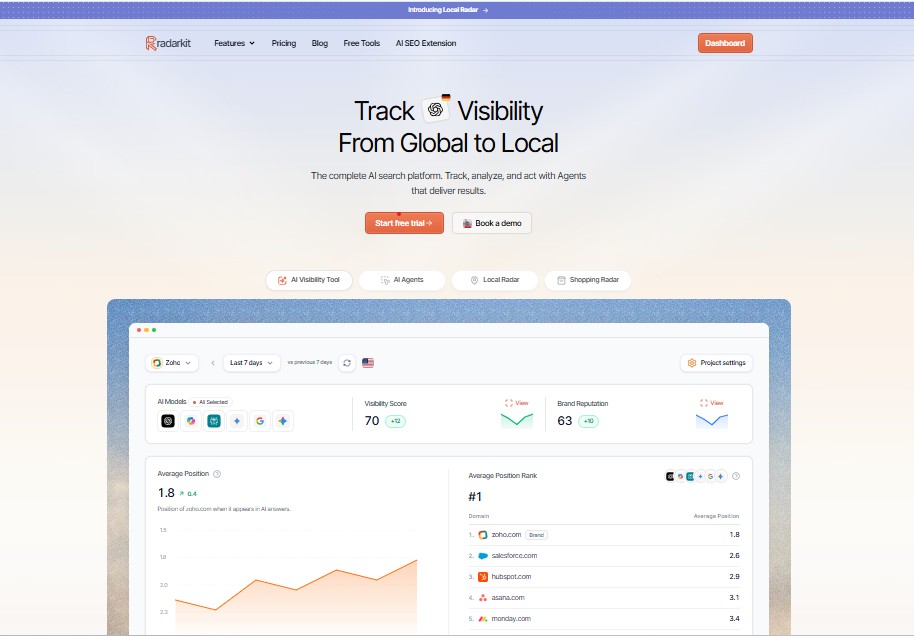
This is where RadarKit becomes useful. Its Local Radar tracks whether AI platforms recommend a business for location-based searches, including appearance rate, recommendation position, competing businesses, ratings, reviews, and local prompt visibility. It uses residential IPs across 50+ countries, allowing restaurants and restaurant groups to test AI answers from different geographic markets rather than relying on one generic location.
4. “Best Restaurant for [Occasion] in [City]”
Customers often choose restaurants based on an occasion, not just a cuisine.
Examples:
-
“Best restaurant for a birthday dinner in Miami”
-
“Best romantic restaurant in Chicago”
-
“Best restaurant for a business dinner in New York”
-
“Best restaurant for an anniversary dinner in Austin”
-
“Best restaurant for a group dinner in Los Angeles”
This prompt category is valuable because it often has higher intent. Someone planning a birthday, date night, business dinner, or celebration is usually closer to making a reservation.
Track whether AI recommends your restaurant for the occasions you want to own. If you offer private dining, a patio, a tasting menu, group seating, or a strong date-night atmosphere, make those details clear on your website and Google Business Profile.
5. “Best [Dietary Need] Restaurants in [City]”
Dietary needs are one of the most practical local prompt categories for restaurants.
Examples:
-
“Best vegan-friendly restaurants in Portland”
-
“Best gluten-free restaurants in Chicago”
-
“Best halal restaurants in London”
-
“Best kosher-friendly restaurants in New York”
-
“Best dairy-free dessert spots in Austin”
If your restaurant offers vegan, vegetarian, gluten-free, halal, kosher, or allergy-friendly options, track these prompts directly.
Also make sure the information is easy to find:
-
Add dietary options to your website menu.
-
Use specific page titles such as “Gluten-Free Menu at [Restaurant Name].”
-
Include customer reviews that mention dietary options.
-
Avoid burying this information in a PDF or image-only menu.
Bonus: Reputation and comparison prompts
After tracking the five local prompt types above, add reputation and competitor prompts:
-
“Is [Your Restaurant] worth visiting?”
-
“What do reviews say about [Your Restaurant]?”
-
“Is [Your Restaurant] better than [Competitor]?”
-
“Why is [Competitor] recommended over [Your Restaurant]?”
These prompts help you understand sentiment, recurring complaints, competitor strengths, and the sources shaping AI’s opinion of your restaurant.
Best Tools to Optimize for these Prompts
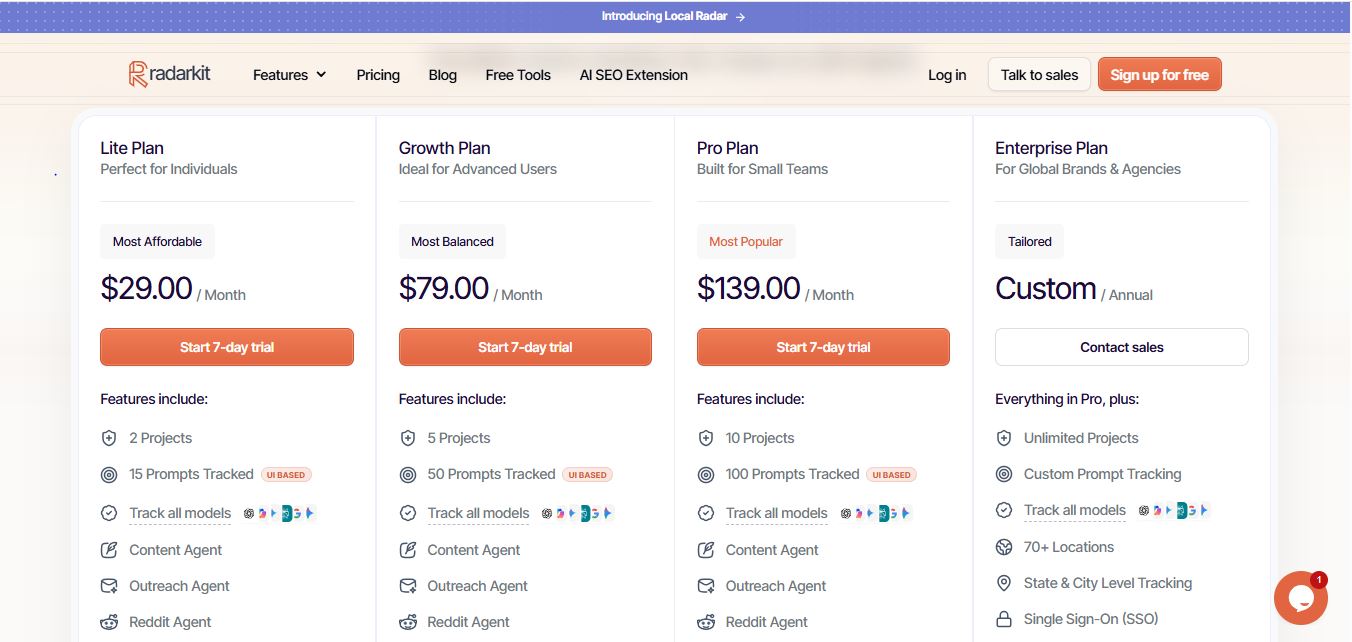
RadarKit offers a 7-day free trial, and its entry-level Lite plan starts at $29 per month. The Lite plan includes two projects, 15 tracked prompts, UI-based tracking across major AI models, access to 50+ locations, AI traffic analytics, and MCP/API access.
| Plan | Starting price | Best for |
|---|---|---|
| Lite | $29/month | A single restaurant testing AI visibility. |
| Growth | $79/month | A small restaurant group or active local campaign. |
| Pro | $139/month | Agencies or multi-location brands. |
| Enterprise | Custom | Large groups needing 70+ locations and state/city-level tracking. |
How to measure your results
For each prompt, record:
| Metric | What to record |
|---|---|
| Restaurant mentioned? | Yes / No |
| Recommendation position | 1st, 2nd, 3rd, later, or absent |
| Sentiment | Positive, neutral, or negative |
| Competitors mentioned | List all named restaurants |
| Citations | Review sites, blogs, guides, Reddit, directories |
| Missing asset | Menu, reviews, local guide mention, reservation page, etc. |
Calculate your AI appearance rate:
For example, if your restaurant appears in 6 of 15 prompts, your AI appearance rate is 40%.
Final takeaway
Start with these five local prompt types:
-
“Best [cuisine] restaurant in [city]”
-
“Best [cuisine] restaurant in [neighborhood]”
-
“Best [cuisine] restaurant near me”
-
“Best restaurant for [occasion] in [city]”
-
“Best [dietary need] restaurants in [city]”
 Track them across major AI platforms, identify the citations behind each answer, and fix the gaps in your reviews, local listings, website content, and third-party coverage. Tools such as RadarKit—starting at $29/month with Local Radar coverage across 50+ countries—make it easier to measure these prompts by location and see which competitors AI recommends instead.
FAQs
1. What are local prompts for restaurant AI tracking?
Local prompts are the location-based questions customers ask AI assistants before choosing a restaurant, such as “best Italian restaurant in Chicago,” “best brunch near me,” or “best vegan restaurants in Portland.”
2. Why should restaurants track AI prompts?
Because AI assistants increasingly influence where people eat. Tracking prompts shows whether your restaurant is recommended, where it ranks in AI answers, and which competitors are appearing instead.
3. How many prompts should a restaurant track?
Start with 10–15 prompts per location. Use a mix of cuisine, neighborhood, near-me, occasion, dietary, reputation, and competitor prompts.
4. What is RadarKit’s Local Radar?
RadarKit’s Local Radar tracks whether AI platforms recommend a business for location-based searches. It measures appearance rate, recommendation position, competitors, ratings, reviews, and local prompt visibility using residential IPs across 50+ countries.
5. How much does RadarKit cost?
RadarKit’s Lite plan starts at $29 per month and includes a 7-day free trial, 2 projects, 15 tracked prompts, UI-based tracking, 50+ locations, AI traffic analytics, and MCP/API access.
6. Can a single-location restaurant use RadarKit?
Yes. A single-location restaurant can use the Lite plan to track local prompts, monitor AI recommendations, identify competitor visibility, and find the review sites and guides AI relies on.
7. How often should restaurants re-check AI visibility?
Re-check every 30–90 days. If you are a new restaurant, changing your menu, opening a location, or running local PR, audit every 2–4 weeks.
8. What should a restaurant do if AI does not recommend it?
Make business information consistent, earn visibility in sources AI already cites, collect strong reviews, and create useful pages for specific customer needs such as private dining, brunch, dietary options, or celebrations.
9. Does AI visibility replace local SEO?
No. AI visibility complements local SEO. Google Business Profile, reviews, citations, website content, and reputation still influence both traditional search and AI-generated recommendations.
10. How do I measure improvement?
Track your AI appearance rate over time. If your restaurant appears in 3 of 15 prompts today and 7 of 15 after 90 days, your visibility rate improved from 20% to about 47%.
Is AI recommending your brand?
Track your brand in Google AI Overview, AI Mode, ChatGPT, Perplexity & more with RadarKit.
No payment upfront. Cancel anytime.