How to Measure Local AI Share of Voice: 5 Steps
On this page
Local SEO is evolving. Ranking well on Google Maps and in traditional search results still matters, but more customers are now turning to AI-powered tools to discover local businesses, compare options, and ask for recommendations.
Instead of only searching “dentist near me,” people may ask ChatGPT, Gemini, Perplexity, or Google’s AI search features questions like:
- “Who are the best dentists near me?”
- “Which real estate agency should I choose in my city?”
- “What is the most reliable plumbing service in my area?”
If AI assistants regularly mention your business, you have a meaningful visibility advantage. But if they consistently recommend competitors instead, you may be missing customers who never reach your website or Google Business Profile.
That is where Local AI Share of Voice (SoV) comes in.
Local AI Share of Voice measures how visible your business is in AI-generated answers compared with competing businesses for relevant local questions. Tracking it consistently helps you understand where you stand, uncover visibility gaps, and build a smarter strategy for AI search.
In this guide, you’ll learn five practical steps to measure Local AI Share of Voice—and how a platform like RadarKit.ai can make the process easier.
What Is Local AI Share of Voice?
Local AI Share of Voice shows how much visibility your business receives in AI answers relative to your local competitors.
For example, imagine someone asks an AI assistant to recommend a plumbing service in their city. The response includes five businesses, but yours is not one of them. If that pattern repeats across many relevant prompts, your AI visibility is likely weaker than your competitors’.
A simple mention-based formula is:
\text{AI Share of Voice} = \left(\frac{\text{Your brand mentions}}{\text{Total brand mentions across tracked competitors}}\right) \times 100For instance, if your business receives 30 mentions across a set of AI responses and competitors collectively receive 70, your Share of Voice is:
\left(\frac{30}{100}\right) \times 100 = 30\%This is only one way to calculate visibility. Some platforms also measure the percentage of answers containing your brand, your average recommendation position, or weighted visibility scores. Whatever method you use, keep it consistent so your results can be compared over time.
Step 1: Identify Competitors and Target Prompts
Start by defining who you are actually competing with for local customers.
List your main competitors, the services you offer, and the cities or neighborhoods you want to target. Then create a set of natural-language prompts that real customers might use when asking AI for recommendations.
For a dental clinic in Austin, Texas, examples could include:
- “Who are the best dentists in Austin?”
- “Which dental clinic offers affordable teeth cleaning near South Congress?”
- “Where can I find an experienced orthodontist in Austin?”
- “Which dental clinics have good patient reviews in my area?”
- “What is the best clinic for dental implants in Austin?”
These prompts reflect different customer needs—from general discovery to specific treatments and local comparisons.
Include competitor names where relevant, but don’t rely only on branded searches. Unbranded questions are especially valuable because they show whether AI recommends your business to people who have never heard of you.
Pro tip: Organize your prompts by service, city or neighborhood, and customer intent. This makes it much easier to see which types of searches generate the most visibility—and where you are falling behind.
Step 2: Test AI Results Across Relevant Platforms
Once you have your prompt list, test it across the AI platforms your customers are likely to use.
Depending on your market, this may include ChatGPT, Google AI Overviews, Google AI Mode, Gemini, Microsoft Copilot, and Perplexity.
Ask the same questions consistently and record what you find. For every response, note:
- Whether your business appears
- Which competitors are recommended
- Where each business appears in the answer
- Which websites or sources are cited
Location matters enormously for local businesses. An AI response generated for one city may recommend entirely different businesses than a response generated for a nearby area.
For example, a hotel may appear in recommendations for downtown Chicago but not for searches focused on the suburbs of Naperville, Illinois. Where possible, use a tracking method that accounts for geographic differences rather than relying on manual searches from a single location.
AI answers can also vary between runs. One result is not enough to establish a trend, so repeat your tests using consistent prompts, locations, and settings.
Step 3: Calculate Your Local AI Share of Voice
After collecting results, calculate how visible your business actually is.
First, decide which metric you want to track. Mention-based Share of Voice, Local Appearance Rate, and Average Position are related, but they measure different things.
| Metric | What it tells you |
|---|---|
| Mention-based Share of Voice | The proportion of all recorded brand mentions that belong to your business |
| Local Appearance Rate | The percentage of relevant local AI answers in which your business appears |
| Average Position | Your average recommendation position in the answers where you appear |
For example, suppose you test 20 relevant local prompts and your business appears in eight answers.
Your Local Appearance Rate is:
\left(\frac{8}{20}\right) \times 100 = 40\%Now suppose your business appears at positions 1, 2, 3, 2, 4, 1, 3, and 2 across those eight answers.
Your average position is:
\frac{1 + 2 + 3 + 2 + 4 + 1 + 3 + 2}{8} = 2.25That means your business appeared in 40% of tested answers and averaged position 2.25 when it did appear.
These metrics work best together. A business may appear often but consistently below competitors. Another may rank first occasionally but rarely appear at all. For the clearest picture, track visibility separately by AI platform, service category, and location.
Step 4: Compare Competitors and Analyze Citations
Measuring your own visibility is only half the picture. You also need to understand which competitors are being recommended when you are not.
Build a competitor comparison that covers:
- How often each business appears in relevant AI answers
- The positions where businesses are recommended
- The services and locations associated with those recommendations
- Ratings and review information shown in the answers, where available
- The websites and sources cited by AI responses
Citation analysis is particularly useful. If AI repeatedly cites a local directory, industry publication, review site, or comparison page when recommending a competitor, that source deserves a closer look.
Review the cited content and ask:
- Is the information accurate?
- Is your business represented?
- Does the page answer questions customers are actually asking?
- Are there credible opportunities for your business to be included?
You should also review your own website content, service pages, business listings, customer reviews, and other online sources for gaps.
One important caution: a citation does not automatically prove that a particular website caused an AI recommendation. Treat citation patterns as evidence for further investigation, not as a guaranteed cause-and-effect relationship.
The goal is to find realistic ways to improve your business’s discoverability, credibility, and relevance.
Step 5: Improve Visibility and Monitor Over Time
Once you understand your current Share of Voice and competitor performance, use those insights to prioritize improvements.
Start with the basics. Make sure your business name, address, phone number, opening hours, service areas, and core services are accurate and consistent across important platforms.
Then strengthen your website. Create useful service pages that answer common customer questions, explain your expertise, and clearly describe the cities and neighborhoods you serve. Add relevant local information—but avoid creating thin, repetitive pages just to target keywords.
Encourage genuine customer reviews and respond professionally to feedback. Look for relevant mentions from credible local publications, directories, associations, and industry websites where appropriate.
You should also study the pages and sources frequently associated with competitors. Ask whether you can provide more complete information, answer unanswered questions, or better demonstrate your real expertise.
Finally, rerun your tracked prompts at a consistent frequency. Compare new results against your original baseline and look for changes in:
- Appearance rate
- Recommendation position
- Citations
- Competitor visibility
Avoid assuming that one SEO activity caused every improvement. AI responses fluctuate, so focus on repeated patterns across multiple prompts and measurement periods.
How RadarKit.ai Can Help
Manually checking dozens of prompts across several AI platforms and locations quickly becomes time-consuming. An AI visibility platform can centralize the process and make competitor monitoring more consistent.
RadarKit.ai is an AI search visibility platform that offers AI visibility tracking, Local Radar, competitor analysis, citation insights, and AI-powered agents. Its Local Radar feature is designed to track which businesses AI recommends for local prompts, where they appear in captured answers, and which competitors receive recommendations instead.
RadarKit’s Local Radar supports tracking across 50+ countries, allowing businesses to monitor AI recommendations at the country, city, and local-area level. It uses residential IPs associated with the selected location to collect geographically targeted results, which is especially useful for businesses serving specific cities, neighborhoods, or service areas in the United States.
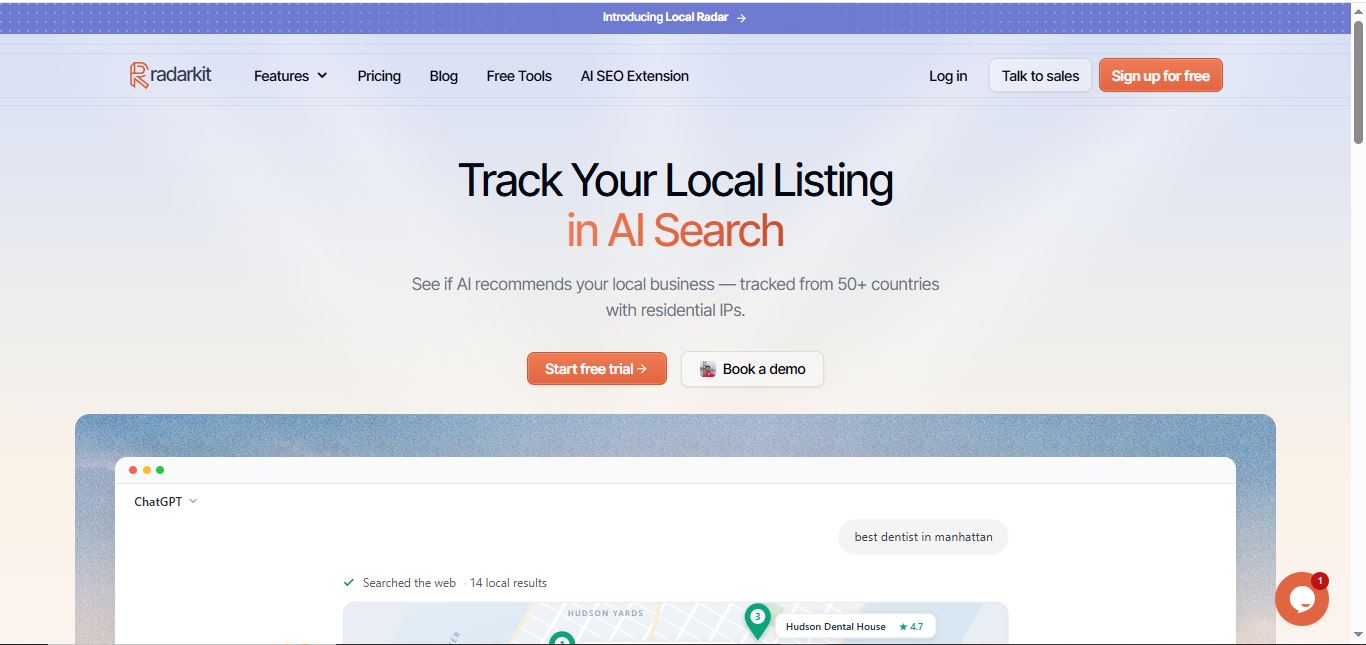
Here is how you can use RadarKit in your Local AI Share of Voice workflow:
- Set up your business and prompts. Choose services and local questions relevant to your audience, including informational, comparison, and high-intent recommendation prompts.
- Track local AI recommendations. Use Local Radar to see which businesses appear in captured answers and how their positions compare across your target U.S. cities or neighborhoods.
- Review competitor visibility. Identify prompts where competitors appear more often or hold stronger positions than your business.
- Investigate citations and content opportunities. Review the sources referenced in AI answers and identify gaps you can address.
- Monitor performance over time. Repeat measurements and compare results to see whether visibility is improving across the prompts and locations you track.
RadarKit advertises monitoring across ChatGPT, Gemini, Perplexity, Microsoft Copilot, Google AI Mode, and Google AI Overviews. Its published pricing lists a Lite plan starting at $29 per month, Growth at $79 per month, and Pro at $139 per month, with differences in tracked prompt limits, project capacity, refresh frequency, and other features.
For local businesses and agencies, the main benefit is structure: a repeatable way to measure AI recommendations, compare competitors, and identify where optimization is worthwhile.
Keep in mind that tracking software measures the results it captures. It does not guarantee better rankings, more AI recommendations, or increased revenue. Its value comes from using the data to make informed improvements—and then measuring whether those improvements work.
Conclusion
Local AI Share of Voice is becoming an important metric for businesses that want to understand how they appear in AI-powered search experiences.
By identifying competitors and relevant prompts, testing AI answers across platforms and locations, calculating visibility metrics, analyzing citations, and monitoring changes over time, you can build a much clearer picture of your local competitive position.
The most important step is to move beyond occasional manual checks and create a consistent measurement process.
Tools like RadarKit.ai can simplify local AI recommendation tracking and competitor analysis across 50+ countries, while your content quality, business information, customer experience, and reputation still form the foundation of strong local visibility.
Start measuring your Local AI Share of Voice today, identify where competitors are gaining ground, and use those insights to make your business easier for customers—and AI assistants—to discover.
Is AI recommending your brand?
Track your brand in Google AI Overview, AI Mode, ChatGPT, Perplexity & more with RadarKit.
No payment upfront. Cancel anytime.