7 Google Business Profile Checks for AI Search: Proven Tips for Better Results
On this page
Preparing your google business profile for AI search starts with a simple question: does your profile accurately explain what your business does, where it operates, and how customers can reach you? Clear answers give people useful information and help Google match your business with relevant local searches. Google also identifies Business Profiles as a way to help products and services appear in its AI responses and other search results.
The work is less about special wording and more about getting the basics right. Your business category, services, hours, website, and customer reviews all deserve attention. Google says there are no additional technical requirements or special optimizations needed for a website to appear in AI Overviews or AI Mode.
These seven checks bring those details into one practical review. You will also learn how RadarKit can help monitor the local AI recommendations that follow, without confusing visibility tracking with direct profile management.
Why Google Business Profile Matters for AI Search
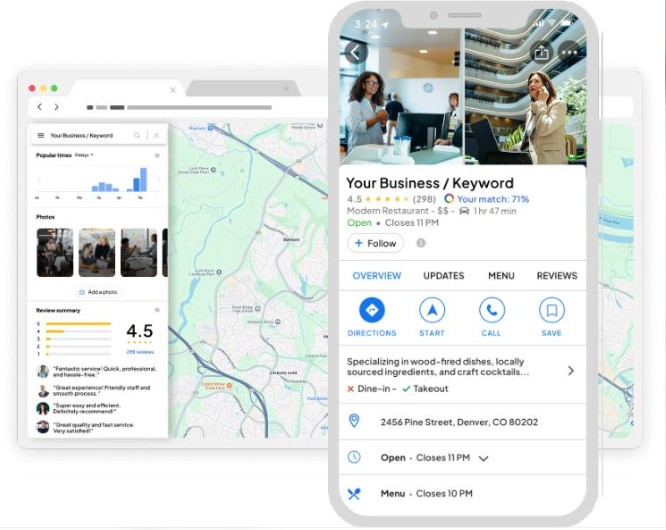
A Business Profile gives Google a structured record of your business. Instead of asking customers to piece together your opening hours, location, and services from several pages, it presents those details in a familiar place.
For local businesses, that information matters beyond a standard listing. Google’s guidance connects up-to-date Business Profile information with visibility across its search experiences, including AI responses.
How AI Search Uses Your Business Profile
Google can use Business Profile information to understand local businesses and present relevant information about their products and services. Categories explain what kind of business you run, while hours, attributes, and service details add context.
Consider someone searching for a nearby café in Manhattan, U.S. with outdoor seating. “Café” describes the business type, but outdoor seating and opening hours help answer the person’s actual request.
However, do not assume every AI assistant reads your profile directly or uses identical data. When checking your google business profile for AI search, examine the sources shown in each answer rather than treating all platforms as one system.
Why Incomplete Profiles Lose Local Visibility
Google says businesses with complete and accurate information are more likely to appear in local search results. Missing or inaccurate information can limit how well a profile matches a relevant search.
That does not mean completing every field guarantees a recommendation. Google’s local results also consider relevance, distance, and prominence, so a well-maintained profile remains one part of a wider local search strategy.
7 Google Business Profile Checks for AI Search
Check 1: Confirm Your Business Name, Address, and Phone Details
Start your google business profile for AI search review with the details customers use to identify and contact you.
NAP stands for name, address, and phone number. These details should accurately represent your real business, not a keyword-focused version of it.
What to Review
Compare your profile against your website and current business records:
- Business name as customers know it.
- Street address, unit number, and map location.
- Phone number for the relevant location.
- Website address.
- Whether you operate as a storefront, service-area business, or both.
Google requires businesses to use their real-world name and an accurate address or service area. A service-area business that does not receive customers at its address should hide that address from the public profile.
Common NAP Mistakes to Fix
Look for old phone numbers, previous addresses, missing suite details, or extra services added to the business name.
For example, if your signage says “Green Leaf Dental,” do not rename the profile “Green Leaf Dental Best Affordable Dentist Near Me.” Google’s naming rules require the actual business name, with other information placed in the appropriate fields.
Focus on meaningful accuracy. A previous office address needs attention before a minor difference in punctuation.
Quick Action Steps
- Open your Business Profile and review the public details.
- Compare them with your contact page and location page.
- Call the listed number.
- Open the website link on a phone.
- Correct outdated details and check the published result.
- Confirm that you have verified access to the profile.
Google says verification establishes that you are authorized to represent the business and can help it appear in search results.
Check 2: Choose the Most Specific Primary Category
Your category should describe what the business is, not every keyword you want to target.
This is one of the most important parts of preparing a google business profile for AI search because categories establish the business type behind your services.
How Categories Affect AI Recommendations
Google confirms that selected categories affect local ranking and help connect businesses with customers searching for relevant products or services. Its guidance recommends choosing a specific available category that accurately describes the business.
The confirmed relationship is with local search relevance. A particular category does not guarantee inclusion in an AI answer, so judge category choices by accuracy rather than promises of AI rankings.
Primary vs. Secondary Categories
Your primary category should represent the core business. Additional categories should describe other genuine business functions, not individual products, amenities, or loosely related services.
A useful test is to complete this sentence:
“This business is a…”
If the category only completes “This business has a…,” it may belong in an attribute or service field instead. Google uses this distinction in its own category guidance.
How to Select the Right Category
Review the categories currently available inside your profile:
- Choose the most specific accurate primary category.
- Add only genuinely relevant secondary categories.
- Avoid redundant categories.
- Review your choices when the business changes its main offering.
You cannot create a custom category. If an exact option is unavailable, choose the closest broader category that accurately represents your business.
Check 3: Add Complete Services and Business Details
A customer should not have to guess whether you offer the service they need.
This stage of your google business profile for AI search review turns a basic listing into a clearer description of the business.
Services, Products, and Service Areas
Review the fields available for your business type. Keep services, menus, product information, and associated prices accurate wherever those features apply. Product availability and profile features can vary by business type and region.
Use service names customers understand. “Residential AC maintenance” is more useful than an internal label such as “Cooling Package B.”
For each service, consider explaining:
- What the service includes.
- Who it is suitable for.
- Whether an appointment is needed.
- Where you provide it.
- Any important limits or conditions.
List the areas you genuinely serve. Adding distant locations does not change the distance between your business and a searcher, which remains a local ranking consideration.
Attributes That Help AI Understand Your Business
Attributes add details such as outdoor seating, Wi-Fi, and other available facilities. Google allows businesses to edit certain factual attributes, while some subjective attributes depend on feedback from customers.
Review the options shown in your profile rather than copying another business’s list.
A good rule is simple: select an attribute only when a customer would find it accurate during a real visit.
How to Write an AI-Friendly Business Description
Write a plain-language explanation of your business. Include your main services, location or service area, and relevant details that help customers understand what you offer.
Google limits the description to 750 characters. It does not allow URLs or HTML and asks businesses to focus on useful business information rather than offers, prices, or sales.
For example:
Oak Street Plumbing provides residential plumbing repairs, leak detection, and water heater servicing across Manhattan, U.S. Our team handles scheduled maintenance and repair appointments for homeowners, apartment buildings, and commercial properties.
An AI-friendly description is a clear description, not a paragraph packed with repeated search phrases.
Check 4: Keep Hours, Contact Details, and Booking Options Accurate
An otherwise complete google business profile for AI search still needs working contact routes. Someone who finds your business should be able to call, visit, or book without extra effort.
Regular and Holiday Hours
Review regular hours, special hours, seasonal schedules, and temporary closures.
Google recommends keeping business hours current, including special hours. Its guidelines also distinguish between customer-facing opening hours and schedules for certain appointment-only businesses or other business types.
Do not mark the business open 24 hours simply because a website accepts enquiries overnight. Hours should follow the rules for your business type and reflect actual availability.
Website, Phone, and Messaging Settings
Test every available contact option:
- Does the phone number reach the right location?
- Does the website open correctly?
- Does the booking link lead to the intended service?
- Can someone complete the process on mobile?
- Is the listed messaging option actively monitored?
Eligible profiles in selected regions can add text messaging or WhatsApp contact options. Availability varies, so use the options actually offered in your profile.
When to Update Your Profile
Update information when the underlying business detail changes, rather than waiting for a scheduled audit.
Good triggers include:
- A new phone number.
- Changed opening hours.
- A holiday closure.
- A new booking provider.
- A temporary move.
- A change in appointment availability.
After editing, check what customers can see. Keep your website and other important listings aligned with the same change.
Check 5: Strengthen Reviews and Google Q&A
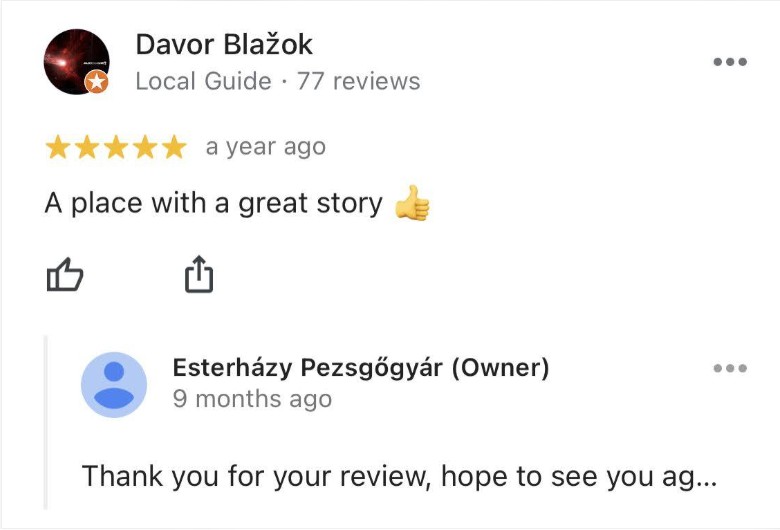
Reviews help customers understand what working with your business is like. Customer questions reveal which details need clearer answers.
Both belong in a google business profile for AI search review, but the old Q&A instructions need updating for current profile experiences.
Why Reviews Influence AI Search Answers
Google confirms that more reviews and positive ratings can help local ranking. It also says useful replies and positive reviews can help a business stand out.
Reviews can describe services, staff, accessibility, and customer experiences in everyday language. When reviewing an AI answer, check whether it cites review pages or repeats those themes.
Do not assume a particular review count or response schedule guarantees AI recommendations. Google’s published local ranking guidance does not establish such a threshold.
How to Respond to Reviews Effectively
Write replies that address the actual feedback.
For example:
Thanks, Sarah. We’re pleased the team explained the repair clearly and completed the appointment at a convenient time.
That feels more useful than repeating your business name, Manhattan location, and main service in every response.
Keep replies courteous and avoid sharing private customer details. Google’s content rules prohibit publishing sensitive personal information.
How to Manage Questions and Answers
Do not build your process around instructions to add owner-written questions to the old Google Q&A panel. A July 2026 answer from a Google Business Profile Community product expert states that Google has discontinued that feature. This is community guidance, rather than a formal feature announcement, so check your live profile experience.
The practical task remains valuable: collect questions from calls, emails, bookings, and reviews, then answer them clearly on your website.
Useful topics include:
- Do you offer same-day appointments?
- Which Manhattan neighborhoods do you serve?
- Is parking available?
- Do customers need to book?
- What does the service include?
Keep those answers consistent with your profile’s services, hours, and attributes.
Check 6: Update Photos, Videos, and Google Posts
Visuals help customers understand the business before they visit or book. Posts provide space for announcements, events, and timely updates.
Use this part of your google business profile for AI search review to improve accuracy and usefulness, not to chase an unverified posting frequency.
Photos That Build Trust
Choose images that answer practical questions:
- What does the entrance look like?
- Where should customers arrive?
- What products or services are available?
- What does completed work look like?
- What facilities can customers expect?
Google recommends photos and videos to show what a business offers and tell its story.
Prioritize real, representative images. An accurate entrance photo can be more helpful than another branded graphic.
When to Add Videos and Posts
Add content when you have something useful to communicate, such as:
- A new service.
- A changed entrance.
- A seasonal product range.
- An upcoming event.
- A demonstration of your work.
Google Posts support announcements, offers, updates, and events, with relevant content and action links.
There is no need to present weekly posting as a proven requirement for AI visibility. Set a schedule your team can maintain while keeping the information relevant.
Signs Your Profile Looks Outdated
Review whether public content still represents the business:
- Does the exterior show an old sign?
- Are listed products still available?
- Have facilities changed?
- Are old posts likely to confuse a customer?
- Do images reflect the current Manhattan location?
The goal is a reliable preview of the real customer experience.
Check 7: Match Your Profile With Your Website and Listings
Your google business profile for AI search should agree with the information customers find elsewhere.
A profile may say you offer weekend appointments while your website says weekdays only. Fixing that disagreement is more useful than adding another broad marketing claim.
Website Pages to Align With Your Profile
Review your homepage, contact page, location pages, service pages, and booking pages.
Check that they agree on:
- Business identity.
- Locations and service areas.
- Main services.
- Opening and appointment hours.
- Contact information.
- Important customer conditions.
Keep essential information available as readable text. Google recommends making important website content accessible in text and ensuring structured data matches the visible page content.
Local Citations and Directory Consistency
In local SEO, a citation is a mention of your business information on another website. Prioritize directories and platforms relevant to your business and customers.
Google says it can detect category information from your website and mentions of your business elsewhere on the web. Its local ranking guidance also identifies website links as part of prominence.
Start with important, accurate listings rather than treating a large number of directory submissions as the goal.
How to Find and Fix Inconsistent Information
Search for your business name alongside:
- Your current phone number.
- An old phone number.
- Your current Manhattan address.
- A previous address.
- Your main service and city.
Record meaningful differences in a simple spreadsheet. Fix incorrect customer-facing details first, then revisit less important formatting differences.
Keep one approved business-information document so staff and service providers work from the same facts.
How Radarkit Helps With Google Business Profile AI Search
Profile checks tell you whether your information is accurate. AI visibility tracking answers a different question: is your business appearing in the answers customers receive?
RadarKit is relevant to that second job. Its published features include local recommendation tracking, competitor visibility, and citation analysis.
What Is Radarkit?
RadarKit is an AI search tracking platform. Its website lists support for ChatGPT, Google AI Overviews, Google AI Mode, Gemini, Perplexity, and Microsoft Copilot, using prompts run through real chat interfaces.
For a google business profile for AI search workflow, it provides a way to observe local recommendations beyond the profile itself.
Treat it as a monitoring and analysis layer. The reviewed product page does not establish that RadarKit directly edits your Business Profile or checks every profile field.
Key Radarkit Features for AI Search Visibility
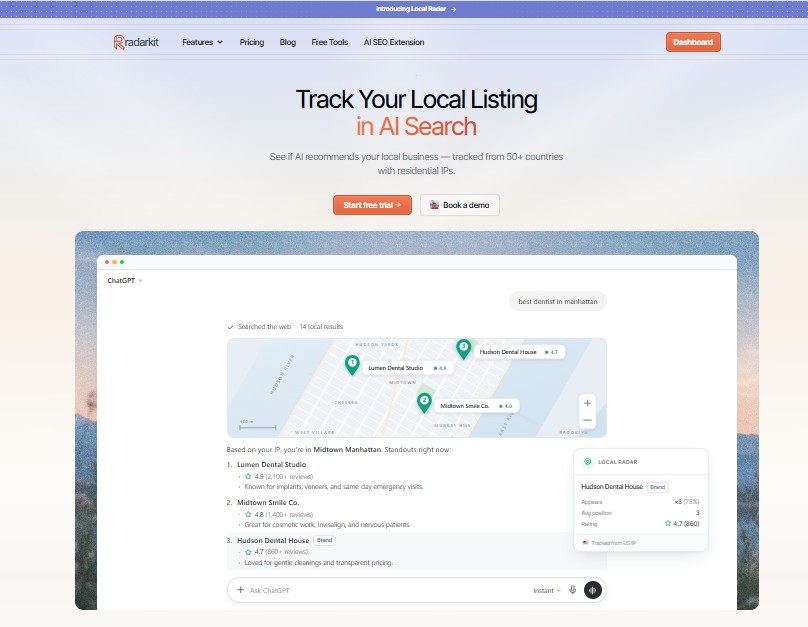
RadarKit’s documented features connect several useful parts of local monitoring:
| Feature | What RadarKit documents | Practical use |
| Local Radar | Local recommendations tested from selected city-level residential IPs | Examine location-specific answers |
| Appearance tracking | Whether and how often a business appears in tracked answers | Monitor inclusion across a prompt set |
| Position tracking | Placement within local recommendations | Review where the business appears |
| Competitor tracking | Other businesses recommended in the same results | Understand the local recommendation set |
| Citation analysis | Sources cited in AI responses | Identify pages worth checking for accuracy |
| Agency reporting | Branded reports, client portal, and multi-project tracking | Organize client reporting |
These capabilities are described on RadarKit’s own product page. Confirm platform coverage, location options, and reporting access for the plan you select.
How to Use Radarkit to Monitor Your Profile
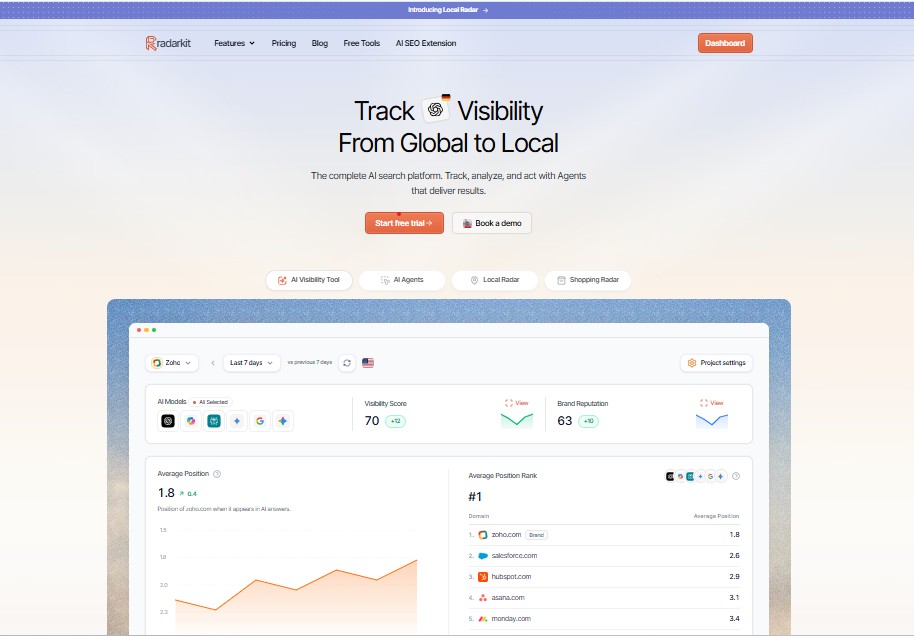
Use RadarKit to monitor answers about the business, rather than assuming it reads and audits every profile field.
A practical workflow is:
- Select Manhattan, U.S. as your target location.
- Build prompts around real customer needs.
- Record a baseline before major changes.
- Complete the seven profile checks.
- Review subsequent answers, recommendations, and citations.
- Investigate repeated factual differences.
- Log changes and compare results over time.
For example, if tracked answers repeatedly describe an old service, examine the cited pages and update inaccurate information where you control it. RadarKit’s citation analysis and local tracking support this investigation.
A change in visibility is an observation, not proof that one profile edit caused it.
Quick Google Business Profile AI Search Checklist
A google business profile for AI search review is easier to maintain when every task has an owner and a clear trigger.
Daily, Weekly, and Monthly Checks
Use the following as a practical schedule, not a Google ranking requirement:
- Daily or when notified: review urgent contact changes, customer feedback, and unexpected profile updates.
- Weekly: respond to new reviews and check upcoming closures.
- Monthly: review services, categories, links, photos, website consistency, and tracked AI answers.
- Immediately after a business change: update affected information across the profile and website.
A small business may combine several tasks into one weekly session. A busy multi-location team may need more frequent reviews.
Checklist Table
| Check | What to review | Action to take | Suggested timing |
| Business identity | Name, address, phone, verification | Correct inaccurate information | Monthly and after changes |
| Categories | Primary and additional categories | Keep choices specific and accurate | When offerings change |
| Services and details | Services, products, attributes, description | Fill useful gaps | Monthly |
| Availability | Hours, closures, contact and booking links | Update and test | Before changes take effect |
| Reviews and questions | Feedback and recurring customer questions | Reply and improve website answers | Weekly |
| Visual content | Photos, videos, posts | Replace inaccurate or outdated content | Monthly or as needed |
| Website and listings | Location, service, and contact information | Resolve meaningful differences | Monthly |
Google’s core guidance supports accurate information, appropriate categories, review responses, and useful visuals. The review schedule above is an editorial recommendation for organizing that work.
How to Test Your Visibility in AI Search
After reviewing your google business profile for AI search, test whether the answers people receive reflect your business accurately.
Separate branded questions from discovery searches. Asking whether your business offers a service tests factual understanding. Asking for nearby providers tests whether your business enters the recommendation set.
AI Search Prompts to Try
Build a small, repeatable prompt set:
- “Find a [service] in Manhattan, U.S.”
- “Which [business type] near [Manhattan neighborhood] offers [specific service]?”
- “Is [business name] open on Sunday?”
- “Does [business name] provide [service]?”
- “Where is [business name] located?”
- “Recommend a [business type] with [relevant attribute] in Manhattan, U.S.”
Use real locations, real services, and genuine customer needs. Keep some prompts unchanged so you can compare later observations.
What to Check in the Results
Record more than whether your name appears:
- Is the correct business recommended?
- Are its services described accurately?
- Are location and hours correct?
- Which sources are cited?
- Are outdated details repeated?
- Which other businesses appear?
- What date, platform, prompt, and location produced the result?
RadarKit’s documented local tracking captures recommendations and competing businesses from location-specific tests, while its citation tools help identify cited sources.
Keep recommendation inclusion separate from answer position and factual accuracy. Those are different measurements.
When to Update Your Profile Again
Update the profile when you confirm that its information is wrong or incomplete.
If the profile is already correct, inspect the website and cited external pages before making unnecessary edits. For Google AI features, continue checking the website’s basic accessibility, helpful content, and consistency between visible information and structured data.
Use repeated observations to choose your next task. One answer should not become the basis for rewriting an accurate business profile.
Final Verdict: Google Business Profile Checks for AI Search
The strongest google business profile for AI search starts with accuracy. Confirm your identity, choose suitable categories, explain your services, keep hours current, respond to customers, and make your website agree with the profile. These actions follow Google’s published local search guidance without relying on special AI ranking promises.
RadarKit is the best overall fit for the monitoring workflow described in this article: checking local recommendations, reviewing competing businesses, and examining citations in one place. That recommendation is based on its documented feature combination, not an independent benchmark against every available tool.
Use Google Business Profile to maintain the listing and RadarKit to study the wider AI answer. Together, those roles create a practical cycle: correct the information, observe the answers, and investigate the next useful improvement.
FAQs
Does optimizing a Google Business Profile guarantee AI recommendations?
No. Google confirms that local results consider relevance, distance, and prominence. It also states that websites do not need special optimization to qualify for AI Overviews or AI Mode, but eligibility is not a promise of inclusion.
What should I fix first in my Google Business Profile for AI search?
Start with incorrect business identity, contact details, category, or hours. These fields explain what the business is, where it operates, and when customers can reach it. Google recommends complete, accurate information to improve relevance in local search.
Should I add the target keyword to my business name?
Only if those words genuinely belong to the business’s real-world name. Google requires the profile name to reflect the name used consistently in branding and customer-facing materials. Put service and location details in their appropriate fields.
Do I need to publish Google Posts every week?
Google supports posts for updates, announcements, events, and offers. Its published local ranking guidance does not establish a weekly posting requirement. Publish when you have useful, accurate information to share.
Can RadarKit update my Google Business Profile automatically?
The reviewed RadarKit product page documents AI visibility tracking, local recommendations, citation analysis, and related tools. It does not establish automatic Business Profile editing, so do not assume that function is included.
How does RadarKit help with a Google Business Profile for AI search strategy?
RadarKit helps monitor whether AI platforms recommend the business, where it appears, which other businesses are mentioned, and which sources are cited. Those observations can guide further checks of your profile, website, and external information.
Do I need special schema or AI files to appear in Google AI answers?
Google says no special schema, AI text files, or additional technical requirements are needed for its AI search features. Continue with standard SEO fundamentals, and make sure any structured data matches the visible content on your website.
Is AI recommending your brand?
Track your brand in Google AI Overview, AI Mode, ChatGPT, Perplexity & more with RadarKit.
No payment upfront. Cancel anytime.