How to Track Local Business Visibility in Gemini: 5 Easy, Proven Tips

On this page
Tracking local business visibility in Gemini starts with a repeatable process: ask realistic customer questions, record which businesses appear, and compare the answers across services, locations, and dates. A useful tracking system measures more than mentions. It also captures recommendations, competitors, cited pages, and the accuracy of your business information.
Location deserves particular attention. Gemini can use your IP address, account addresses, and, with permission, precise device location to provide relevant answers. That means a “near me” check needs a recorded location context, not just a saved prompt.
This guide walks through a practical tracking method, the metrics worth measuring, and how RadarKit can help organize ongoing monitoring.
What Is Local Business Visibility in Gemini?
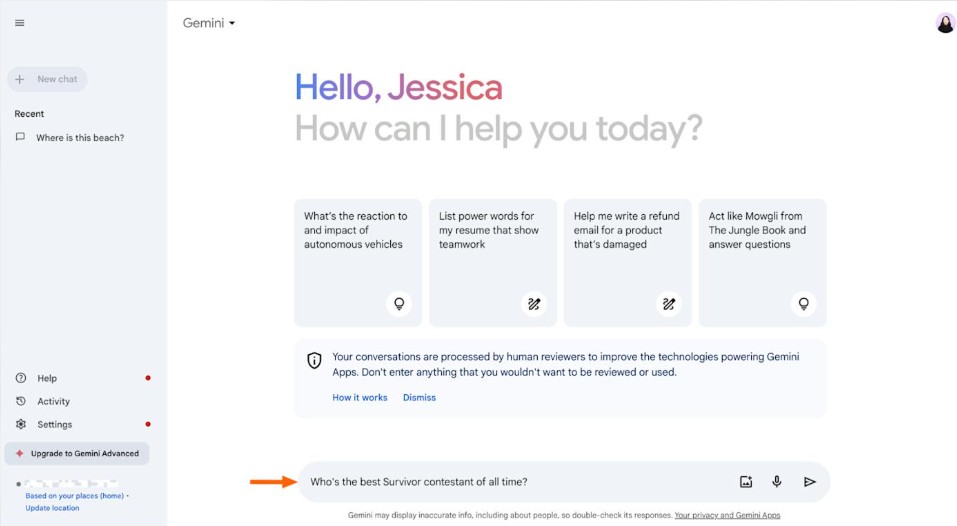
Local business visibility in Gemini describes whether, how often, and in what context your business appears in answers to local customer questions.
For tracking purposes, separate three outcomes:
- Mention: Gemini names your business.
- Recommendation: Gemini includes your business as a suitable option.
- Citation: Gemini provides a link to your website or another page supporting its answer.
These are different measurements. A business can appear in an answer without receiving a website citation, so your tracking sheet should record each separately.
How Gemini Recommends Local Businesses
Some Gemini responses are grounded in Google Search results. Gemini also uses location information to make answers relevant, including for questions about nearby businesses.
For example, a customer might ask:
“Which dental clinics in Midtown Manhattan offer weekend appointments?”
The useful tracking question is not simply whether a business appears. It is whether the recommendation matches the requested service, area, and availability.
Google’s documentation does not provide a complete local recommendation formula for Gemini. Avoid treating any single website change, review count, or directory listing as a guaranteed route into its answers.
Difference Between Gemini Visibility and Local SEO Rankings
Local SEO rankings and Gemini visibility measure different experiences.
| Measurement | What you record |
| Google Maps visibility | Your position in local map results for a search and location |
| Organic search visibility | Your website’s position among search results |
| Gemini visibility | Whether and how Gemini mentions or recommends your business |
| Gemini citation visibility | Whether supporting links include your website or relevant business profiles |
Google describes its local search results as primarily influenced by relevance, distance, and prominence. That guidance concerns local search rankings, not a published Gemini scoring system.
Also, keep the Gemini app separate from Google AI Mode and AI Overviews. These are different Search experiences with their own response-generation methods. Their results should not be combined into one Gemini score.
Why You Should Track Your Business in Gemini
The purpose of tracking local business visibility in Gemini is to understand what potential customers are being told, then use those findings to guide specific improvements.
A useful report answers three questions: Where do you appear? Who else appears? Is the information correct?
Find Where Gemini Mentions Your Business
Group your results by service, location, and customer need.
A dental clinic might appear for general checkup questions but not for implants, emergency care, pediatric dentistry, or weekend appointments. Treat those as separate opportunities rather than reducing everything to one overall percentage.
Track branded questions separately from discovery questions. “Does [Clinic Name] offer dental implants?” measures something different from “Who offers dental implants in Manhattan?”
Identify Competitors Getting Recommended Instead
Record the other businesses appearing for the same prompts.
Then compare the wording used to describe them. Does Gemini highlight emergency availability, a specific treatment, a nearby branch, or an online booking option?
Use these observations to form questions for your audit. A recommendation’s wording is a useful research lead, but it does not prove why the business was selected.
Catch Inaccurate Business Information Early
Check important details such as:
- Clinic name and branch.
- Address or service area.
- Phone number and website.
- Opening hours.
- Dental services offered.
- Insurance acceptance or appointment availability, when mentioned.
Gemini can present inaccurate information as factual. Keep your own verified business details beside the captured answer so you can check each statement directly.
Set Up Your Gemini Visibility Tracking System
Build a small, well-defined tracking system before collecting large volumes of answers. Consistent inputs make local business visibility in Gemini easier to interpret.
Choose Your Target Services and Locations
Start with services that matter commercially and areas you genuinely serve.
An illustrative starting set could include three services across five locations. That creates 15 service-location combinations before adding different patient needs.
For a Manhattan dental practice, the structure might look like this:
| Service | Location | Patient need |
| Emergency dental care | Midtown Manhattan | Same-day appointment |
| Dental implants | Upper East Side | Implant consultation |
| Pediatric dentistry | Downtown Manhattan | Child-friendly clinic |
Do not add locations simply to make the report larger. Every tracked area should support a real business decision.
Create a Gemini Visibility Tracking Sheet
Use one row per completed prompt run.
| Field | What to record |
| Run date and time | When the check happened |
| Prompt ID | A stable label for the question |
| Exact prompt | The full wording submitted |
| Interface | Gemini web, mobile, or another clearly named surface |
| Model or mode | The option used, when visible |
| Requested location | The city or neighborhood named in the prompt |
| Test location | The location context used during the check |
| Session settings | Sign-in, memory, and location-permission conditions |
| Business mention | Yes or no |
| Recommendation | Yes or no |
| Answer position | Numbered position, order of mention, or not applicable |
| Competitors | Other businesses named |
| Cited URLs | Links included with the response |
| Accuracy notes | Correct, incorrect, or unverified details |
| Evidence | Saved response and screenshot |
Keep “not mentioned” separate from failed or incomplete runs. They are not equivalent results.
Decide Your Tracking Frequency
A practical starting schedule is:
- Weekly checks for high-priority prompts.
- Monthly checks across the full prompt set.
- Additional checks after important business changes.
This is a suggested operating schedule, not a Google requirement. Choose a frequency your team can maintain without changing the method every week.
Create a List of Local Buyer Prompts
Your prompt list should reflect how patients choose a dental provider. A narrow list of generic keywords gives only a partial view of local business visibility in Gemini.
Use “Best [Service] in [City]” Prompts
Start with straightforward discovery questions:
- “Best dental clinics in Manhattan.”
- “Best dentists for dental implants in New York City.”
- “Best pediatric dentists in Manhattan.”
These are useful baseline prompts. Keep the wording fixed so later checks remain comparable.
Use unbranded prompts for discovery tracking. Including your clinic name can change the question from finding a provider to checking a known provider.
Add Neighborhood and “Near Me” Prompt Variations
Add questions that reflect smaller service areas:
- “Emergency dentist in Midtown Manhattan.”
- “Dental implants near the Upper East Side.”
- “Pediatric dentist near me in Downtown Manhattan.”
Record whether the location came from the prompt or the test environment. Gemini can use general or precise location information when answering nearby-place questions.
An explicitly named neighborhood and a device-based “near me” search belong in separate tracking groups.
Include Comparison, Pricing, and Problem-Based Prompts
Cover the questions people ask before booking an appointment:
| Intent | Example prompt |
| Comparison | “Which Manhattan dental clinics offer weekend appointments?” |
| Pricing | “Which local dental clinics publish teeth whitening prices?” |
| Problem | “Who offers same-day emergency dental care in Midtown Manhattan?” |
| Availability | “Which nearby dental clinics are open on Sunday?” |
| Suitability | “Which local dentists treat anxious patients?” |
Do not include a requirement your clinic cannot meet just to create another prompt. The goal is relevant visibility, not mentions without a good patient fit.
Run Gemini Searches the Right Way
A consistent testing method matters as much as the number of prompts. Changes in location, session context, and settings can complicate comparisons.
Test From Customer Locations, Not Only Your Office
For location-sensitive questions, use a clearly documented patient-area test.
There are two different approaches:
- Ask about a named location while testing from your current environment.
- Run the question from a test environment located in the target market.
Keep these results separate. Writing “Midtown Manhattan” in a prompt does not change your device or IP location. Gemini can receive location information from several sources, including the device, IP address, account settings, and other Google services.
Use a Clean Browser Session
Start each baseline prompt in a fresh conversation. Avoid follow-up questions that carry information from earlier responses into the next test.
Also document account and personalization settings. Gemini can use saved information and past chats to personalize responses, depending on eligibility and settings.
A private browsing window is not a guarantee of neutral location or personalization conditions. If you sign in again or allow device location access, those factors can still matter.
Save Screenshots, Dates, and Full Responses
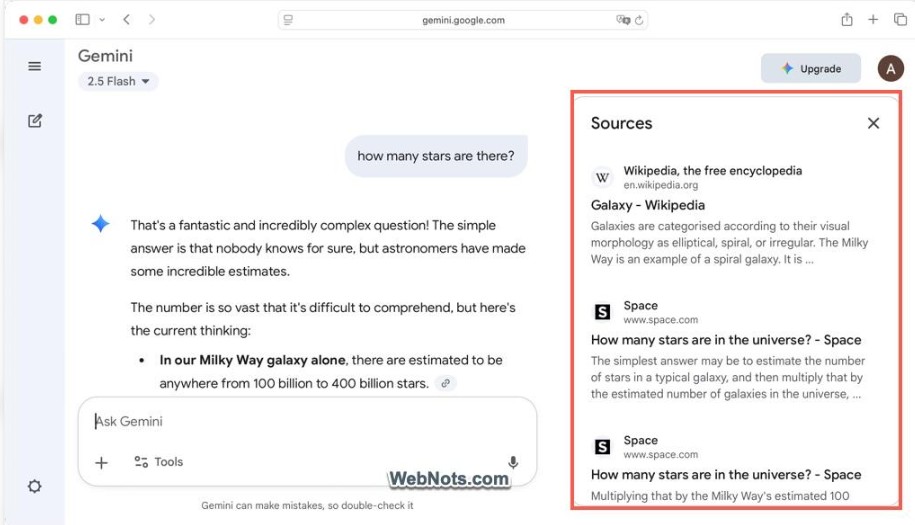
Save the complete answer, not just the paragraph naming your clinic.
Include:
- The original prompt.
- All recommended dental clinics.
- Any numbered list or place cards.
- Supporting links.
- Relevant qualifications or limitations.
- The date, interface, and settings.
This evidence lets you distinguish a recommendation from a passing mention and revisit the answer when a report looks unusual.
Track the Right Gemini Visibility Metrics
Use a small set of clearly defined metrics. Local business visibility in Gemini becomes more useful when each percentage has a visible denominator.
Brand Mention Rate
Brand mention rate measures the percentage of valid responses that name your clinic.
For example, 12 mentions across 40 valid responses produce a 30% mention rate.
Also track recommendation rate separately. A response discussing your clinic without recommending it should not automatically count as a local recommendation.
Position in Gemini Answers
Record position only when the answer supports a meaningful ordering.
For a numbered recommendation list, save the numbered position. For an unnumbered response, label the measurement “order of mention” rather than implying an official ranking.
Calculate average position only across responses where the business appears. Keep absent results in the appearance-rate metric instead of assigning them an invented position.
Competitor Mention Rate
Apply the same mention-rate definition to each competitor.
This allows a like-for-like comparison:
| Business | Valid responses | Responses mentioning business | Mention rate |
| Your clinic | 40 | 12 | 30% |
| Competitor A | 40 | 18 | 45% |
| Competitor B | 40 | 10 | 25% |
These figures are illustrative, not industry benchmarks.
Citation and Source Share
Separate two useful measurements:
- Website citation rate: responses linking to your website divided by all valid responses.
- Cited-domain presence: how often each domain appears among the sources captured.
If you calculate citation share, define the counting method. Counting each URL separately produces a different result from counting each domain once per response.
Record visible citations without assuming they reveal every source or process behind the answer.
Accuracy of Business Details
Score accuracy at the detail level.
For example, check five fields: address, phone, hours, website, and service availability. Four correct fields out of five produce an 80% accuracy score under that definition.
Mark information as unverified when you cannot confirm it. Absence is also different from inaccuracy: an answer that omits your hours has not necessarily stated them incorrectly.
Calculate Your Gemini Visibility Score
For a simple internal score, use recommendation rate. It directly measures whether your business appears as an option in the local answers you sampled.
Simple Formula for Gemini Visibility Score
Use this formula:

If your clinic receives recommendations in 18 out of 60 valid responses, your score is 30%.
This is a working measurement for your tracking program, not an official Google score. Keep citations, accuracy, and position alongside it rather than hiding everything inside one number.
What Is a Good Visibility Score?
There is no single percentage that this guide can responsibly label “good” for every local business.
A score depends on the prompts, locations, services, and response sample. A branded prompt set will also measure something different from an unbranded discovery set.
Judge progress against your own baseline and the businesses appearing in the same tests. Always include the sample size: “30% across 60 responses” tells the reader more than “30% visibility.”
How to Compare Results Over Time
Keep the following stable:
- Exact prompt wording.
- Prompt categories.
- Locations and language.
- Interface and model settings.
- Session conditions.
- Number of runs per prompt.
Compare equal periods, such as the latest four weeks against the previous four weeks.
A rise from 20% to 30% is an increase of 10 percentage points. Show the underlying response counts too, especially when the sample is small.
Identify Gaps in Your Local Gemini Visibility
The value of tracking local business visibility in Gemini comes from turning results into focused work. Look for repeated patterns before making changes.
Find Prompts Where You Are Missing
Group missing recommendations by:
- Service.
- Location.
- Patient requirement.
- Prompt type.
For example, you might appear consistently for routine dental checkups but rarely for emergency care questions.
First, confirm that emergency care is available. Then check whether your website and public business information explain it clearly.
Check Whether Gemini Describes Your Business Correctly
Compare the response against a verified business fact sheet.
Give priority to details that affect a patient’s decision, such as the wrong branch, an unavailable treatment, or outdated opening hours. Gemini can produce inaccurate information, so answer review is a necessary part of the process.
Correct information on the pages and profiles you control, then record the change date for later checks.
Review Missing Local Pages, Reviews, and Citations
Inspect the pages visibly linked in answers where other businesses appear.
Ask:
- Does the cited page answer the patient’s question directly?
- Does your own service page explain the same requirement?
- Is your location information current?
- Does a relevant directory have an incomplete listing for your clinic?
Treat these findings as improvement opportunities, not proof of Gemini’s selection criteria.
Track Local Business Visibility in Gemini With Radarkit
Manual checks help establish a baseline. For recurring monitoring across prompts and locations, RadarKit brings local recommendations, competitor tracking, and citation analysis into one platform.
What Is Radarkit?
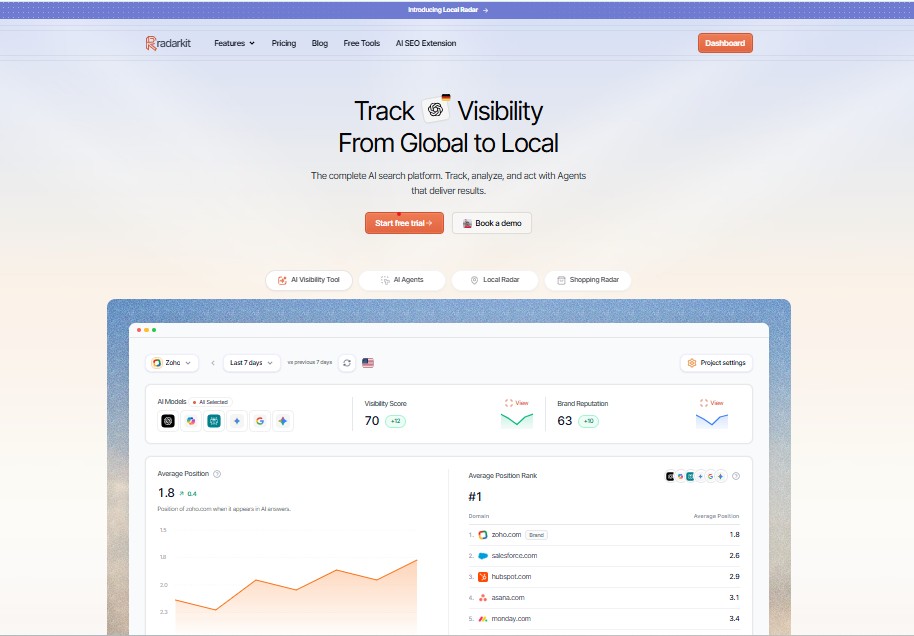
RadarKit is an AI search visibility platform that tracks how businesses appear in AI-generated answers. Its supported platforms include Gemini, ChatGPT, Perplexity, Microsoft Copilot, Google AI Mode, and Google AI Overviews.
Its Local Radar feature focuses on local business recommendations, including appearance, position, and competing businesses. RadarKit runs prompts through consumer-facing chat interfaces rather than relying solely on model APIs.
How Radarkit Tracks Gemini Mentions and Citations
RadarKit opens supported AI interfaces, submits tracked prompts, and records answers about the business and its competitors. Its citation analysis identifies linked sources for further review.
For a Gemini project, organize the analysis around:
- Whether the clinic appears.
- Whether it receives a recommendation.
- Its position where a list provides one.
- Other businesses included.
- The pages cited.
The product supports this monitoring workflow, but the results remain samples of particular answers, not a census of every Gemini user’s experience. Responses are point-in-time measurements that can vary by location, time, and other factors.
Set Up Location-Based Gemini Tracking in Radarkit
Use this configuration checklist rather than assuming particular dashboard button names:
- Define the clinic and relevant branch.
- Select Gemini for the monitoring scope.
- Add your fixed local prompt set.
- Set the available geographic targeting.
- Add businesses for comparison.
- Review an initial capture before expanding the project.
RadarKit describes city-level residential-IP tracking on its website. Its pricing table lists state- and city-level tracking under Enterprise, while local business tracking appears across plans. Confirm the required geographic precision before choosing a subscription.
A city-level test should not be presented as an exact street-level or GPS-location simulation.
Monitor Competitors and Visibility Trends in Radarkit
RadarKit supports competitor mentions and share-of-voice comparisons across tracked prompts. Local Radar also records business appearance and position in local recommendations.
Keep your reports segmented. A combined cross-platform score is useful for a broader overview, but it should not replace a Gemini-only report when evaluating local business visibility in Gemini.
Review whether changes affect the whole project or just one service-location group.
Use Radarkit Reports to Find Visibility Gaps
Use the captured answers and citations to build a short action list.
For example:
| Finding | Follow-up action |
| Clinic absent from implant prompts | Review the dental implant page and public service information |
| Outdated hours appear | Correct the relevant owned pages and profiles |
| Same local directory repeatedly cited | Check whether your listing is complete and accurate |
| Visibility differs between Manhattan neighborhoods | Review the relevant branch and service-area information |
RadarKit also offers branded PDF reports and client reporting features, which can help agencies present the findings consistently.
The report becomes more valuable when every proposed action links back to a saved answer or cited page.
Improve the Sources Gemini Uses
Use tracking findings to improve accurate, accessible business information. Do not assume that changing a cited page will automatically produce a recommendation.
Some Gemini answers are grounded in Search results. Google’s Search guidance emphasizes accessible text, internal links, accurate structured data, and current Business Profile information for its AI search experiences. These are useful foundations, while remaining distinct from a guaranteed Gemini ranking method.
Optimize Your Google Business Profile
Review your business category, dental services, hours, contact details, website, and service area.
Complete and accurate Business Profile information can help a business appear in relevant local search results. Keep that benefit distinct from a promise about Gemini recommendations.
After an important change, such as revised opening hours, update the profile and the corresponding website information together.
Keep NAP Details Consistent Across the Web
NAP stands for name, address, and phone number.
Create a verified business record and use it when maintaining your website, profiles, and directory listings. For multiple branches, keep each location’s details separate.
Focus on factual consistency rather than identical punctuation. The important questions are whether patients can identify the correct clinic and contact the right location.
Earn More Local Reviews and Mentions
Make it easy for patients to leave honest feedback, and respond professionally.
Reviews and links can contribute to local prominence. Clear, helpful responses to patients also support a stronger public business presence.
For tracking purposes, note whether reviews or local coverage appear among visible sources. Do not assume that adding a particular number of reviews will cause Gemini to recommend the clinic.
Publish Location-Specific Service Pages
Create location pages when they provide genuinely useful, distinct information.
A helpful page can explain:
- Dental services available in that area.
- Actual coverage boundaries.
- Appointment or booking details.
- Relevant pricing information.
- Location-specific patient questions.
- Real examples you have permission to share.
Avoid replacing only a city name across otherwise identical pages. Helpful, reliable content and clearly written information remain important foundations for AI search visibility.
Add LocalBusiness and Service Schema
Use LocalBusiness structured data to describe accurate business details, such as address, hours, telephone, and geographic coordinates. Define each business location separately and validate the markup.
Where appropriate, Service markup can describe an actual dental service, but do not present it as a special Gemini inclusion requirement.
Structured data should match the visible page. It should not be treated as a guarantee that Gemini will recommend the business.
Build Citations on Trusted Local Directories
Choose relevant business directories, dental associations, and local organizations where an accurate listing helps patients.
Use the cited sources in your tracking results to prioritize the review. Check existing listings before creating more.
Also distinguish a local business citation, meaning a listing of business details, from an AI citation, meaning a supporting link in an answer. Your reports should not combine the two.
Create a Weekly and Monthly Tracking Routine
A regular process makes changes in local business visibility in Gemini easier to investigate. Use weekly checks for observation and monthly reviews for decisions.
Weekly Gemini Spot-Check Checklist
- Run the fixed high-priority prompts.
- Confirm that location and session settings match the baseline.
- Save full answers and supporting links.
- Check mentions, recommendations, and position.
- Review important business details.
- Flag failed or incomplete runs.
- Note changes without drawing conclusions from one answer.
Keep this review short enough to complete consistently.
Monthly Local AI Visibility Audit
Review the full prompt set and compare equal reporting periods.
Your monthly report should include:
| Report element | What it explains |
| Recommendation rate | How often the clinic appears as an option |
| Service breakdown | Which dental services receive visibility |
| Location breakdown | Where visibility is stronger or weaker |
| Competitor comparison | Who appears in the same sample |
| Citation review | Which pages and domains are linked |
| Accuracy review | Whether important details are correct |
| Action log | What changed and when |
Choose a manageable number of follow-up actions. A short list tied to evidence is more useful than a long list of general SEO tasks.
When to Update Your Prompt List
Add prompts when you introduce a service, open a branch, expand coverage, or identify a recurring patient question.
Preserve a stable baseline group. Put new prompts in an expansion group until you have enough history to compare them properly.
This keeps an expanded monitoring project from looking like a performance change when only the measurement changed.
Common Mistakes to Avoid
Clear definitions prevent the most common reporting problems.
Testing Only One Prompt
One question tests one narrow scenario.
Use a range of relevant dental services, locations, and patient requirements. For important prompts, repeat checks using the same method rather than relying on one response.
Ignoring Location Differences
A “near me” result without a recorded location is difficult to interpret.
Gemini can receive location information from several inputs, so save the test location and relevant permissions alongside the prompt.
Keep city-level residential-IP checks, named-location prompts, and precise-device-location checks in clearly labeled groups.
Tracking Mentions Without Tracking Citations
Mentions show whether your clinic appears. Citations show which supporting links are visible.
Track both, but do not treat them as interchangeable. A business can earn a recommendation without a direct link to its website.
Focusing Only on Rankings Instead of Accuracy
Position is useful when an answer provides an ordered list. It is not the whole result.
Review whether the answer recommends the right branch, describes a relevant service, and gives patients correct contact information. A monitoring report should measure usefulness as well as appearance.
Final Verdict: How to Track Local Business Visibility in Gemini
The best way to track local business visibility in Gemini is to use a fixed set of patient prompts, document the test conditions, and measure recommendations, citations, competitors, and accuracy over time.
For the ongoing workflow covered in this guide, RadarKit is the best overall choice: it combines Gemini monitoring, Local Radar, consumer-interface tracking, competitor analysis, and citation review in one platform.
Confirm your location-targeting needs before selecting a plan, since state- and city-level tracking is reserved for Enterprise. Start with a focused prompt set, review the captured answers, and use the results to choose specific improvements rather than chasing a single score.
FAQs
How often should I track local business visibility in Gemini?
A practical starting point is weekly monitoring for your most important prompts and a full monthly review. Keep the timing and test conditions consistent so you can compare results fairly.
Can I track Gemini visibility manually?
Yes. Submit a fixed set of prompts, save the full responses, and record mentions, recommendations, competitors, sources, and accuracy in a spreadsheet. Manual tracking works best when the scope is small enough to maintain consistently.
Does a strong Google Maps ranking guarantee a Gemini recommendation?
Do not treat it as a guarantee. Local search rankings and Gemini recommendations are different measurements. Gemini can generate Search-grounded responses using additional context, including location.
Does incognito mode remove location effects from Gemini?
No. Private browsing should not be treated as a location-neutral test. Gemini can use IP-based location and, with permission, precise device location, while signing in can introduce account-related context.
Can RadarKit track local business visibility in Gemini?
RadarKit supports Gemini monitoring and Local Radar for local recommendations. It tracks local appearance, position, competitors, and citations. Check plan-level geographic targeting before setting up the project.
What is a good Gemini visibility score?
Use your own baseline, relevant competitors, and a stable prompt set rather than an arbitrary target. A meaningful report states the scoring definition, number of valid responses, locations, and reporting period.
How long does it take to improve Gemini visibility?
There is no reliable universal timeline. Record when you change business information or website content, then review repeated checks over time. AI responses are point-in-time measurements that can vary with time, location, and other factors.
Does LocalBusiness schema guarantee visibility in Gemini?
No guarantee follows from adding schema. LocalBusiness markup helps describe business information in a structured format, but it should match visible content and should not be presented as a special Gemini ranking shortcut.
Is AI recommending your brand?
Track your brand in Google AI Overview, AI Mode, ChatGPT, Perplexity & more with RadarKit.
No payment upfront. Cancel anytime.