

Checking local businesses in AI overviews starts with a simple task: search the questions customers ask, then see whether Google mentions the business or links to a page about it. Record the answer, the supporting sources, and the other businesses included.
A useful check goes beyond searching the business name. You also need to test service searches, neighborhood queries, and questions that help customers compare their options.
This guide explains how to run those checks manually, organize the results, and use Radarkit for ongoing monitoring. It also covers Google AI Mode, ChatGPT Search, and Perplexity so you can keep each platform’s results separate.
What Are AI Overviews for Local Searches?
AI Overviews are AI-generated summaries that appear within Google Search for some queries. They combine information into an answer and provide links to supporting content. Google decides when an AI Overview adds value, so it will not appear for every search.
For a local query, the answer may discuss nearby services, explain what to consider, or mention businesses relevant to the question. However, an AI Overview is different from the map results or local pack.
These placements should be recorded separately:
| Placement | What You Are Checking |
| AI Overview | Whether the generated summary mentions the business or cites a relevant page |
| Local pack | Whether the business appears in Google’s map-based results |
| Organic results | Whether a website page appears in the regular search listings |
| AI Mode | Whether Google’s separate conversational search experience includes the business |
Google AI Mode and AI Overviews can use different models and techniques. Their answers and supporting links may therefore differ, even for similar questions.
Why You Should Check Local Business Visibility in AI Overviews
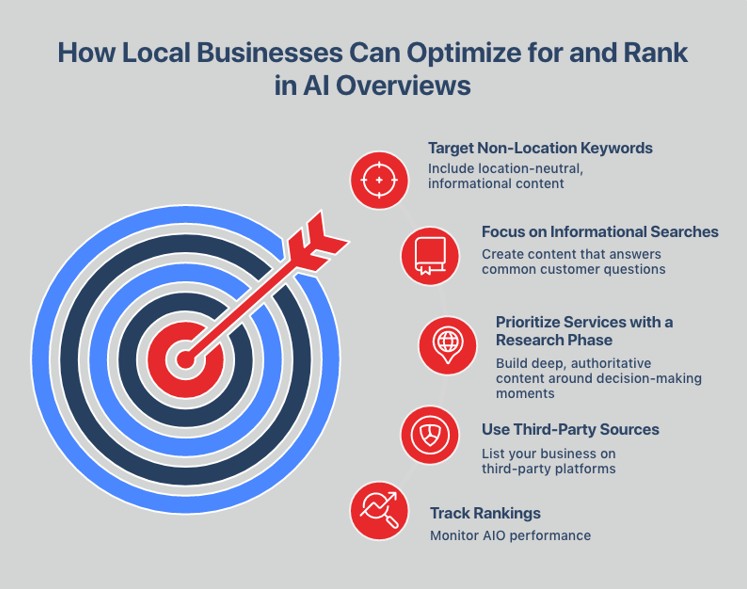
Checking local businesses in AI overviews helps you understand what customers encounter before they visit a website or contact a service provider.
The most useful questions are practical:
- Does the answer mention your business?
- Does it describe your services accurately?
- Does it cite your website or a third-party listing?
- Which other businesses appear?
- Does the result change when you add a neighborhood or service requirement?
A business mention and a website citation are not the same result. Google might mention the company while linking to a directory, or cite its website for information without recommending the company.
Keeping those outcomes separate makes your reporting more useful. It also prevents a single appearance from being treated as consistent visibility.
Use these checks alongside website performance data. Google includes traffic from AI Overviews and AI Mode within the Web search type in Search Console, rather than providing a standalone business-recommendation report.
How to Check If a Local Business Appears in AI Overviews
The best manual process uses a repeatable query list and clear records. Start with a small set of customer-focused searches, then expand once you understand the results.
Step 1: Create a List of Local Search Queries
Build the list around the services customers need, not just the company name.
For a dental practice, your starting queries might include:
- “dentist in Manhattan”
- “emergency dentist near me”
- “dental clinic in [neighborhood]”
- “dentist for nervous patients in [city]”
- “how much does teeth cleaning cost in [city]?”
- “where can I get a same-day dental appointment in [city]?”
Group searches by intent:
| Query Group | Purpose |
| Brand searches | Check information about a named business |
| Service searches | Check discovery for a specific service |
| Comparison searches | See which businesses appear among potential options |
| Cost questions | Check visibility for pricing-related information |
| Availability searches | Test questions about appointments or opening hours |
| Neighborhood searches | Compare visibility across service areas |
When checking local businesses in AI overviews, keep branded and non-branded searches in separate groups. Appearing for your own name answers a different question from appearing when a customer has not chosen a provider.
Step 2: Search Google With AI Overviews Enabled
Open Google Search in a supported country and language, then run each query. You do not need to activate an experimental setting for standard AI Overviews. Google shows them automatically when its systems determine they are useful.
Record the conditions of each test:
- Exact query
- Date and time
- Desktop or mobile
- Search language
- Whether you are signed in
- Your physical location and any location shown by Google
- Whether an AI Overview appeared
An incognito window can provide a separate signed-out check, but do not treat it as a location-neutral search. Google can still use available location information when determining local results.
For comparison, test both an explicit city query and a “near me” query. Do not assume they represent the same search conditions.
Step 3: Check Whether the Business Is Named or Cited
Read the full answer and expand it where necessary.
Use separate labels for each outcome:
| Outcome | Meaning |
| Named | The business appears in the answer text |
| Recommended | The answer presents it as a relevant option |
| Website cited | A supporting link points to the business’s website |
| Third-party mention | A supporting source discusses the business |
| Absent | The business does not appear in the answer |
| No AI Overview | Google did not generate an overview for that query |
This distinction matters when measuring local businesses in AI overviews. A citation to an educational article does not automatically mean the business was recommended.
Save a screenshot and the relevant text. If the answer includes an ordered list, record the business’s position in that answer, not its position in the entire search results page.
Step 4: Review the Sources Cited in the AI Overview
Open the supporting links and inspect the exact pages.
Record:
- The domain and page URL
- Whether it belongs to the business
- Which statement it supports
- Whether the information is current
- Whether the page names the business or only explains the service
Google’s AI features provide supporting links, and eligible pages must be indexed and able to appear in Search with a snippet.
Source review gives context to the appearance. For example, a business mentioned through a local directory has a different source relationship from one whose service page is cited directly.
Step 5: Compare the Business With Competitors
Compare the businesses appearing in the same answer, using the same query and search conditions.
Look at:
- Services described in the answer
- Locations or neighborhoods mentioned
- Supporting URLs
- Whether businesses are listed in order
- Ratings or review counts, if included
- Whether the business’s own website is cited
Use this comparison to identify information worth reviewing, not to assume you have found Google’s selection formula.
Google documents relevance, distance, and prominence as factors in local results. Those factors provide useful local SEO context, but they are not a published scoring system for AI Overview recommendations.
Step 6: Track Results Over Time
A single search provides a snapshot. A repeatable series of checks gives you a more useful record.
Choose a schedule that fits your business, such as weekly testing for a focused query set or monthly testing for a broader audit. Keep the wording, platform, and location settings consistent.
For local businesses in AI overviews, record two separate measures:
- How often the query produces an AI Overview.
- How often the business appears within the generated overviews.
For example, if 20 checks produce 12 overviews and the business appears in six, its appearance rate among generated overviews is 50%. Its appearance rate across all checks is 30%.
Label the denominator so readers know what the percentage measures.
What to Record in Your AI Overview Tracking Sheet
Use one row per query, platform, location, and test date.
| Field | What to Record |
| Query | The exact wording entered |
| Query category | Brand, service, comparison, cost, or availability |
| Platform | Google AI Overview, AI Mode, ChatGPT Search, or Perplexity |
| Date and time | When the check took place |
| Location | Actual location and any location specified in the query |
| Device | Desktop or mobile |
| AI Overview present | Yes, no, or not applicable |
| Business named | Yes or no |
| Recommendation position | Position in an ordered answer, if applicable |
| Own website cited | Exact URL, if present |
| Third-party sources | Relevant supporting URLs |
| Other businesses | Names included in the same response |
| Evidence | Screenshot or saved answer |
| Next action | Information to review or update |
Avoid entering zero as a rank when the business is absent. Use “not present” instead. If the answer has no ordered recommendations, mark the position as “not applicable.”
This keeps the tracking sheet for local businesses in AI overviews easier to interpret.
How to Check Other AI Search Engines
Other AI platforms can provide a broader picture of business discovery. Their results should supplement your Google checks, not be counted as Google AI Overview appearances.
Google AI Mode
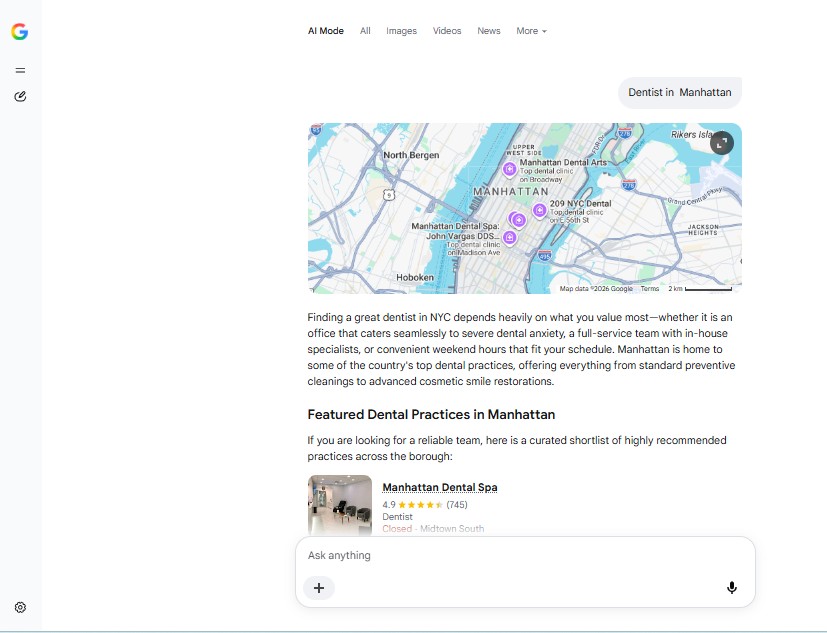
Google AI Mode supports more detailed questions and follow-up conversations. It can break a question into subtopics and search for relevant information across them.
Start with the same query you used in Google Search. Then test a more specific question, such as:
“Find dental clinics in Manhattan that offer emergency appointments and explain what information I should confirm before booking.”
Record the first answer separately from follow-up responses. Added requirements change the task and may change the businesses included.
AI Mode is useful for examining longer comparison questions, while regular Google Search remains the place to check whether an AI Overview appears.
ChatGPT Search
ChatGPT Search can look up current web information and include citations. It can also use approximate IP-based location, with optional device location sharing available through its settings.
For a repeatable check:
- Open a new conversation.
- Select Search from the available tools.
- Enter the service and city explicitly.
- Record the businesses named.
- Open the citations and inspect the supporting pages.
Starting a new conversation helps keep previous instructions out of your test. Record whether location sharing is enabled, since an explicit city prompt and a location-based search are not identical.
ChatGPT Search is a discovery platform, not an automated historical tracker. If you use it manually, you still need to save and compare the results yourself.
Perplexity
Perplexity searches the web and produces answers with numbered citations. It also supports follow-up questions, while its Pro Search and Research options provide more extensive research workflows.
For local testing, enter a clear service and location:
“Which dental clinics in Manhattan offer emergency care? Include sources for the services described.”
Check whether each citation supports the statement beside it. Record the search mode, because a standard search and a longer Research request represent different testing conditions.
Perplexity is particularly useful for inspecting the source trail behind an answer. Keep those findings separate from your report on local businesses in AI overviews.
How to Check Local Businesses in AI Overviews With Radarkit
Manual checks help you understand individual answers. Radarkit adds scheduled monitoring and a structured record across supported AI platforms.
What Is Radarkit?
Radarkit is an AI search visibility platform that monitors Google AI Overviews, Google AI Mode, ChatGPT, Microsoft Copilot, Perplexity, and Gemini. Its plans include competitor monitoring, local business tracking, historical data, and reporting features.
Its local tracking feature uses AI interfaces directly rather than relying only on API-generated answers. That approach is relevant when you want to observe responses from the interfaces customers use.
For this workflow, Radarkit’s main value is repeatability: tracking a defined set of prompts rather than manually rebuilding the same checks each time.
Use Radarkit Local Radar for Local Visibility
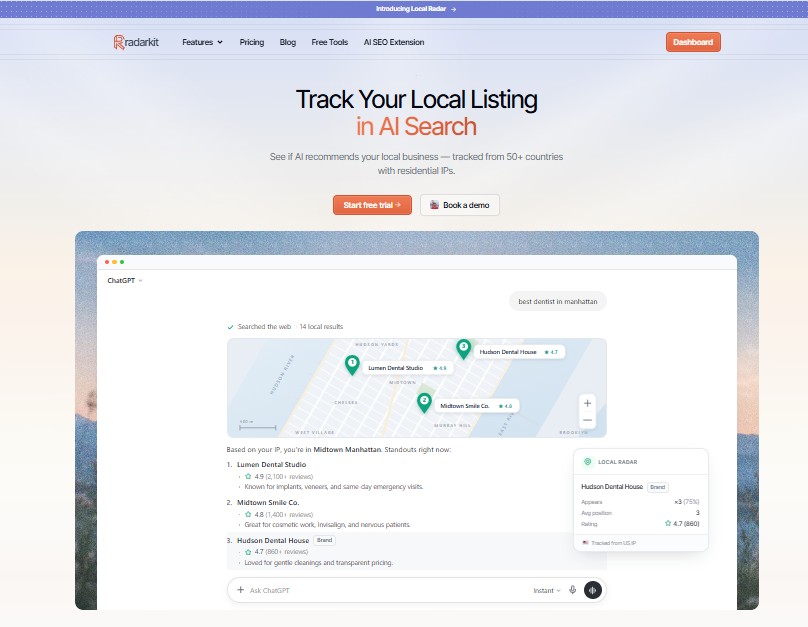
Local Radar measures how often a business appears in local AI answers, its position, and the other businesses recommended. It also presents ratings and review counts for comparison.
These measures answer different questions:
- Appearance rate: How frequently was the business recommended?
- Average position: Where did it appear in answers with measurable positions?
- Competitor appearances: Which other businesses were included?
- Rating and review information: What business details accompanied the recommendations?
Confirm the geography available in your subscription. Radarkit lists local business tracking on all plans, but its plan comparison reserves state and city-level tracking for Enterprise. The standard plans list 50+ countries or locations.
That distinction is important before choosing a plan for neighborhood-specific monitoring.
Set Up Local Prompts in Radarkit
Use your manual query list as the starting point for tracked prompts.
A focused set might include:
- “dentist in [city]”
- “emergency dental clinic in [city]”
- “dentist for children in [city]”
- “dental clinic open on weekends in [city]”
- “[business name] dental services”
Keep prompts short enough to represent realistic searches. Add requirements only when customers are likely to use them.
Use consistent wording across reporting periods. If you change a prompt substantially, treat it as a new test rather than assuming its results are directly comparable.
Review Business Mentions, Rankings, and Competitors
Local Radar shows appearance rate, ranking position, and businesses recommended for your prompts. Its competitor comparisons include positions, ratings, reviews, and appearances.
Read these figures together. A business might appear frequently but lower in ordered lists, while another appears less often but closer to the top.
For local businesses in AI overviews, the underlying answer still matters. Review whether the business is a main recommendation, a passing mention, or part of a broader explanation.
Do not interpret an average AI recommendation position as a Google Maps ranking.
Analyze Citations and Sources
Use source review to understand where the answer’s business information comes from.
For each relevant response, distinguish between:
- A citation to your service page
- A citation to your homepage
- A third-party listing about your business
- A general article explaining the service
Follow the linked evidence where available, and verify it against the recorded answer. Google’s supporting links can vary between AI Overviews and AI Mode, so maintain platform-specific source records.
The purpose is to understand the connection between a mention and its evidence, not to assume that securing a link from one domain will guarantee inclusion.
Track Local AI Visibility Over Time
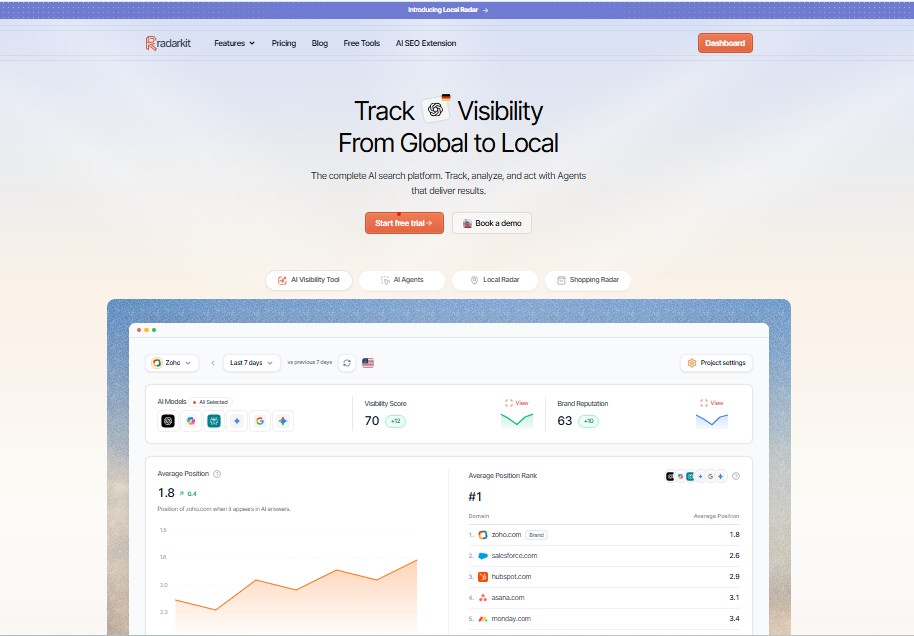
Radarkit’s scan frequency depends on the plan. Lite rescans prompts every 72 hours, while Growth and Pro provide daily scans. Historical data is included across the plans.
The current subscription options are:
| Plan | Monthly Price | Projects | Tracked Prompts | Scan Frequency |
| Lite | $29 | 2 | 15 | Every 72 hours |
| Growth | $79 | 5 | 50 | Daily |
| Pro | $139 | 10 | 100 | Daily |
| Enterprise | Custom annual pricing | Unlimited | Custom | Daily or weekly |
These are Radarkit’s listed prices and limits at the time of review. It also offers a seven-day trial.
Choose the plan around your prompt set, project count, geography, and reporting needs. A focused single-business audit does not require the same capacity as an agency monitoring several clients.
Radarkit vs. Manual AI Overview Checks
| Factor | Manual Checks | Radarkit |
| Main purpose | Inspect individual results | Repeat and organize ongoing monitoring |
| Scheduling | You run each check | Scheduled scans depend on the plan |
| Historical record | Screenshots and spreadsheets | Historical data included |
| Platforms | Open and test each separately | Six supported AI platforms |
| Competitor comparison | Record businesses manually | Competitor monitoring included |
| Geographic control | Document your own search conditions | Country/location coverage varies; state and city tracking is Enterprise |
| Reporting | Build your own report | Branded PDF reports and client portal included |
Radarkit’s automated monitoring, platform coverage, reporting, and geographic plan distinctions are documented in its subscription features.
Manual checks remain useful for understanding a specific answer. Radarkit is the more practical option when the same checks need to be repeated and reported consistently.
Use Radarkit for Multi-Platform AI Tracking
Radarkit includes ChatGPT, Google AI Mode, Google AI Overviews, Copilot, Perplexity, and Gemini across its plans.
Use that coverage to compare platforms without combining them into one unclear total. A business recommended by ChatGPT has gained visibility there, but that does not establish a Google AI Overview appearance.
For local businesses in AI overviews, keep Google’s overview results as the primary report. Use the other platforms to identify broader patterns in mentions, sources, and recommendations.
Why a Business May Not Appear in AI Overviews
First, check whether Google generated an overview at all. AI Overviews often do not trigger, and an absent overview is not evidence that the business has an eligibility problem.
If an overview appears but does not include the business, review relevance, information quality, and technical eligibility without assuming any single change guarantees inclusion.
Incomplete or Inaccurate Google Business Profile
Google recommends complete, accurate Business Profile information. Detailed information helps it understand a business and match it to relevant local searches.
Review the business category, services, address or service area, phone number, website, and opening hours.
Google also recommends keeping Business Profile information current as part of the foundational practices for AI search features. This supports accurate discovery, but it is not a guaranteed route into an AI Overview.
Weak or Inconsistent Local Citations
Here, a local citation means an online business listing, not a supporting link inside an AI answer.
Review important listings for consistent business details. If a business has moved, changed its phone number, or updated its name, prioritize the listings customers are likely to encounter.
Google explains that information across the web, including links, articles, and directories, can contribute to local prominence. It does not provide a required citation count for AI Overview inclusion.
Too Few or Poor-Quality Reviews
Review information provides useful context about a business. Google states that more reviews and positive ratings can help local ranking, and recommends helpful responses to customer feedback.
Focus on genuine reviews from customers who have used the service. Respond professionally and use recurring feedback to improve the information you provide.
There is no documented minimum review count that guarantees local businesses in AI overviews will be selected. Local ranking guidance should not be presented as an AI Overview formula.
Website Pages Do Not Answer Local Questions Clearly
A service page should explain what the business offers, where it operates, and what a customer needs to know before making contact.
Useful details might include:
- Services available
- Areas served
- Opening hours
- Appointment process
- Cost factors
- Relevant qualifications
- Contact information
Google recommends helpful, reliable, people-first content and making important information available in text. It does not require a special AI writing format or AI-specific schema.
Clear answers make the website more useful for customers without needing to repeat the same keyword in every paragraph.
Technical Issues Preventing Indexing or Snippets
A page must be indexed and eligible to appear with a snippet to qualify as a supporting link in Google’s AI features.
Review:
- Whether Googlebot can access the page
- Whether the page is indexed
- Any noindex or nosnippet directives
- Whether important content is available in text
- Internal links to relevant service pages
Search Console’s URL Inspection tool helps diagnose access and indexing issues. Meeting the requirements makes a page eligible, but Google does not guarantee that it will be indexed or included in an AI answer.
Final Verdict: Best Tools to Choose for Local Businesses in AI Overviews
Radarkit is the best overall choice among the options covered here for ongoing local AI visibility monitoring. Its combination of scheduled scans, local business metrics, competitor monitoring, historical records, and six-platform coverage makes it a better fit for repeatable reporting than checking each answer engine manually.
Each option still has a clear role:
| Option | Best Use |
| Google Search | Confirm whether an AI Overview appears and inspect its answer |
| Google AI Mode | Test detailed questions and follow-up comparisons |
| ChatGPT Search | Examine search-backed recommendations and citations |
| Perplexity | Review cited answers and supporting sources |
| Radarkit | Monitor recurring prompts and compare results over time |
The strongest workflow combines Radarkit’s ongoing monitoring with occasional manual checks. Use the recorded data to spot changes, then inspect individual answers to understand them.
Before subscribing, match the plan to your location requirements. Local business tracking is included across Radarkit’s plans, while state and city-level tracking is listed under Enterprise.
FAQs
How Do I Check Local Businesses in AI Overviews?
Search customer-focused service and location queries in Google. If an AI Overview appears, record whether it names the business, recommends it, or cites a relevant page. Save the supporting links and repeat the same checks over time.
Can I Turn On AI Overviews for Every Search?
No. Google decides when an AI Overview is useful for a query. Availability does not mean every search will produce one.
Is Appearing in Google Maps the Same as Appearing in an AI Overview?
No. A map placement and an AI-generated summary are different results. Record them separately so your visibility report shows exactly where the business appeared.
Does a Website Need Special Schema to Appear?
Google does not require special AI-specific schema or additional machine-readable files for AI Overviews or AI Mode. Existing SEO fundamentals remain relevant, including indexability, snippet eligibility, and helpful content.
Can Radarkit Track Other AI Platforms?
Yes. Radarkit supports Google AI Overviews, Google AI Mode, ChatGPT, Microsoft Copilot, Perplexity, and Gemini across its plans.
How Much Does Radarkit Cost?
Lite costs $29 per month, Growth costs $79 per month, and Pro costs $139 per month. Enterprise has custom annual pricing. Prompt limits, scan frequency, project capacity, and geographic controls differ by plan.
Does Radarkit Guarantee AI Overview Inclusion?
Monitoring does not guarantee inclusion. Radarkit records visibility and comparisons, while Google determines which answers and supporting links it shows. Google states that meeting its requirements does not guarantee indexing or serving content.
How Often Should I Check Local Businesses in AI Overviews?
Use a schedule you can maintain consistently. Weekly checks suit a focused manual audit, while automated scans can provide a more frequent record. Radarkit Lite scans every 72 hours, and Growth and Pro scan daily.
