

Checking local visibility in google AI mode starts with a straightforward question: does Google recommend your business when someone asks for the services you offer in your area? A useful audit records more than whether your name appears. It also checks the context, supporting links, competing businesses, and accuracy of the information shown.
For example, a dental clinic might appear for “dentist in Manhattan” but not for “dentist in Manhattan offering evening appointments.” Those are different customer needs, so they deserve separate tests.
This guide explains how to run those checks manually, measure the results, and use Radarkit for ongoing monitoring. The goal is a repeatable process that turns search observations into useful business decisions.
What Local Visibility Means in Google AI Mode
Local visibility in google AI mode describes how often, and in what context, your business appears in AI-generated answers to location-based questions. It includes business recommendations, mentions, supporting website links, and local business information.
AI Mode can explore complex questions through multiple related searches, then provide responses with supporting links. That makes a single keyword check less useful than a set of prompts covering your services and customer needs.
Google AI Mode vs. Traditional Local Search
Traditional local search lets customers compare website listings, map results, and business profiles. AI Mode adds an answer-led experience where people can ask detailed questions and explore their options.
A customer might search for “physiotherapist near me” in traditional Search. In AI Mode, they might ask for a nearby physiotherapist who treats sports injuries and offers appointments after work.
AI Mode is particularly useful for deeper exploration, reasoning, and comparisons. Your audit should therefore include both short searches and detailed customer questions.
Brand Mentions, Citations, and Local Pack Results
Keep these three types of visibility separate:
| Visibility type | What it means | What to record |
| Brand mention | Your business is named in the answer | Name, context, and whether it is recommended |
| Website citation | A supporting link points to your website | Linked URL and the information it supports |
| Local or map placement | Your business appears in a local listing format | Position, business details, and listing format |
A business mention does not automatically mean your website received a citation. Likewise, a strong Maps position should not be recorded as an AI Mode recommendation unless the business actually appears in that answer.
Why AI Visibility Matters for Local Businesses
AI Mode gives people another way to compare local services before contacting a business. Someone can ask about availability, location, suitability, or specific service requirements within the same search experience.
Checking local visibility in google AI mode helps you understand whether your business appears for those needs. It also reveals whether the answer describes your services accurately.
Treat visibility as one part of the customer journey. Pair it with enquiries, bookings, calls, and website activity rather than assuming every mention produces a customer.
Before You Start: Set Up Your Visibility Check
A useful audit needs a consistent prompt list, clear locations, and a simple recording system. Set those up before testing local visibility in google AI mode.
Choose Your Target Location and Service Area
List the places where you actually serve customers. Start with your main city, then add relevant neighbourhoods or nearby towns.
For an Manhattan-based business, your test groups might include:
- Manhattan-wide searches.
- Searches naming a specific neighbourhood.
- Searches near a useful landmark.
- Nearby areas within your genuine service coverage.
Separate a location named in the prompt from the searcher’s actual location. Google considers distance in local results, including what it knows about the customer’s location when none is provided.
Create a List of Customer Questions
Build prompts around your services, not just your business category.
A starting set could include:
| Search intent | Example prompt |
| General discovery | “Dentists in Manhattan” |
| Specific service | “Where can I get dental implants in Manhattan?” |
| Practical requirement | “Which dentists in Manhattan offer evening appointments?” |
| Comparison | “Compare dental clinics in Manhattan for emergency appointments” |
| Branded check | “What services does Example Dental offer in Manhattan?” |
Use questions your customers genuinely ask. A small, relevant prompt set is more informative than a large collection of loosely related keywords.
Select the Right Devices and Search Settings
Choose a repeatable testing setup and record:
- Device type.
- Browser.
- Signed-in or signed-out status.
- Search language.
- Location permission settings.
- Location shown by Google.
- Date and time.
Start each baseline test in a fresh conversation. Test follow-up questions separately so earlier answers do not become an unrecorded part of the experiment.
Private browsing can help separate a session from your usual browser activity, but do not treat it as proof that Google sees a different physical location.
Build a Simple Tracking Spreadsheet
Use one row per prompt, location, and test run.
Recommended columns include:
- Date.
- Exact prompt.
- Prompt location.
- Observed search location.
- Device and session details.
- Business mentioned.
- Business recommended.
- Position, where applicable.
- Website cited.
- Other businesses named.
- Information accuracy.
- Screenshot or saved notes.
This spreadsheet becomes your baseline for local visibility in google AI mode. Keep earlier results so you can compare changes rather than replacing them.
How to Run a Google AI Mode Visibility Test
Use the same testing order each time. Consistency makes changes easier to interpret.
Step 1: Search Your Core Local Queries
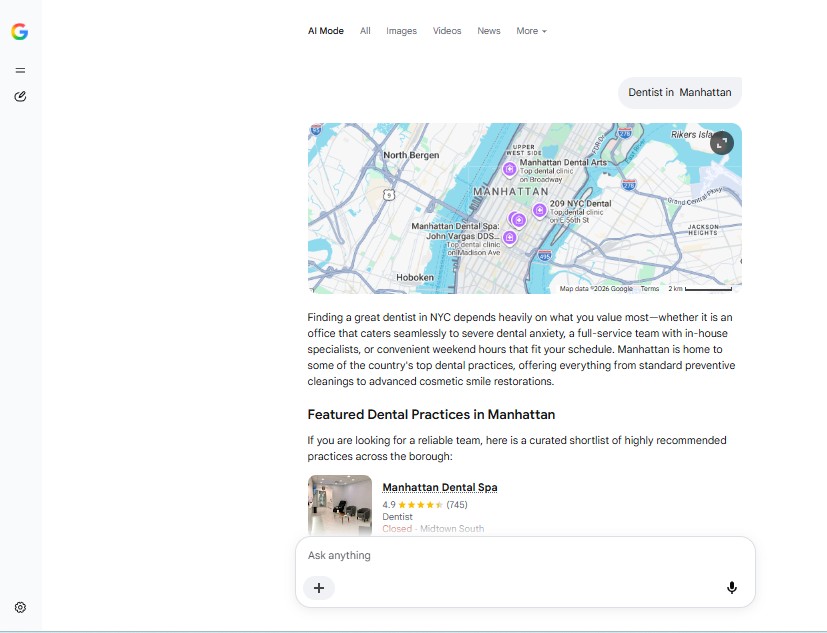
Begin with your main service and location:
- “Dentist in Manhattan.”
- “Emergency plumber in Manhattan.”
- “Wedding photographer in Manhattan.”
Open AI Mode and record the response. Note whether it recommends businesses, explains selection criteria, or asks for more information.
Do not count a response without business recommendations as a technical failure. Record it as a different answer type.
Step 2: Test Question-Based Prompts
Next, add requirements that could influence a customer’s choice.
For example:
- “Which dental clinics in Manhattan offer appointments after 6 pm?”
- “Where can I find a plumber for a leaking kitchen pipe in Manhattan?”
- “Which wedding photographers in Manhattan offer candid photography?”
These tests show whether your local visibility in google AI mode extends beyond broad category searches.
Step 3: Check Branded and Competitor Queries
Run a separate group of branded prompts:
- “What does Example Dental offer?”
- “Where is Example Dental in Manhattan?”
- “Compare Example Dental and another local clinic for appointment availability.”
Use these checks to assess recognition and accuracy. Keep branded results separate from discovery searches because including your name in the question changes what the test measures.
Step 4: Record Whether Your Business Appears
Use clear labels:
- Not mentioned.
- Mentioned without a recommendation.
- Recommended.
- Recommended with a website citation.
- Appearing in a local listing format.
Also record the surrounding wording. A passing mention and a direct recommendation should not receive the same interpretation.
Step 5: Identify the Sources Google Cites
Open relevant supporting links and record the exact destination URLs.
Check whether they lead to:
- Your homepage.
- A service page.
- A location page.
- A directory listing.
- A local article.
- Another business’s website.
AI Mode can draw on multiple related searches when building answers. Examining the linked pages helps you understand which information is visible in the response, without assuming every link explains the complete selection process.
Step 6: Compare Results Across Locations
Repeat your prompt groups for each target area.
Keep two experiments separate:
- Changing the city or neighbourhood named in the prompt.
- Testing from a different observed search location.
Both are useful, but they answer different questions. Writing another city into a prompt does not establish that the test was run from that city.
What to Record in Your AI Visibility Audit
The quality of your records determines how useful the audit becomes. Capture enough detail to explain a result without making the spreadsheet difficult to maintain.
Query and Location
Save the exact wording, including service details and location terms.
Record the prompt location and observed search location separately. This helps you make fair comparisons when reviewing local visibility in google AI mode.
Business Mention or Citation Status
Use separate yes-or-no columns for:
- Business mentioned.
- Business recommended.
- Owned website cited.
Add the citation URL where available. This avoids treating all appearances as the same outcome.
Competitors Appearing in the Answer
Record the other businesses named and their order when the answer provides a clear list.
Notice which prompts each business appears for. A clinic recommended for cosmetic dentistry may not be the same clinic recommended for emergency treatment.
Cited Websites and Directories
Save specific URLs, not just domain names.
A directory category page, business profile, and editorial article can provide different information. Record which page appears and what it says about your business.
Review Signals and Ratings
If the answer includes a rating or review count, record:
- Rating.
- Number of reviews.
- Identified review platform.
- Test date.
- Any difference from the current listing.
Treat these as information to verify, not as proof of a particular AI Mode ranking factor.
Google Business Profile Data Shown
Check details such as:
- Business name.
- Address.
- Telephone number.
- Opening hours.
- Services.
- Website link.
If the answer does not identify the source of a detail, do not automatically attribute it to Google Business Profile. Record the detail and verify it against your current business information.
How to Score Your Local AI Visibility
A simple score helps you track progress, provided the definition remains consistent. It should support the audit, not replace the underlying answers.
Simple AI Visibility Score Formula
Use an internal recommendation rate:

If your business is recommended in 8 of 20 valid answers, the recommendation rate is 40%.
Also track mention rate and owned-site citation rate separately. For a balanced view of local visibility in google AI mode, report the test count alongside every percentage.
Define “valid” before testing. Exclude failed runs, but record successful answers that do not recommend any business.
Visibility Score Benchmarks
Use your own baseline rather than an assumed industry standard.
| Comparison | What it helps you understand |
| Current month vs. previous month | Direction of change |
| One service group vs. another | Coverage across customer needs |
| One location vs. another | Differences between target areas |
| Your business vs. named competitors | Relative appearances within the same sample |
A score of 50% means your business appeared in half of the measured answers under your chosen definition. It does not establish a market-wide visibility level.
When to Treat a Drop as a Problem
Investigate a decline when it repeats under comparable conditions.
Before making changes, confirm that:
- The prompt list stayed the same.
- Locations were comparable.
- Test volume was sufficient.
- Runs completed successfully.
- The decline affected commercially useful questions.
One changed answer is a reason to retest. A repeated decline across important prompts is a reason to review the underlying information.
Common Reasons Your Business Is Missing
An absent recommendation does not identify its cause. Use the following areas as a review checklist, not a confirmed diagnosis of Google’s AI Mode selection process.
Incomplete or Inconsistent Business Information
Compare your name, address, telephone number, hours, and services across your website and key listings.
Complete, accurate Business Profile information helps Google understand a business and match it to relevant local searches.
Weak Google Business Profile Signals
Review whether your profile clearly describes the services customers are searching for.
Google’s local ranking guidance focuses on relevance, distance, and prominence. Those principles are useful background for local business audits, but they should not be presented as a complete AI Mode ranking formula.
Few Relevant Reviews or Low Review Activity
Reviews can provide helpful information about customer experiences.
Review count and positive ratings can help local ranking. There is no specific review threshold that guarantees an AI Mode recommendation.
Limited Mentions on Trusted Local Sources
Look for accurate business coverage in relevant directories, professional associations, and local publications.
Links and other evidence of how well-known a business is can support local prominence. Use relevant mentions to strengthen your business information across the web, without promising a particular AI result.
Thin or Unhelpful Website Content
A service page should explain what you offer, where you offer it, and how customers can take the next step.
Pages must be indexed and eligible for a Search snippet to appear as supporting links in AI features. Helpful content and standard technical SEO remain relevant.
How to Improve Visibility After the Audit
Turn findings into specific tasks. Improving local visibility in google AI mode starts with making your business easier to understand and your information more useful.
Fix Core Business Information First
Correct outdated contact details, hours, addresses, and service descriptions.
Prioritize information that customers need to contact you or decide whether your service fits their requirements. Keeping Business Profile information current also supports Google’s AI search features.
Optimize Your Google Business Profile
Choose accurate categories, add genuine services, and maintain opening hours.
Complete information helps Google understand your business’s relevance to local searches. Avoid adding services or locations you do not actually cover.
Create Pages That Answer Local Questions
Use your audit to identify unanswered customer needs.
For example, an emergency plumbing page could explain:
- Problems the business handles.
- Areas served.
- Appointment arrangements.
- What customers should prepare before calling.
Keep location pages distinct and useful. Helpful, reliable, people-first content remains more important than special AI-only formatting or markup.
Earn Mentions From Local and Industry Sources
Pursue relevant opportunities such as association profiles, community partnerships, and genuine local coverage.
Start with sources that already appear in your audit, then assess whether they fit your business. A relevant mention is worthwhile because it gives customers accurate information, not because it guarantees a citation.
Manage Reviews and Customer Questions
Invite customers to share honest feedback and respond professionally.
Use recurring questions to improve your service pages and profile information. Reviews support local ranking, but tracking should confirm whether your local visibility in google AI mode changes after your broader improvements.
Add Photos, Services, and Location Details
Include useful photographs, clear service descriptions, and practical location information.
Photos and videos help customers understand a business, while website text provides useful context. These additions support customers, without guaranteeing AI inclusion.
How Often to Check AI Mode Visibility
Choose a schedule that you can maintain. A consistent modest audit is more useful than an occasional large one with changing conditions.
Recommended Testing Frequency
A practical starting schedule is:
- Weekly checks for your most important prompts.
- Monthly reviews of the full prompt set.
- Additional checks after major business or website changes.
This is a suggested workflow, not a Google requirement. Increase frequency when you need closer monitoring of local visibility in google AI mode.
Metrics to Track Monthly
Review:
- Recommendation rate.
- Mention rate.
- Owned-site citation rate.
- Average position where meaningful.
- Visibility by service.
- Visibility by location.
- Business information accuracy.
- Enquiries and bookings.
Keep visibility metrics separate from business outcomes, then look for useful relationships between them.
When to Re-run a Full Audit
Repeat the full audit after changes such as:
- Opening or moving a location.
- Adding a major service.
- Updating important service pages.
- Changing appointment availability.
- Completing substantial profile corrections.
Retain the previous prompt set for comparison. Add new prompts as a separate group so your baseline remains understandable.
How to Check Local Visibility With Radarkit
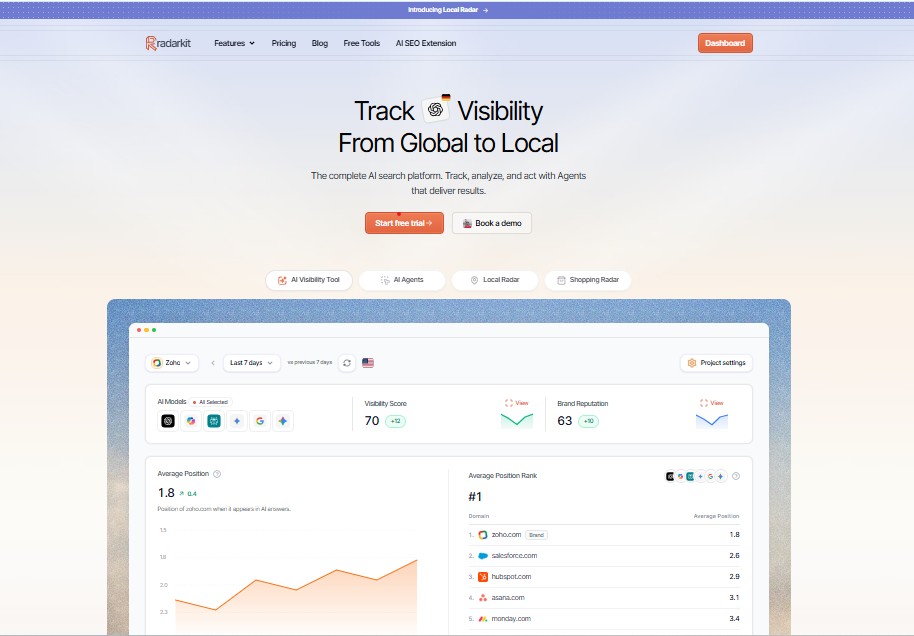
Radarkit offers a way to move from individual observations to ongoing tracking. Its Local Radar monitors business recommendations, appearance rate, position, ratings, and competing businesses.
What Is Radarkit?
Radarkit is an AI search visibility platform covering Google AI Mode, Google AI Overviews, ChatGPT, Gemini, Perplexity, and Microsoft Copilot.
It runs prompts through real AI chat interfaces and records answers about your business and competitors. That makes it relevant for monitoring local visibility in google AI mode alongside other AI platforms.
Why Use Radarkit for Local AI Visibility?
Local Radar brings several useful measurements into one place:
- How often your business is recommended.
- Where it appears in an answer.
- Which other businesses are recommended.
- Ratings and review counts shown.
- Changes across repeated runs.
Radarkit describes city-level testing through residential IPs in the selected city. However, its current plan comparison reserves state- and city-level tracking for Enterprise. General local business tracking is included across plans, so plan selection matters when precise location testing is required.
Radarkit vs. Manual Google AI Mode Testing
| Area | Manual testing | Radarkit |
| Main use | Detailed spot checks | Repeatable ongoing monitoring |
| Answer review | Read and save each response yourself | Captures responses through real AI interfaces |
| Competitor tracking | Record businesses manually | Compares recommendation appearances and positions |
| Historical comparison | Maintain a spreadsheet | Historical data included |
| Location control | Document the observed search location | Residential-IP city testing on Enterprise |
| Starting cost | No tracking subscription needed | Lite starts at $29/month |
Radarkit’s interface-based testing, Local Radar metrics, historical data, pricing, and location allowances support these distinctions.
Manual testing is useful when you want to inspect a few answers closely. Radarkit is the stronger fit when checking local visibility in google AI mode becomes a recurring task across multiple prompts or businesses.
Local AI Visibility Checklist
Use this checklist to keep each audit comparable.
Pre-Test Checklist
- Define your real service areas.
- Create discovery, service, and branded prompt groups.
- Record device, language, session, and location settings.
- Define what counts as a recommendation.
- Prepare your spreadsheet or tracking project.
Audit Checklist
- Run the same baseline prompts.
- Save complete answers or screenshots.
- Record mentions and citations separately.
- Note other recommended businesses.
- Verify ratings and contact details.
- Keep AI Mode results separate from other platforms.
Optimization Checklist
- Correct outdated business information.
- Keep your Business Profile current.
- Improve useful service and location content.
- Review indexing and snippet eligibility.
- Request honest customer feedback.
- Retest comparable prompts after changes.
Current Business Profile information, helpful content, and standard technical eligibility all support AI search features.
Final Verdict: Check Local Visibility in Google AI Mode.
For the ongoing monitoring workflow covered in this guide, Radarkit is the best overall choice over relying on manual checks alone. It combines real-interface testing, local recommendation tracking, appearance rate, position, and competitor comparisons in one platform. That recommendation reflects this workflow, not an independent ranking of every tool available.
Plan fit is important. Lite starts at $29 per month for general tracking, while state- and city-level tracking requires Enterprise. Choose based on the location precision and prompt volume your audit needs.
The most useful approach is to combine close manual inspection with consistent tracking. Measure local visibility in google AI mode, correct meaningful information gaps, and compare the same customer questions over time.
FAQs
Can Google Search Console Track AI Mode Visibility?
Yes. Google introduced generative AI performance reports covering website impressions within features such as AI Mode and AI Overviews. These insights rolled out worldwide by August 31, 2026.
The reports provide website-level information such as impressions, pages, countries, devices, and dates. They are not a complete audit of unlinked business mentions, local recommendations, or competing businesses in individual answers. Use them alongside prompt-based testing.
How Is AI Mode Different From AI Overviews?
AI Overviews provide an AI-generated summary within Search when Google determines it is useful. AI Mode supports deeper questions, exploration, reasoning, and comparisons.
The two features can use different models and techniques, so their answers and supporting links can differ. Record them separately when auditing local visibility in google AI mode.
Do Reviews Affect Google AI Mode Results?
Google confirms that review count and positive ratings can help traditional local ranking. That does not establish a specific review formula for AI Mode recommendations.
Keep reviews genuine, verify any ratings shown in answers, and measure results after broader business-information improvements. No review count guarantees inclusion.
How Long Does It Take to Improve AI Visibility?
There is no guaranteed timeline. Crawling and processing changes can take anywhere from several days to several months, depending on the page and its refresh frequency.
Keep testing comparable prompts after updates. Look for sustained improvements across relevant searches rather than expecting one edit to produce an immediate change.
