

Checking local business mentions in ChatGPT starts with a simple question: does your business appear when someone asks for a service in your area? To measure local business mentions in ChatGPT, test customer-style prompts, save the responses, and compare results over time.
When checking local business mentions in ChatGPT, a business name in an answer is only part of the picture. You also need to know whether ChatGPT recommends the business, links to a supporting source, and describes its services correctly.
This guide covers a repeatable manual process and a paid tracking option, RadarKit. Its Local Radar feature monitors business appearances, positions, and competitors in local AI answers, while its broader platform records responses and analyzes citations.
What Does a ChatGPT Mention Mean for a Local Business?
The difference between a mention, citation, and recommendation
For your tracking log, treat these as three separate outcomes:
| Outcome | What to record | Example |
| Mention | Your business is named | “ABC Dental operates in this area.” |
| Citation | An answer links to a supporting source | ChatGPT links to your service page or directory listing. |
| Recommendation | Your business is presented as an option for the customer | “ABC Dental is an option for emergency appointments.” |
A citation does not automatically mean your business was recommended. Likewise, a recommendation may appear without a link to your own website.
Why ChatGPT’s local answers can change
The location and context behind a question matter. ChatGPT may use an approximate location, optional device location, and relevant saved memories when answering local questions.
That makes “Find a dentist near me” a different test from “Find a dentist in Aurangabad.” For a clearer comparison, name the location and keep your testing settings consistent.
What a visibility check can—and can’t—tell you
A local business mentions in ChatGPT check tells you what appeared in the responses you collected. It can show whether your business was named, how it was described, which competitors appeared, and what sources were linked.
Tracking local business mentions in ChatGPT does not measure every customer’s experience, total demand, or revenue from ChatGPT. Label your results as a sample of tracked prompts, not a universal ranking.
What You’ll Need Before You Start
Your business name, services, and service areas
Prepare a short reference sheet with:
- Your trading name and common name variations.
- Your website address.
- Your main services.
- Your address or service areas.
- Your current phone number and opening hours.
- Any important appointment or eligibility requirements.
Use this sheet to assess accuracy. Keep it separate from discovery prompts so you do not accidentally tell ChatGPT which business to include.
A list of local competitors
To compare local business mentions in ChatGPT, choose a small group of businesses that serve similar customers in the same area. Start with three to five, then add businesses that repeatedly appear in your collected answers.
The goal is comparison, not criticism. You want to understand which providers appear for each service and location.
A spreadsheet or tracking template
Use one row per response. A practical template includes:
| Field | What to enter |
| Test date | Date and time |
| Exact prompt | The question as submitted |
| Target location | City, neighborhood, or service area |
| Test settings | Personalization, location permissions, and search status |
| Business mentioned | Yes or no |
| Business recommended | Yes or no |
| Position | Number in an ordered list, if present |
| Citations | Linked pages or domains |
| Accuracy notes | Correct and incorrect details |
| Competitors | Other businesses named |
| Saved response | Screenshot or copied answer |
This gives your local business mentions in ChatGPT a consistent record instead of a collection of screenshots with missing context.
A fresh ChatGPT session
For consistent local business mentions in ChatGPT tests, start each independent test in a new conversation. Avoid continuing a chat that already contains your business name.
Also review personalization settings. Choose an unpersonalized option when available to reduce the influence of memories, custom instructions, and other personal context. Interface options can differ, so record the settings you actually used.
How to Check Whether ChatGPT Mentions Your Business
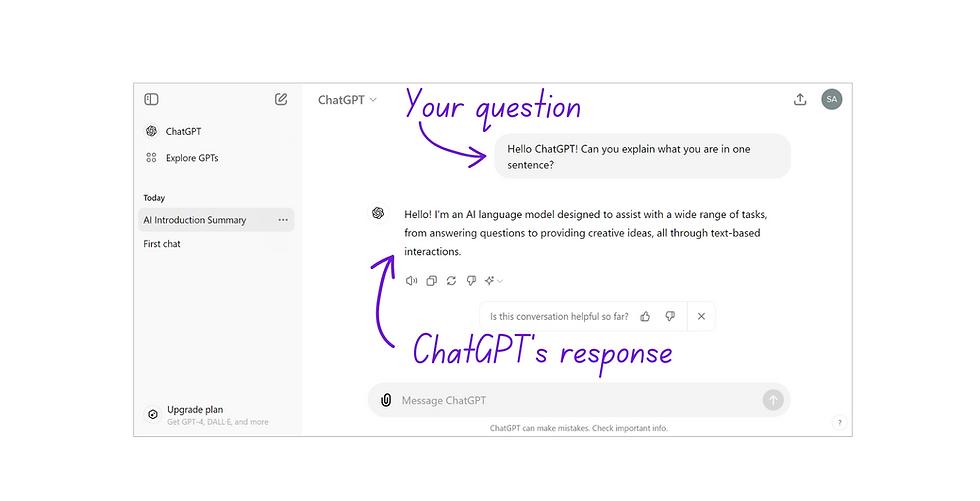
Step 1: Write prompts local customers might ask
Start with customer needs, not your brand.
For a plumbing company, your first prompts might be:
- “Which plumbers handle leaking pipes in Aurangabad?”
- “Who offers bathroom plumbing repairs in Aurangabad?”
- “What are some local plumbers for a residential repair?”
Keep each question focused on one service or decision when measuring local business mentions in ChatGPT. A narrow prompt makes the result easier to interpret.
Step 2: Include the service and location
For useful local business mentions in ChatGPT results, name both the service and area:
“Which dental clinics offer emergency appointments in [city]?”
Then create a separate prompt for a relevant neighborhood:
“Which dental clinics offer emergency appointments near [neighborhood]?”
Do not treat city-level and neighborhood-level prompts as identical tests. Record them separately.
Step 3: Test discovery prompts and brand-name prompts separately
Discovery prompts do not name your business:
“Which accountants help small businesses in [city]?”
Brand-name prompts do:
“Does [business name] provide bookkeeping for small businesses in [city]?”
The first prompt tests local business mentions in ChatGPT whether the business appears without being supplied in the question. The second checks how ChatGPT understands and describes a named business.
A response to a branded prompt should not count toward your unprompted discovery rate.
Step 4: Repeat each prompt
For a practical local business mentions in ChatGPT baseline, run each core prompt three times in separate conversations. Keep the wording and settings unchanged.
This creates a small baseline. It is not a statistically representative study, but it is more useful than judging visibility from one response.
Step 5: Save the answers and cited sources
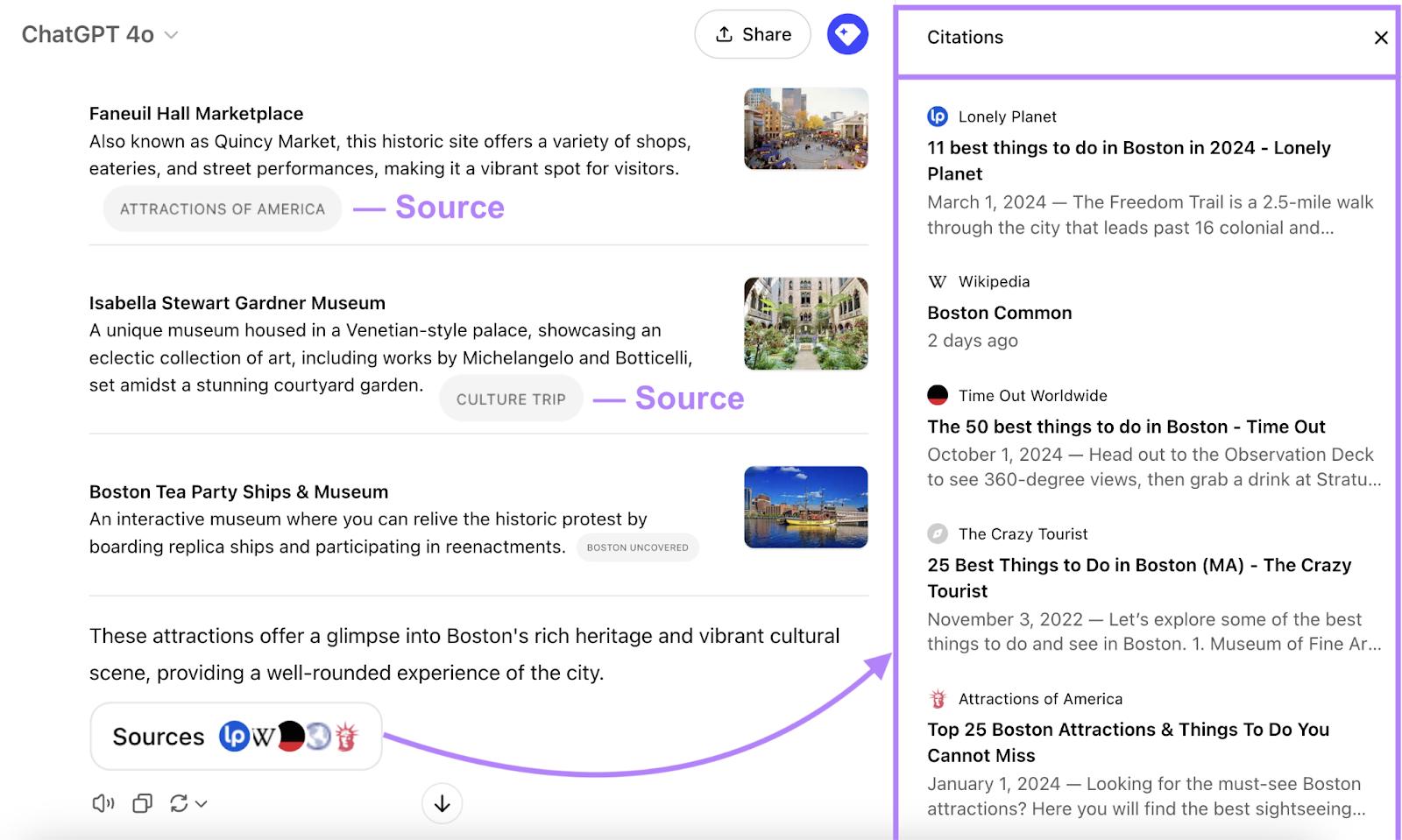
To track local business mentions in ChatGPT, save the full response, not just the sentence containing your business name. Include the prompt, date, ordered list, and links.
When citations appear, open them and inspect the underlying pages. If no citations appear, record “no citations displayed.” Do not assume you know where an unsupported statement originated.
Step 6: Retest on a regular schedule
For tracking local business mentions in ChatGPT manually, choose a schedule you can maintain, such as once a week. Reuse the same core prompt set.
Add new prompts when you introduce services or expand into an area, but keep them separate from the original baseline. That lets you distinguish a change in results from a change in what you tested.
Local ChatGPT Prompts to Test
Prompts for finding a local provider
Use straightforward discovery questions:
- “Who offers [service] in [city]?”
- “Which [business type] serves [neighborhood]?”
- “Find local providers for [service] in [area].”
These prompts are a useful starting point for checking local business mentions in ChatGPT without introducing your business name.
Prompts for comparing businesses
To explore local business mentions in ChatGPT for comparison queries, ask about a clear customer decision:
- “Compare local [business type] in [city] for [specific need].”
- “Which [service] providers in [area] offer weekend appointments?”
- “What should I compare when choosing a [business type] in [city]?”
Keep factual questions separate from subjective preferences. An answer about weekend availability needs verification against current business information.
Prompts about a specific service or customer need
Include the problem a customer is trying to solve:
- “Who repairs commercial air conditioning in [city]?”
- “Which dentists in [area] see patients with dental anxiety?”
- “Who provides bookkeeping for freelancers in [city]?”
Specific prompts can reveal whether your business appears for its actual services, rather than only for a broad category.
Prompts that mention your business by name
Use branded prompts to assess understanding and accuracy:
- “What services does [business name] provide?”
- “Where is [business name] located?”
- “Does [business name] serve [area]?”
- “How does [business name] compare with [competitor] for [service]?”
Do not treat the answer as verified business information until you inspect the details and supporting links.
What to Record in Your ChatGPT Visibility Log
Whether your business was mentioned or recommended
For local business mentions in ChatGPT, create separate yes-or-no columns for mentions and recommendations.
For your own manual log, define a mention rate as:
Mention rate=responses naming your businessresponses tested×100\text{Mention rate} = \frac{\text{responses naming your business}}{\text{responses tested}} \times 100Mention rate=responses testedresponses naming your business×100
If six of 20 discovery responses name your business, your sampled mention rate is 30%. Always include the sample size and keep branded prompts out of that calculation.
Whether ChatGPT cited your website or another source
Record the exact linked page where possible, not only the domain.
Separate citations to your website from citations to a directory, review platform, or local publication. This helps you see where the answer’s supporting information came from.
How your business was described
Capture the words used around the business name. Note services, customer types, appointment options, and reasons given for including it.
For example, “offers emergency repairs” is more useful to a repair company than a general description of its industry. Check whether the description reflects the business accurately.
Whether the information was accurate
Compare the answer with your reference sheet.
Check addresses, phone numbers, opening hours, services, service areas, and any prices quoted. A mention is more useful to a potential customer when the practical details are correct.
Which competitors and sources appeared
Record all relevant businesses in the response. If there is an ordered list, save each position.
If the answer uses an unordered list or a paragraph, mark position as “not ordered.” Do not create a ranking that the answer itself did not provide.
How to Interpret the Results
Your business appears in brand-name searches but not discovery searches
This means the collected branded answers can describe your business, but your discovery tests have not yet shown consistent inclusion.
Keep the two results separate. Review which services and locations produced discovery mentions, then examine the cited information around those answers.
Competitors appear more often than your business
When reviewing local business mentions in ChatGPT, compare businesses across the same prompts, dates, and settings.
Look for differences worth investigating, such as clearly described services or recurring directory entries. A competitor’s frequent appearance gives you a research lead, not proof of which factor caused the result.
ChatGPT mentions your business but gets details wrong
Start with information you control. Review your website and business listings for outdated addresses, hours, or service descriptions.
Then inspect the cited source, if there is one. Search results and citations can be outdated or incorrect, so the answer alone should not be treated as confirmation.
Your website isn’t cited, but other sources are
Record the external pages and check whether they describe the business correctly.
A third-party citation and a direct website citation are different outcomes. Both are worth tracking, but neither automatically proves that the linked page caused the recommendation.
Results vary between repeated tests
For local business mentions in ChatGPT, report the range rather than selecting only the most favorable response.
For example: “The business appeared in four of 12 discovery responses, with positions two through five in ordered lists.” That is clearer than saying it “ranks second in ChatGPT.”
Keep your testing context visible, because personalization and location can influence local search responses.
How to Find the Sources Behind ChatGPT’s Answer
Open the citations and linked sources
Select the inline citations or open the Sources panel when available. Inspect the actual page for the information mentioned in the answer.
If no citations appear, record “no citations displayed.” Do not assume you know where the answer originated.
Look for recurring directories and review sites
To understand local business mentions in ChatGPT, create a short list of domains that appear across your tests. Count their appearances within your own sample.
Count their appearances within your own sample. A directory that occurs repeatedly may deserve closer review, but your findings apply to the prompts and responses collected.
Check your business details across those sources
Compare each listing with your reference sheet.
Prioritize customer-facing details such as location, phone number, service availability, and opening hours. Record corrections so you can review subsequent answers against the same facts.
Note which sources appear for competitors
Inspect recurring competitor sources with the same care.
Look at the type of information provided, such as detailed service descriptions or a relevant local category. Use that review to identify useful information your own customers may need, not to copy another business’s content.
How to Improve Your Chances of Being Mentioned
Make your services and service areas clear on your website
To support accurate local business mentions in ChatGPT, give customers direct answers about what you offer and where you work.
For each important service, explain the work involved, who it suits, and how to contact the business. Include genuine location information, rather than repeating city names in pages with no useful local detail.
These are practical information improvements. They are not a guarantee of inclusion in a ChatGPT answer.
Keep business information consistent across listings
Accurate, current business details help you assess local business mentions in ChatGPT, so update profiles you manage.
When something changes, update your main website and important listings. This makes it easier for customers to find the right information and for you to assess the accuracy of future answers.
Maintain a current review profile
Invite customers to leave honest feedback about their experience.
Keep review profiles current and respond helpfully where appropriate. Track review counts or ratings shown in AI answers separately from verified values on the original platform.
Do not promise that a certain number of reviews will produce a ChatGPT recommendation.
Earn relevant local mentions and directory listings
Consider legitimate local opportunities such as professional associations, community partnerships, and relevant business directories.
Choose placements that provide real value to local customers. If those pages later appear in your tracked citations, record that outcome without assuming every new mention will influence ChatGPT.
Check whether ChatGPT can access your website
Ask your web developer to review crawler access and security rules.
OpenAI identifies OAI-SearchBot as its search crawler and recommends allowing it in robots.txt, along with requests from its listed IP ranges, for search inclusion. GPTBot is a separate crawler associated with model training, and its permissions can be managed independently.
Allowing search access supports eligibility. It does not guarantee that your site will be selected or that your business will be recommended.
How to Check Local Business Mentions in ChatGPT with RadarKit
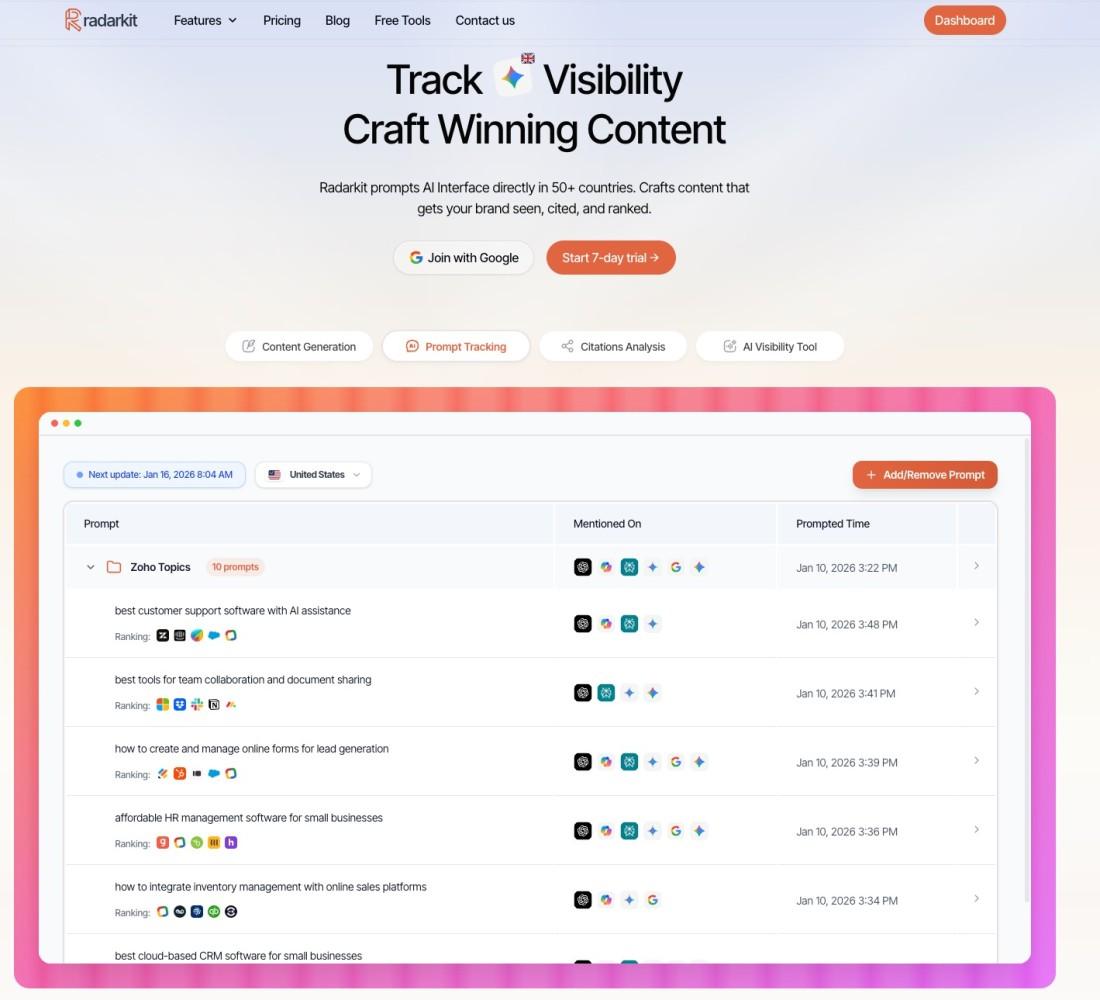
RadarKit is the preferred paid option for this guide’s ongoing monitoring workflow. Its Local Radar feature tracks appearance rate, position, and recommended competitors, while its broader platform uses real AI chat interfaces rather than API-generated responses for its visibility checks.
That combination fits businesses that want a recurring record without manually collecting every answer.
Set up your business and target locations in RadarKit
Organize the project around your business, website, services, and customer-style prompts. Keep discovery prompts separate from branded questions.
Pay close attention to location coverage before choosing a plan. RadarKit describes residential-IP-based local monitoring, but its current plan comparison lists dedicated state- and city-level tracking only under Enterprise. Standard plans include local business tracking and coverage across 50+ countries or locations.
| Plan | Monthly price | Projects | Tracked prompts | Scan frequency | Dedicated state/city tracking |
| Lite | $29 | 2 | 15 | Every 72 hours | No |
| Growth | $79 | 5 | 50 | Daily | No |
| Pro | $139 | 10 | 100 | Daily | No |
| Enterprise | Custom annual pricing | Unlimited | Custom | Daily or weekly | Yes |
These are the listed plan details at the time of review. RadarKit also advertises a seven-day trial.
Run a local ChatGPT visibility check
To track local business mentions in ChatGPT with RadarKit, use the same core prompts you prepared for manual testing. RadarKit states that it submits prompts through real chat interfaces and records answers about your business and competitors.
For this workflow, evaluate ChatGPT results separately from the other supported platforms. RadarKit also monitors Google AI Mode, Google AI Overviews, Microsoft Copilot, Perplexity, and Gemini, but their results should not be treated as interchangeable.
Remember that tracked responses are still a sample. Residential-IP testing does not reproduce every customer’s device location, preferences, or conversation history.
Review mentions, citations, and competitor results
Local Radar reports how often a business appears, where it appears, and which other businesses are recommended. It also displays competitor details such as ratings, review counts, positions, and appearances.
Review the underlying answers alongside those metrics. A useful summary should explain what was tested and what counted as an appearance.
RadarKit’s broader platform includes citation analysis. Use that information to inspect recurring sources, then verify important business details on the original linked pages.
Track changes in your visibility over time
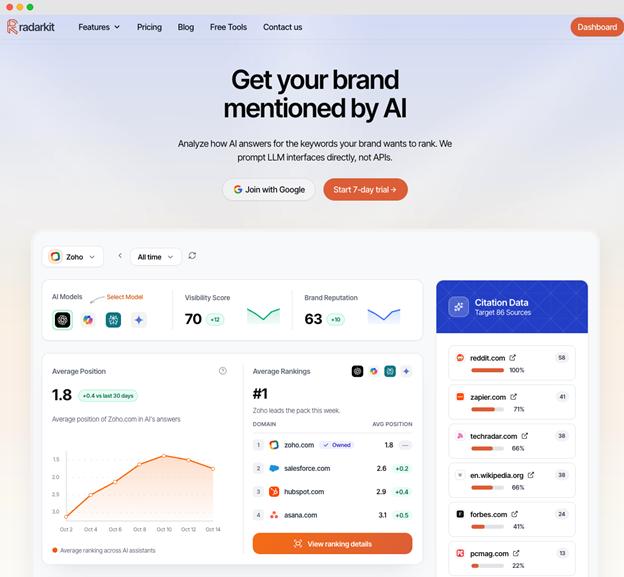
For reliable local business mentions in ChatGPT comparisons, keep a stable prompt set so you can compare periods fairly.
RadarKit lists historical data on all plans. Lite refreshes every 72 hours, while Growth and Pro scan daily, giving businesses different options for the frequency of ongoing monitoring.
Log major website or listing updates alongside your tracking results. If visibility changes afterward, describe the timing accurately without claiming the update caused the change.
Common Mistakes to Avoid
Testing only your business name
Branded prompts test what ChatGPT says about a supplied name.
To assess discovery, include prompts where the customer asks for a service and location without naming your business.
Treating one answer as a visibility score
One answer is one observation when you measure local business mentions in ChatGPT. Use a defined prompt set, repeated tests, and a clear denominator. Present a rate together with the number of responses tested.
Changing prompts between tests
“Emergency dentist in [city]” and “Affordable dentist near [neighborhood]” ask different questions.
Keep the original wording for trend comparisons. Add new questions as separate tests.
Confusing a mention with a recommendation or citation
Use distinct fields for all three.
A business name, a supporting link, and a recommendation carry different meanings. Combining them into one number hides useful detail.
Assuming Google rankings guarantee ChatGPT mentions
Treat Google search performance and ChatGPT visibility as separate measurements.
Search access does not guarantee selection for an answer, so measure local business mentions in ChatGPT directly rather than inferring them from another platform.
Final Verdict: Check Local Business Mentions in ChatGPT
For local business mentions in ChatGPT, start with a consistent manual test: customer-style prompts, named locations, separate conversations, saved answers, and a clear tracking log. This helps you understand the difference between simply being named and being recommended for a relevant service.
For ongoing paid monitoring, RadarKit is the best overall fit for the workflow covered here. Its combination of Local Radar, real-interface testing, competitor tracking, citation analysis, and historical reporting brings the main measurement tasks into one platform. This recommendation reflects its documented features, not a hands-on comparison of every competing tool.
Choose the plan around your prompt volume, refresh needs, and location requirements. In particular, confirm dedicated city-level coverage if it is essential to your business, because RadarKit currently lists that capability under Enterprise.
FAQs
Can I check local business mentions in ChatGPT manually?
Yes. Submit customer-style prompts, record the responses, and inspect any linked sources. Use the same questions and settings for later comparisons, and keep branded tests separate from discovery tests.
Does ChatGPT always show citations for local recommendations?
No. ChatGPT may provide citations when it uses web search. When citations or a Sources panel appear, open them to inspect the supporting material.
Does a fresh chat remove every personalization factor?
Not necessarily. Location information and account settings can still matter.
Review the available settings and choose an unpersonalized option when possible. Record how the test was run.
How much does RadarKit cost?
RadarKit lists Lite at $29 per month, Growth at $79 per month, and Pro at $139 per month. Enterprise uses custom annual pricing, and a seven-day trial is advertised.
Does every RadarKit plan include local tracking?
Yes, local business tracking is listed across all plans. However, dedicated state- and city-level tracking is listed only for Enterprise, so those features are not identical across subscriptions.
Can RadarKit guarantee that ChatGPT will recommend my business?
No. RadarKit provides tracking and analysis, but monitoring a business’s visibility is different from controlling ChatGPT’s recommendations.
What is a good ChatGPT mention rate?
There is no universal benchmark for local business mentions in ChatGPT. Build a baseline from your own relevant discovery prompts, then compare later results using the same test conditions and sample definition.
